WIC Waste Ink Pad reset utility for Epson printers reset. Adjustment Program Artisan, ME, PX

Want to Reset Printer and Save Your Money?
Step 1 - Download WIC Reset Program Free
Step 2 - Buy RESET KEYS OnLine
Step 3 - Get RESET KEYS OnLine and Reset Printer!

LiveZilla Live Help
 Discussion Board  |   FAQ 
  Search in
     
  Home » Service Manual Catalog » Shipping & Returns Download
Waste Ink Pad Reset utility
Video
How to reset Epson printers

How to reset Epson PX660?
How to reset Artisan 810?

New Epson Adjustment Programs

How to buy Reset Keys?

All Video Manuals...
Service Manuals
WIC - multimodel waste ink Reset Utility for Epson printers

ASUS Service Manuals
APPLE Service Manuals
BROTHER Service Manuals
EPSON Service Manuals
EPSON Adjustment Programs
EPSON Firmware
EPSON Parts Lists
CANON Service Manuals
CANON Service Tools
DAEWOO Service Manuals
HARMAN KARDON Service Manuals
HP Service Manuals
KONICA MINOLTA Manuals
Kodak - Encad Manuals
KYOCERA - MITA Manuals
LENOVO Service Manuals
LEXMARK Service Manuals
MARANTZ Service Manuals
MIMAKI Service Manuals
OCE Service Manuals
OLIVETTI Service Manuals
PANASONIC Service Manuals
PIONEER Service Manuals
ROLAND Service Manuals
RICOH Service Manuals
SAMSUNG Service Manuals
SHARP Service Manuals
SONY Service Manuals
TOSHIBA Service Manuals
XEROX Service Manuals
Manuals on 911manuals.com
More brands
Acer (101)
Aiwa (2216)
Akai (61)
Alpine (23)
AOC (88)
Apple (388)
Audi (1)
BBK (36)
Blaupunkt (138)
BMW (2)
Bose (346)
Canon (441)
CLEVO (38)
Compaq (50)
Epson (140)
Daewoo (90)
Denon (882)
Erricson (30)
Funai (84)
Grundig (693)
Harman Kardon (325)
HP (82)
Infinity (128)
Integra (544)
JBL (610)
JVC (2142)
Kenwood (882)
Konica-Minolta (514)
Lexmark (73)
LG (1378)
Motorola (60)
Nokia (87)
Panasonic (3764)
Philips (708)
Pioneer (954)
Roadstar (213)
Samsung (1259)
SaNyo (676)
Sharp (386)
Sony (8887)
Star (60)
Technics (64)
Toshiba (500)
Yamaha (115)
Free Epson Firmware

Epson Firmware Free download

Secure Website

Secure Website

Our customers
Total customers: 57446
Customers online: 10

ЯндекÑ.Метрика
Affiliate Program
Affiliate Log In
Affiliate Information
Affiliate Program FAQ
Epson 1390 / 1400 / 1410 FirmWare update Epson 1400 firmware update

Problem description

This problem is common for Epson Photo 1390, 1400 and 1410 models inkjet printers.
When the Waste Ink Counter if OVERFLOW (more then 100%) you have to Reset the Waste Ink Counter to continue printing.
After RESET the Waste Ink Counter is 0% and the printer can print again. It's Ok.
BUT! For this models you can get Waste Ink Counter OVERFLOW again after you have already RESET the Waste Ink Counter to 0%. You print few pages and the Waste Ink Counter is OVERFLOW again!

The Epson Status monitor display following message:
Epson Stylus Photo 1400 Problem: The counter cannot be initialized by a present firmware. please execute this function again after making the firmware the lasted.

This is not normal. This is a bug in the printers Firmware (software of the printers mainboard in flush rom).

How to fix this firmware problem?

To fix this problem you have to update the printers firmware. It takes about 2 minutes to perform this procedure.
ASP main board mounts the flush rom that can be updated. After the printers Firmware has been updated the printer will work perfect and the Waste Ink Counter will count waste ink properly.

To update the Firmware you need:

- firmware file ( *.dat file) for this models - 1390, 1400, 1410 (the firmware file is common for this models only);
- update utility to push firmware file to printers flush rom - IPL USB Sender .

How to make firmware update procedure?

  1. Put the printer in UPDATE MODE:
    Push and hold all the buttons - Paper + Ink + Power until all the LEDs turn ON. (It is about 10 secs)
  2. Run the IPL USB Sender under Windows XP/2000 (or in compatibility mode).
  3. Click on “Select Port". (Figure 1)
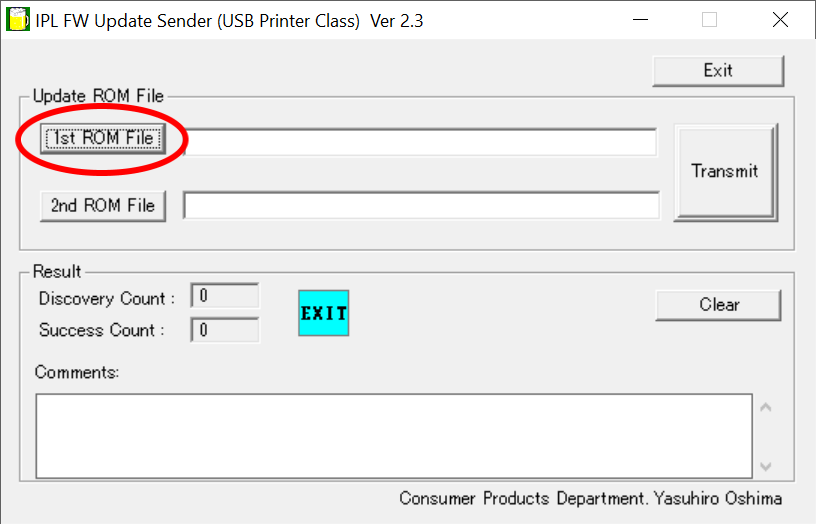
  4. Click the “1st ROM File” button and choose the dat file. (Figure 2)
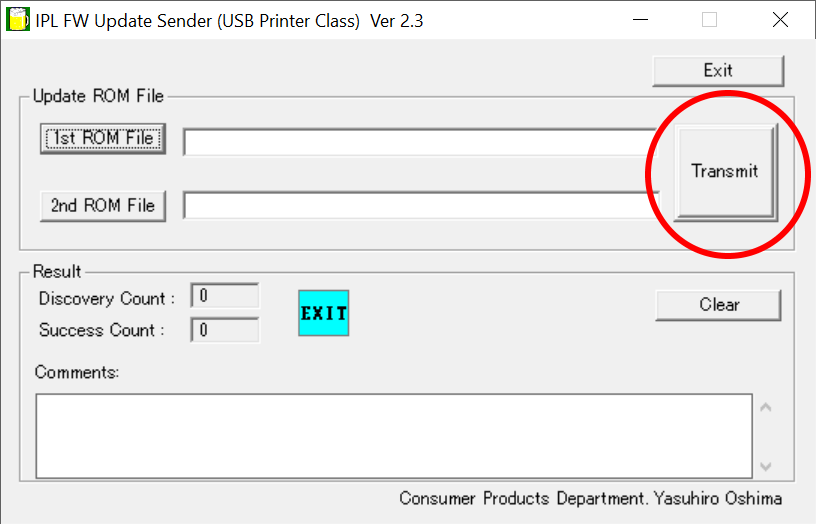
  5. Click the “Transfer” button.(Figure 3) The following message will appear on the Reply area of the IPL USB Sender:
    "The data transfer was completed. Please confirm the panel of the printer."
    The Paper, Ink and Power LEDs blink regularly about 1 min - printer verify data.
    The Power LED turns ON - printer checks ROM.
  6. To finish firmware update procedure:
    While all LEDs - Paper + Ink + Power blink synchronously, press the Ink and the Paper buttons - aAll the LEDs (Paper + Ink + Power) turn OFF.
    Turn the printer OFF.

                
 Fig.1 (Click to enlarge)                  Fig.2 (Click to enlarge)                      Fig.3 (Click to enlarge)

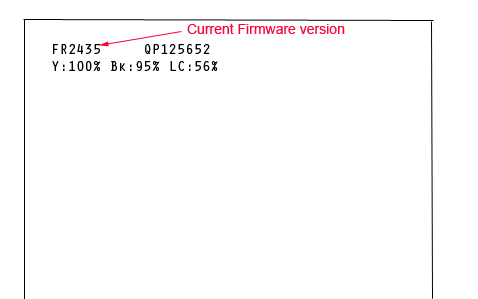
You can check the Firmware version BEFORE and AFTER firmware update procedure. The firmware version is placed in the Nozzle Check Report (to print it - Push the Paper SW + Power SW for printing the nozzle check. After initialization, a status sheet is printed. The firmware version is printed at the beginning of the first line.(Figure 4).


Fig.4 (Click to enlarge) 


WIC Reset Utility (download 4.5 mB):
- can check Waste Ink Counter (free);
- can reset Waste Ink Counter (RESET KEY require).

IPL USB Sender utility - can update Epson printers Firmware. More information...

Firmware *.DAT files for Epson Inkjet printers. Check model you need....


Shopping Cart more
0 service manuals or
adjustment programs
How to pay?
We accept
Credit Cards, Scrill
and Western Union payments

Free WIC Reset Ink Pad Utility

Free WIC Reset Ink Pad Utility


(Min amount for Western Union payment is $50. See details.)


We DO NOT accept PayPal
How to buy in Your country:

Argentina

sistemacontinuo.com.ar

Algeria

easyprint-dz.com

Australia

Mir-Aus.com.au

Columbia

SolucionesInteligente.com

Ecuador

SolucionesInteligente.com

India

ChipResetters.com

Mexico

Itipsa.com
Mexico

Montenegro

Kvisko-Toner.com

New Zealand

Mir-Aus.com.au

Kenya

Inkjet-Systems.com
MagiColors.biz

Turkie

BitmeyenKartus.com.tr
Cescesor.com
Want to sell Reset Keys in Your country?
Waste Ink Pads Reset
Waste Ink Counters Reset
by WIC Reset Program New!


How to get FREE RESET KEY? New!

How to reset waste ink counters in old models?

Print Head Cleaning Manual

Epson Printer Service Utility 2

How to update printer Firmware

How to fix Epson 1390, 1400, 1410 bug and update Firmware

About Adjustment Programs

How to run Windows 98, XP programs under Windows 7, Vista?

Information
Conditions of Use
Privacy Notice
Shipping & Returns

About Service Manuals

How to reset Epson flashing lights error - waste ink counter?

How to reset Canon waste ink counter?

How to reset HP printers?

A printer error has occured

OctoInkjet - Quality waste ink kits. Worldwide support!

F A Q

EPSON Printer Spares
HP Parts Store

Good sources for parts

CONTACT US NOW
Reviews more
RESET KEY for the WIC Reset Uility
Hi thank you so much for help more people for there job an ..
5 of 5 Stars!
Useful software

Download WinZip
from our site
or from official site

Download Adobe Acrobat
from our site
or from official site
Useful links
MIS Associates Inc - Quality Inkjet Supplies USA, Canada and International Shipping

Best Printer Forum - FixYourOwnPrinter

Best russian CISS Forums - Resetters.ru

OctoInkjet - Excellent waste ink kits and global support

Reset waste ink counter for Canon iPF5000 iPF6100
Languages
English Spanich
Most popular models: Epson reset epson printer service PX-1004, XP-102, XP-103, XP-200, XP-203, XP-202, XP-303, XP-400, XP-600, XP-700, XP-800, L110, L210, L300, L355, L351, TX720, T50, P50, Artisan 810, R3000, R2000, PX700, TX700, Artisan 700, L100, L200, DX4400, PX800, TX800, Artisan 800, K200, PX660, TX730, TX720, TX820, TX830, TX130, SX235, SX445, SX125, SX218, SX130, SX620, DX4400, DX5000, DX8450, BX305f, BX320, RH 585, PX810, PX710, Pro 7900, WP-4540, Artisan 50, Artisan 835, Artisan 630 635, NX305, NX420, ME340, ME32, Workforce 610, R1900, R1800, Canon Service Tool V3400, MP160, iP4940, iR2022, iR2018, MF 3110, Daewoo RD-430, AGC-7200, DF1120, DMP-2400, FA110, FA210, AGC-5620, FR440, DV-115, Samsung 5542ps/m4/0220, SCX-5530, ML1610 Oce 9800, 3165, Panasonic dr4900, PT-47WX42, RF-4900, DR49, PT-51hx41e, FP-7713, sa ht740, Goodman ld2601 Philips 21pt3443, power problom, power supplay problom, Marantz 74PM62, PM64, SR5003, AVM-P909MD, EQ-551, PM-330, PMD580 74 EQ515, PM-730, PMD, SR8010, PM240, SD545, PM 720, Konica DI2010 Minolta DI152 Asus P525, Sony klv-32v300a, bkdm 5070, str-d135, lbt xb 500, HP reset printer deskjet 3050, officejet 7110, PCS 1100, 7680, hp2410, officejet g55, LaserJet M2727 Olivetti STUDIO JET 300, Kenwood 646x, Infinity Alpha-50 Technics sagx390
2MANUALS.COM Copyright, 2002-2013


SERVICE MANUALS - the huge collection of new Service Manuals (Repair Manuals)