

CANON i250, i350 printers
Service Manual and Service Tool

$11.99
CANON i250, i350 printers<br> Service Manual and Service Tool
   Click to enlarge
      

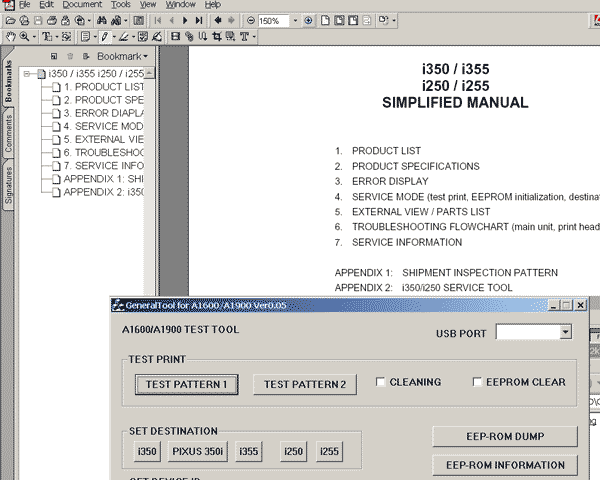
i250, i350 inkjet printers Simplified Service Manual and Service Tool for resetting printer EEPROM. Works under Windows XP.

FORMAT: High resolution PDF document!
ZIP archive: 10 400 kB

I want to:

Any questions about this product?

SEND US REQUEST by filling the form below.


Step 1
ADD TO CART
Step 2
CHECKOUT
Select payment method.
Step 3
Confirm the order.


We are in business since 2002 and do our best to give our customers perfect service!

Our customers reviews:

  Bengt Nilsson 2007-12-26 02:59:52  
  My i250 fell apart while cleaning, and I needed a drawing on how to put it back together again.
  Demon1984 Demon 2007-06-19 22:06:48  
  worked fine!
  eugen niculescu 2006-05-24 21:19:42  
  Worked perfectly! Thanks!
  andi ahmad 2019-12-11 06:01:36  
  my printer blinking red light solve problem help this problem thanks for solve this problem
  Mary-Ann Prinsloo 2022-07-19 12:17:16  
  Good day. I have to clean my printer head EVERY hour. Then it prints fine. Until I leave it for an hour. So this leads to waste pad full and I have to purchase a key every time. Is there another way to go around this problem please? I cannot afford to buy a key every week.

=======Reply ========
You have to make 2 things
- clean parking station first - then inks will not dry on printhead;
- use high quality inks.
  roberto costa 2005-03-28 06:17:39  
  Want to thank u for ur gret websit becoz its so easy and shortly . by other wise i need u to info me about service manual if it has trouble codes and diagnostic and troubleshooting procedures ?......thanx
  Mike Danilovic 2005-08-25 07:56:41  
  Great things! I had some problems with my Epson 2100. The printer stopped to work. However, when I read the manual it was possible for me to disable the indicator of the problem and now the printer works well again. The service program is also a great think! Thanks.
  linda rotgans 2012-07-18 18:49:33  
  All I can say is thank you so much for saving my printer. I changed the ink pads ( very simple task ) and used the Epson Reset. My printer still did not work and I was devastated. I spent MANY hours online researching the problem ( Epson was absoutely no help at all ) and finally came across your product. I used your program to reset the ink pad counter and it reset the counter as advertised. After I restarted the printer It would not do anything. I uninstalled all of the Epson software and reinstalled with the original disk that came with the printer. AWESOME a new printer!!! I can not tell you how much i appreciate your product! I thought I was buying one of the best printers on the market at that time and I am really TICKED off at Epson for building in an unnessisary self destruct. I had purchased every upgrade for my printer Epson offered and was determined to get it working again and you did that for me. THANK YOU !!!!
  angga sri 2006-11-28 06:47:39  
  be epson maniac. because epson is the best. and all my product always use epson. Thank you!
  Demon1984 Demon 2007-06-19 22:06:48  
  worked fine!
Write review



