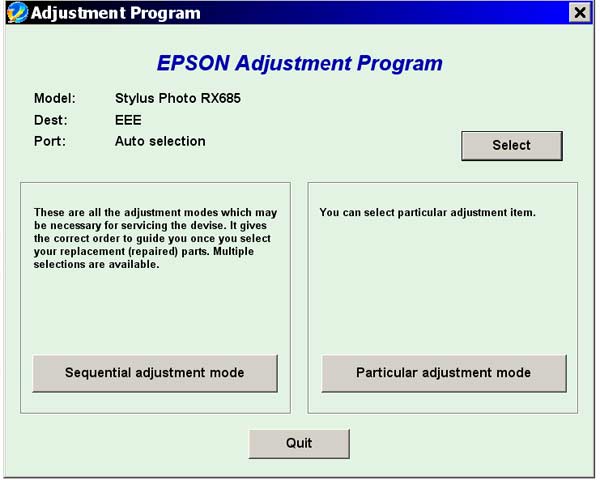
Epson RX685 Service Adjustment Program

$9.96
Epson <b>RX685</b> Service Adjustment Program
   Click to enlarge
      

The Epson Adjustment Program for Epson RX685 can be used under Windows only (Millenium, 2000, XP, Vista [in compatibility mode]).

To find out how to use this utility to reset the waste ink counter we recommend reading the:
5 Clicks Reset Procedure

To get this adjustment program, for the Epson RX685 you need to do the following:

  1. Purchase the utility from 2manuals.com.
  2. You'll get download link on-line and in the email message.

We recommend reading the Epson RX685 Service Manual before using the adjustment utility.

Please contact us if you have not received your order.

You can run this program under Windows XP, Windows Vista, Windows 7 in compatibility mode. It is easy!

Lets get to know how to set it up.

To configure the compatibility mode for an application, just locate the installation directory and right click on the .exe file (program you want to run), selecting Properties from the menu.

Select the Compatibility tab:


Windows 7 compatibility mode


You can choose to run the program in Windows XP compatibility mode.

FOR THIS PROGRAM please use the WINDOWS XP compatibility mode!!!


Download the program and run in compatibility mode!

I want to:

Any questions about this product?

SEND US REQUEST by filling the form below.


Step 1
ADD TO CART
Step 2
CHECKOUT
Select payment method.
Step 3
Confirm the order.


We are in business since 2002 and do our best to give our customers perfect service!

Our customers reviews:

  theold fart 2012-08-18 12:01:50  
  Program is easy to use, with the additional manual for reference. It allowed me to correct a corrupted EEPROM in the printer. All the .prn files are missing, so setting up the printer/scanner and the final print check are not possible. If you only want to reset the ink pad counter then there are cheaper/ free program available. Would give it a GOOD rating if missing files were included.
  Garnett Stokes 2011-01-09 12:37:59  
  My Epson R2880 stopped printing and showed alternating ink and paper flashing lights. I had an extended warranty that I purchased with the printer but because I didn\'t register the warranty within 30 days I was told by Mack Camera that they would not honor the warranty. So after much research and web surfing I found myself at 2manuals. I wasn\'t even sure that the wic was the problem and I had serious doubts about spending more money on what could just be another scam like the extended warranty was. However like one reviewer said, what was $9.99. Well I downloaded the program, obtained the $9.99 pin code, loaded the software, and exactly as the video shows I was up and running. I couldn\'t believe it when the printer sprung to life and was ready to print. Hey, try it. You\'ll be glad you did.
  ARMANDO PEREZ 2011-05-09 09:21:18  
  My Artisan 810 is alive once again. You guys were very helpfull, great job you are doing there. Thanks
  Eva Baumgartner 2025-06-02 15:36:12  
  Großartig! - mit trial versucht, heute gekauft, bezahlt, bekommen, angewendet - und mein Epson XP-950 läuft (mit neuem Tintenkissen) wie neu. Toller Service, ich bin sehr zufrieden.
  dave hardik yogeshbhai 2006-12-03 22:47:49  
  Just wanted to THANK YOU for letting me download that manual. I REALLY appreciate it. You know how kids are when they get on a computer they think they know everything and don\'t know anything. So Thanks Again AL HART
  giuseppe moffa 2020-06-10 15:13:35  
  after only cleaning the printer (Canon G3400) three times in a short period, the waste counter was on 100% (almost new printer). tried the free tools which you can download to reset the counter, they all didn't work. Finally decided to buy the key here and didn't believe it would work. But it did, i can use my printer again and I am happy.
  gökhan gökbulut 2015-12-07 12:05:42  
  Grazie per la tempestività e la cortesia .Stampante resettata e perfettamente funzionante grazie mille .Cordiali saluti Alex
  Mitchell Chand 2011-10-28 17:14:27  
  Excellent support!! Now able to clear the Waste Ink Counter. Thanks guys.
Write review