Epson ET-7750 (EAI) Ver.1.0.0 Service Adjustment Program New!

$19.99
Epson <b>ET-7750 </b> (EAI) Ver.1.0.0 Service Adjustment Program  <font color=red>New!</font>
   Click to enlarge
      

Epson ET-7750 ADJUSTMENT PROGRAM (EAI) Ver.1.0.0 Service Adjustment Program

This adjustment program is developed for making printers adjustments and maintenance such as:

Adjustment
- EEPROM Data Copy
- Initial setting
- Initialize PF deterioration offset
- Initialize PW sensor deterioration counter
- Photo sensor light level adjustment
- Head ID input
- PF / EJ adjustment
- PW / First dot position adjustemnt
- PE adjustment
- Bi-D adjustment
- Head angular adjustment
- PF band adjustment
- Paper Skew adjustment
- CR motor heat protection control
- PF motor heat protection control
- Scanner motor heat protection control

Maintenance
- Head cleaning
- Ink charge
- Waste Ink Pad counter (platen pad counter)
- Shipping setting
- Final check pattern print
- EEPROM dump
- Printer information check
- Paper feed test

The Epson Adjustment Program for New model Epson ET-7750 can be used under Windows only (Millenium, 2000, XP, 7, 8, 10, Vista [in compatibility mode]).

To get this adjustment program, for the Epson ET-7750 you need to do the following:

  1. Purchase the utility from 2manuals.com.
  2. You'll get download link on-line and in the email message too
We recommend reading the Epson ET-7750 Service Manual before using the adjustment utility.

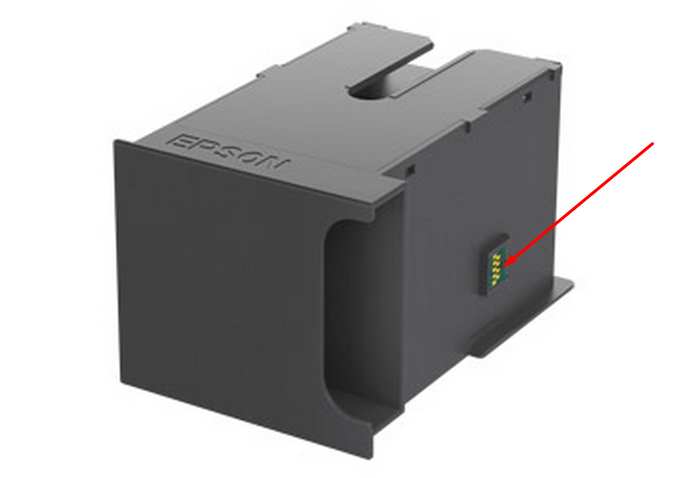
This printer models have separate Waste Ink Maintenance Box with its own IC chip. You can replace Waste Ink Maintenance Box or reset the chip on the Waste Ink Maintenance Box. Read more about how to reset the Waste Ink Maintenance Box.
Please contact us if you have not received your order.

I want to:

Any questions about this product?

SEND US REQUEST by filling the form below.


Step 1
ADD TO CART
Step 2
CHECKOUT
Select payment method.
Step 3
Confirm the order.


We are in business since 2002 and do our best to give our customers perfect service!

  Silvia Brandmeier 2021-10-25 17:32:04  
  It is end of October 2021. I just have bought the second reset key in my printers life. The first one I bought in 2015 !!! That means my printer had already it's life prolonged by 6 years and goes now into the second reset cycle. Keep up the good work to prevent valuable electronic hardware becoming garbage. I never had any trouble in 6 years with the ink waste pad after resetting the counter for the first time.
  Amit Das 2012-09-30 18:27:52  
  I bought your soft on your web site and used it without any trouble My printer works again Thanks a lot for your work
  loay ahmad 2011-03-25 02:10:12  
  Worked perfect!
  joeffrey marquez 2013-02-28 04:48:07  
  Epson PX830. A printer error has occurred. turn off the printer, then press On button to turn on. see your documentation. Can I reset this printer?
  Krittawit Sitthichaiwatthana 2012-02-29 21:55:38  
  It work very well for my TX720WD! This is easy step to save your time and money. Successful reset in 2 minute after payment by paypal.
  Jonathan Irving Ramirez Hernandez 2019-03-26 07:56:43  
  Thank you! :) This actually works and its really helpful.
  Christian Vergara 2008-12-10 07:08:24  
  Thank you ever so much I have downloaded the program and it\'s all good now. Thanks again! Christian
  Tim Nichols 2012-08-11 05:20:43  
  I was leery about paying the $9.99 for a key. After speaking to Epson "Specialist" and being told "Your machine must have issues beyond repair, but we can sell you a new one for $190" I decided to go ahead and try this software. A++ I would recommend this to anyone wishing self repair an epson printer. I have a RX595 , I use a CCS and when I received the waste pad error I was heartbroken. I love this printer. I tried bypassing waste pad but still got the error. This software is well worth the $$ Thank you
Write review





