Activation Key for making Epson WF-C5710, PX-M884F Chipless Printer (for one device only)

$70.00 $50.00
<b>Activation Key</b> for making Epson WF-C5710, PX-M884F Chipless Printer (for one device only)
   Click to enlarge
      

Be sure Your printer can be modified to Chipless Version.
That means You can pass Step 4 of this guide.

Don't buy Activation Key BEFORE You have checked if Your printers Firmware can be changed to Chipless! Follow next 5 Steps.

Step 1
Download and extract Zip archive (How to unzip (extract) files from Zip archive?) with Epson WF-C5710, PX-M884F Firmware  - CU24M3 version

Step 2
Connect printer to PC (under Windows OS) by proper USB cable.
Disable all Epson processes and services. You can do this manually using task manager and administration tools or You can do this via WIC Reset Utility (install and run it, then select MENU -> Support -> Disable processes).

Step 3
Upload Firmware to printer in the NORMAL MODE (do NOT use service mode yet just start the printer with the power button). Run EPFWUPD.EXE file and follow all steps until Firmware will upload in printer. 
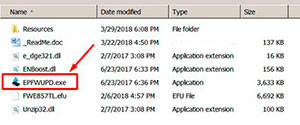
WF-C5710   chipless firmware

When Firmware Update process is complete - printer will restart - usually it will take only a few minutes but can continue for 10-20 minutes in some rare cases. 
If process hangs or stops at 80-99% - replug power cable and start printer manually.

Step 4
Now check current firmware version ( how to check ).
If firmware version is CU24M3 - firmware has been uploaded successfully. You can go to next Step.
If NO - restart the printer and try once more time.

What do You have to do next after uploading chipless firmware?

Step 5
1. Buy this Activation Key
2. Download License.exe application (Windows only). Password to extract - 12345.
3. Run License.exe under Windows and press Activate Online button
4. Input Activation Key and press Ok!

Please keep in mind - there are 2 types of keys:
- Regular Activation Key (HAS expiration date of using);
- No Expiration date Activation Key (can be used whenever You want in 10 years).


Buy Activation Key in case You have uploaded Firmware to Your printer successfully!

Prices and discounts:

Regular Activation Keys (HAS expiration date and couldn't be used after has expired):
1 Activation Key - $50
5 Activation Keys - $48 per Key
10 Activation Keys - $45 per Key
20 Activation Keys - $40 per Key
50 Activation Keys - $35 per Key
100 Activation Keys - $30 per Key
You can pay by PayPal, Visa, MC etc. :
Here or Here

NO EXPIRATION Activation Keys (has NO expiration date - can be used whenever You want):
1 Activation Key - $55
5 Activation Keys - $53 per Key
20 Activation Keys - $50 per Key
You can pay by PayPal, Visa, MC etc. :
Here

*The code is one-time use.

If You have any questions - You can read or place Your questions at Chipless thread at our Discussion Board - https://forum.2manuals.com/index.php?/topic/80414-chiplesssolutions-chipless-firmware-for-epson-printers-chip-virtual/


Step 1
ADD TO CART
Step 2
CHECKOUT
Select payment method.
Step 3
Confirm the order.


We are in business since 2002 and do our best to give our customers perfect service!

Our customers reviews:

  Priscilla Villalobos 2020-07-23 13:18:55  
  Good morning. I have two questions, if you´re so kind to help me. 1) The expiration date key. Does it mean once we get it, we have a period to use it? Or what the expiration date referenced to? 2) If the printer has a problem and we have to format it again, will the key information lost and we need a new one, or does it be able to be used again?. Many thanks ! Esther
  Jonathan Irving Ramirez Hernandez 2019-03-26 07:56:43  
  Thank you! :) This actually works and its really helpful.
  yucel konuk 2010-07-15 11:48:17  
  I NEED px710W ADJUSTMENT PROGRAM FOR WASTE INK PAD ::d
  Jack Vikati 2025-03-17 02:23:07  
  Reset key itself WORKS, hurrah! 5 stars. BUT . . . it was a struggle to get the download. Our MacBook which is a few years old does not allow the download to be installed because Apple blocks "unrecognized developers." That should be taken care of or a warning should be placed on all promotional materials related to WIC RESET KEY. I was able to get the download onto my old Apple desktop which has not had operating system updates. That's how I finally purchased the reset key. Please tell me why the whole business of the reset key, after replacing the ink pads, is not an example of contrived malicious obsolescence? I was tied up for hours, cursing the Epson company, and a breath away from buying a new printer, adding plastic waste into our environment. I liken my experience to changing a car's oil filter and then needing a code to start the car again.
  Erick Garuti 2018-02-01 08:30:45  
  i buy for lx-300+ but downlod a lq-300+ so what can i do now??????

Check you email now
  theold fart 2012-08-18 12:01:50  
  Program is easy to use, with the additional manual for reference. It allowed me to correct a corrupted EEPROM in the printer. All the .prn files are missing, so setting up the printer/scanner and the final print check are not possible. If you only want to reset the ink pad counter then there are cheaper/ free program available. Would give it a GOOD rating if missing files were included.
  Mohamed abbas 2007-07-04 11:55:01  
  It worked out! Thanx!!!
  Harley Rodrigues 2008-03-22 15:56:40  
  oi tudo bem estou precisando do resete da epson cx5900 cx8300 sei que voces s?o americanos e por isso talvez n?o ir?o entender nada que estou escrevendo mas se por um acaso entenderem por favor me mandei este dois reset
  Kullervo Hirvonen 2017-12-20 12:54:32  
  Epson XP-750 alive again. Thank you! Installing and operating were simple. Christmas Greetings 2017 from Finland, 20.12.2017.
Write review