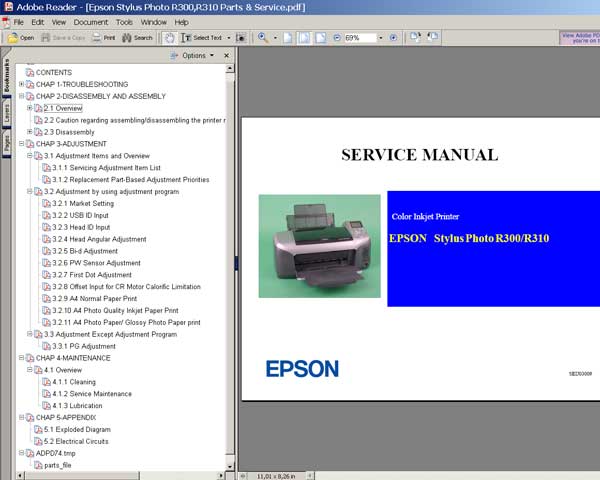
Epson R300, R310, PMD750, PMD750V printers Service Manual and Parts List

$9.99
Epson R300, R310, PMD750, PMD750V printers Service Manual and Parts List
   Click to enlarge
      

This Epson R300, R310, PMD750, PMD750V Service Manual describes basic functions, theory of electrical and mechanical operations, maintenance and repair procedures of the printer. The instructions and procedures included herein are intended for the experienced repair technicians and attention should be given to the precautions on the preceding page.

MANUAL CONFIGURATION
CONTENTS
Chapter 1 TROUBLESHOOTING
1.1 Overview
1.2 Troubleshooting with LED/LCD Indications and Status Monitor 3 Message
1.3 Unit Level Troubleshooting
Chapter 2
DISASSEMBLY AND ASSEMBLY
2.1 Overview
2.1.1 Precautions
2.1.2 Tools
2.1.3 Pre-Shipment Checks
2.2 Caution regarding assembling/disassembling the printer mechanism, and how to ensure the quality of reassembled product
2.3 Disassembly
2.3.1 Removing Paper Support Assy.
2.3.2 Removing Housing, Upper
2.3.3 Removing Housing, Middle
2.3.4 Removing Porous Pad, Paper Guide, Front
2.3.5 Removing Panel Board
2.3.6 Removing Stacker Assy.
2.3.7 Removing Main Board
2.3.8 Removing ASF Assy.
2.3.9 Removing Holder, Shaft Assy.
2.3.10 Removing CR Motor
Chapter 3 ADJUSTMENT
3.1 Adjustment Items and Overview
3.1.1 Servicing Adjustment Item List
3.1.2 Replacement Part-Based Adjustment Priorities
3.2 Adjustment by using adjustment program
3.2.1 Market Setting
3.2.2 USB ID Input
3.2.3 Head ID Input
3.2.4 Head Angular Adjustment
3.2.5 Bi-d Adjustment
3.2.6 PW Sensor Adjustment
3.2.7 First Dot Adjustment
3.2.8 Offset Input for CR Motor Calorific Limitation
3.2.9 A4 Normal Paper Print
3.2.10 A4 Photo Quality Inkjet Paper Print
3.2.11 A4 Photo Paper/ Glossy Photo Paper print
3.3 Adjustment Except Adjustment Program
3.1 PG Adjustment
Chapter 4 MAINTENANCE
4.1 Overview
4.1.1 Cleaning
4.1.2 Service Maintenance
4.1.3 Lubrication
Chapter 5 APPENDIX
5.1 Exploded Diagram
5.2 Electrical Circuits

FORMAT: High resolution PDF document!
Zip archive: 8 054 kB

I want to:

Any questions about this product?

SEND US REQUEST by filling the form below.


Step 1
ADD TO CART
Step 2
CHECKOUT
Select payment method.
Step 3
Confirm the order.


We are in business since 2002 and do our best to give our customers perfect service!

Our customers reviews:

  david simpson 2012-10-29 03:26:46  
  Brilliant stuff,very informative,well illustrated,althought i have an electronice background anyone could follow this very easily,a lot of thought & effort gone into this,welldone
  Tyler Thompson 2016-12-02 22:26:06  
  Thank You. I had just bought a new printer and Epson asked to update the firmware...unfortunately in the middle of the update my power shut off. I thought for sure I had deep sixed my brand new device. Even on the Epson website I could not find a manual firmware recover for my printer and OS version...others printers yes, but not this one. I found you website and thought I'd give it a try. Horray, My printer is back working again. While I am not happy to have to pay someone else for something that Epson should have given for free, your price was with-in reason and your software was easy to use.
  Bruce Nicholson 2007-06-03 06:28:43  
  Really terrific service and rescue manual and a very helpful and approachable team of people. The very small expenditure indeed saved me the price of a new printer.
  Fabrizio d'amore 2012-11-20 18:35:38  
  Ordinata chiave resettato contatore tutto ok! Veloci ed affidabili per il reset della stampante mi aveveno chiesto 50€, invece con 9,99 $ ho risolto.
  GENNA SHOES 2025-06-14 11:16:01  
  ho ordinato 1 codice online, il codice è arrivato subito tramite mail, l'ho applicato alla mia epson et-4700, ho spento e riacceso la stampante ed ora il contatore segna 0%, ottimo!!! Grazie!!!
  george prionidis 2009-02-11 00:00:35  
  thank you for fast respond I will recommend you to all my friends in Iran and Emirate UAE You are the best and god be with you!
Write review
Shopping Cart more
Shopping Cart is empty


How to pay?
We accept
Credit Cards, PayPal
and Western Union payments


We accept M-Pesa
Pay By M-Pesa
How to Pay by M-Pesa


Buy here or find Resellers in your country:

Argentina

Pay in Argentina Peso

Algeria

EasyPrint-dz.com

Australia

Mir-Aus.com.au

Bangladesh

Pay in Bangladesh by BDT

Brasil

Pay in Brasilian Reals
ReseteadoresWIC
Brasil

Burundi

PrintersAfrica.com

China

Pay in Chineese Yuan

Cote D Ivoire

MonpcImprime.com

Columbia

Pay in Columbian Peso
ReseteadoresWIC

Dominicana

Rellenadodecartuchos.com

DR Congo

Buy in DR Congo

Ecuador

ReseteadoresWIC

Ethiopia

PrintersAfrica.com

France

InkCissPrinter

Ghana

Pay in Ghana Cedis

Germany

InkCissPrinter.com

Japan

Pay in Japaneese Yen

Iran

MahaShop.ir
FixPrinters.ir

Iraq

AlmohandsWorkshop

Indonezia

Pay in Indonesian Rupiahs
FastPrint.co.id

Italia

Inkspeed.it
Stampacontinua.it

Kenya

PrintersAfrica.com
MagiColors.biz

New Zealand

Mir-Aus.com.au

Philippines

Pay in Philippine Peso

Poland

Tusze.info
Progbit.pl
ResetPampersa.pl
ResetWIC.pl

Portugal

Printsemfim.com
InkCissPrinter.com

Romania

CissMarket.ro
Cartuseria.ro
AmDigital.ro

Rwanda

PrintersAfrica.com
Ciss-Solutions.com

Saudi Arabia

Alelm-Alamal.com

Soomaaliya

PrintersAfrica.com

South Sudan

PrintersAfrica.com

Spain

InkCissPrintert.com

Tanzania

PrintersAfrica.com

Turkiye

Cescesor.com

Uganda

PrintersAfrica.com

Vietnam

WIC.vn
ResetKey.net
Want to sell Reset Keys in Your country?
Notifications more
NotificationsNotify me of updates to Epson R300, R310, PMD750, PMD750V printers Service Manual and Parts List