CANON PIXMA iP1200, iP1600, iP2200 General Tool
To reset waste ink pads counters you have to use iP1600 Service Tool:
1. Order and DOWNLOAD Service Tool for Canon iP1200, 1600, 2200
2. Unzip downloaded file by WinZip.
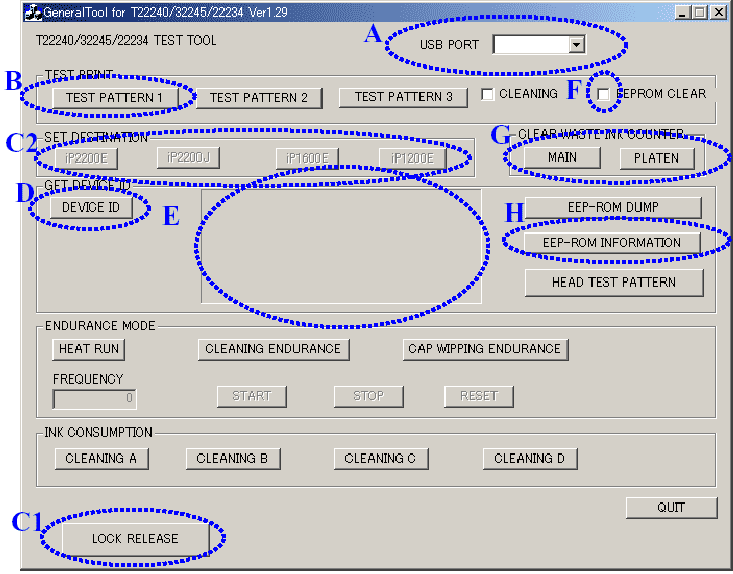
3. Run GeneralTool.exe file
4. Select the connected USB port number from USB PORT
5. Click LOCK RELEASE, and select the applicable model name in SET DESTINATION
6. In CLEAR WASTE INK COUNTER, select MAIN or PLATEN. The selected waste ink counter will be reset. MAIN resets the main waste ink counter, PLATEN resets the platen waste ink counter.
If both the main and platen waste ink absorbers are replaced, reset both the main and platen waste ink counters.
iP1200, 1600, 2200 printers Service Tool
ZIP archive: 9 697 kB
|
|
|
|
|
Step 1
ADD TO CART |
Step 2
CHECKOUT
Select payment method. |
Step 3
Confirm the order. |
|
|
We are in business since 2002 and do our best to give our customers perfect service!
|
Our customers reviews:
| Vadimka Vadimka | 2010-05-03 12:54:42 | | Спасибо. Все скачалось то что нужно! | |
| ed dy | 2007-06-15 00:30:52 | | Canon service manual for iP1200, ip1600 worked out fine!! | |
| ary sasmita | 2006-08-27 02:03:31 | |
| Heri Putra Kelana | 2006-05-12 05:06:13 | | please confirmation canon ip1200,1600,2200 printer service tools. | | | Margaret Scheperle | 2013-01-04 01:13:05 | | Sure wish your live support was online. I could understand it being down on New Year's Eve, but not today.
I sent an email to this effect also, but no reply.
The reset key worked, thanks. For just half a day, however. Not what I expected for $9.99. Please advise. | |  | Ronald Guevarra | 2020-07-19 18:26:14 | | Great software! Helped me out most when i needed. Downloaded software and used the trail key and instantly reset my printer, will definitely purchase key next time when needed. Thanks | | | Alan Nisbet | 2011-09-28 14:43:07 | | After hours of trying to reset my Epson Stylus Photo PX710W I found Waste Ink Counter reset utility - I purchased the key and it set my counter back to Zero - The printer is now working again.
Next time I buy a printer it will not ne an Epson.
Alan | | | fer mon | 2011-08-06 16:16:20 | | NECESITARĶA LA LLAVE PARA LIMPIAR UNA EPSON STYLUS PHOTO RX-585 | | | Paul Jumbo | 2019-04-19 18:47:57 | I had Epson WF-2650 and it wasn't printing fully, skipping lines, even though colors were full.
I did a lot of cleaning, head cleaning, put new cartridge but no luck. I did some head cleaning using glass cleaner and syringes as shown on various youtube video.
After that, my printer didn't recognize two of the cartridges. I tried everything, cleaning contacts etc, nothing worked.
I was finally going to buy new cartridges however stores were closed today so I decided to look for chip-resetting tool but nothing good was available locally.
I came across this WIC reset utility and was really skeptical if it will work. I took the chance, bought the key, used the tool to reset firmware to chipless firmware, it was successful at the first go.
At this point, printer showed all ink levels 100%. I printed a test page and it came out perfect.
To make it even more interesting for me, I live in Europe and during one of the trip, I bought two sets of XL cartridges for this same model but printer didn't recognize in the past and I was going to throw them since these were no good for my EU model. I tried these again after chip reset firmware and voila, they works too.
I am amazed at the propaganda of these printer manufactures that even original printer cartridges from US didn't work on the model here in EUROPE, these used to fit perfectly but printer wouldn't recognize however, now they works too.
Today, I was almost ready to trash my 2.5 yr old and not much used printer but after a lot of trying and finally using WIC reset utility, the printers works like new and saved me a lot!
These were the best 20 CHF/USD I spent today!
Thank you very much and I don't need to worry about relying on a hardware chip-reset tool. I will now be able to use US model cartridges and re-fill i like without having to worry. I even printed some photos using this same printer on photo paper today and printer did an excellent job. | | | deepak jha | 2012-11-19 09:36:35 | | respected,
send for me free of cost wic reset key so that i myself reset l 200 printer because its third counter is going to overflow soon
so i request you help me for this consideration i will ever obliged to you. | | | İSMAİL BAYRAKTAR | 2010-07-07 15:52:19 | | The reset key of Epson Px 650 worked properly. Artisan 810 also. | |
|







 Total customers: 445122
 Customers online: 203








