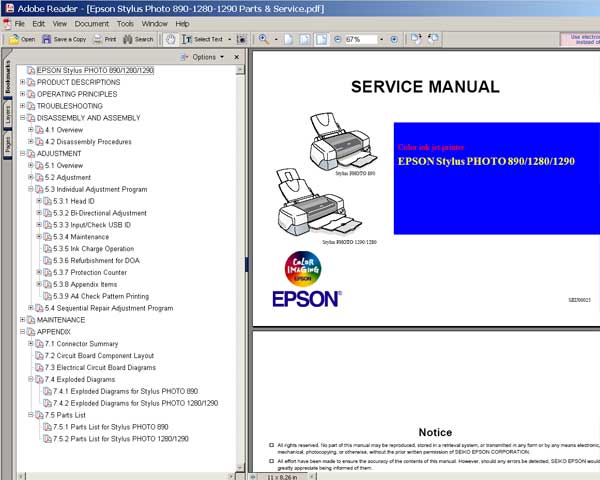
Epson Stylus Photo 890, 1280, 1290, PM3500C service manual describes basic functions, theory of electrical and mechanical operations, maintenance and repair procedures of EPSON Stylus PHOTO 890/1280/1290. The instructions and procedures included herein are intended for the experienced repair technicians, and attention should be given to the precautions on the preceding page.
The chapters are organized as follows:
CHAPTER 1. Epson Stylus Photo 890, 1280, 1290 PRODUCT DESCRIPTIONS
Provides a general overview and specifications of the product
CHAPTER 2. Epson Stylus Photo 890, 1280, 1290 OPERATING PRINCIPLES
Describes the theory of electrical and mechanical operations of the product
CHAPTER 3. Epson Stylus Photo 890, 1280, 1290 TROUBLESHOOTING
Provides the step-by-step procedures for troubleshooting
CHAPTER 4. Epson Stylus Photo 890, 1280, 1290 DISASSEMBLY AND ASSEMBLY
Describes the step-by-step procedures for disassembling and assembling the product
CHAPTER 5. Epson Stylus Photo 890, 1280, 1290 ADJUSTMENTS
Provides Epson-approved methods for adjustment
CHAPTER 6. Epson Stylus Photo 890, 1280, 1290 MAINTENANCE
Provides preventive maintenance procedures and the lists of Epson-approved lubricants and adhesives required for servicing the product
APPENDIX
Provides the following additional information for reference:
• EEPROM Address Map
• Connector Pin Assignments
• Component Layout
• Exploded Diagrams
• Electrical Board Circuit Diagrams
Contents
Chapter 1 Epson Stylus Photo 890, 1280, 1290 PRODUCT DESCRIPTIONS
1.1 Overview
1.1.1 Features
1.1.2 Accessories, Consumable Products, and Options
1.2 Basic Specifications
1.2.1 Printing Specification
1.2.2 Control Code
1.2.3 Paper Feeding
1.2.4 Input Data Buffer
1.2.5 Paper Specifications
1.2.5.1 EPSON Special Media
1.2.6 Printing Area
1.2.6.1 Cut Sheet
1.2.6.2 Envelopes
1.2.7 Adjust Lever
1.2.8 Ink Cartridge
1.2.9 Electric Specification
1.2.10 Reliability
1.2.11 Environmental Condition
1.3 Interface
1.3.1 Parallel Interface (Forward Channel)
1.3.2 Parallel Interface (Reserve Channel)
1.3.3 USB Interface
1.3.4 Prevention of Data Transfer Time-out
1.3.5 Interface Selection
1.3.6 IEEE1284.4 Protocol
1.4 Operations
1.4.1 Buttons
1.4.2 Indicators
1.4.3 Panel Functions
1.4.4 Special Setting Mode
1.4.5 Printer Initialization
1.4.6 Initialization Value
1.5 Dimension
Chapter 2 Epson Stylus Photo 890, 1280, 1290 OPERATING PRINCIPLES
2.1 Overview
2.1.1 Printhead Mechanism
2.1.2 Carriage Mechanism
2.1.2.1 Carriage Motor (CR Motor)
2.1.2.2 Platen Gap (PG) /Parallelism Adjustment Mechanism
2.1.2.3 Carriage Home Position (HP) Detection
2.1.3 Paper Feeding Mechanism
2.1.3.1 CR Lock Mechanism
2.1.4 Paper Loading Mechanism
2.1.4.1 Drive Transmission to the ASF Unit
2.1.4.2 Paper Loading Operation
2.1.4.3 Pump Mechanism
2.1.4.4 Capping Mechanism
2.2 Electrical Circuit Operating Principles
2.2.1 C378PSB/PSE Board
2.2.1.1 Electrical Circuit
2.2.1.2 Protection Circuits
2.2.1.3 Power Supply Control Function
2.2.1.4 Energy Save Mode
2.2.2 C393MAIN Board Circuit Operation Principles
2.2.2.1 Printhead Driver Circuit
2.2.2.2 RTC (Real Time Clock)/ Reset/ EEPROM Circuit
2.2.2.3 Motor Driver Circuit
2.2.2.4 ASF/Pump Motor Driver Circuit
2.2.2.5 Sensor Circuit
Chapter 3 Epson Stylus Photo 890, 1280, 1290 TROUBLESHOOTING
3.1 Overview
3.1.1 Self-Diagnostic Function
3.1.1.1 Troubleshooting with LED Error Indicators
3.1.1.2 Error Conditions
3.1.1.3 Remedies for Paper Out Error
3.1.1.4 Remedies for the Paper Jam Error
3.1.1.5 Remedies for No Ink Cartridge Error/Ink Cartridge Problem
3.1.1.6 Remedies for Maintenance Request Error
3.1.1.7 Remedies for Fatal Error
3.1.2 Isolating the Faulty Part on the Power Supply Board
3.1.3 Isolating the Faulty Part according to the Phenomenon
Chapter 4 Epson Stylus Photo 890, 1280, 1290 DISASSEMBLY AND ASSEMBLY
4.1 Overview
4.1.1 Precaution for Disassembling the Printer
4.1.2 Tools
4.1.3 Specifications for Screws
4.1.4 Service Checks After Repair
4.2 Disassembly Procedures
4.2.1 HOUSING Removal
4.2.2 Circuit Board Assembly Removal
4.2.3 Panel Unit Removal
4.2.4 Printhead Unit Removal
4.2.5 TRAY, ABSORBER ASSEMBLY Removal
4.2.6 Ink Unit Removal
4.2.7 MOTOR ASSEMBLY, CR Removal
4.2.8 MOTOR ASSEMBLY, ASF Removal
4.2.9 DE Unit Removal
4.2.10 ASF Unit Removal
4.2.10.1 SHAFT, ROLLER, LD Removal
4.2.10.2 ROLLER ASSEMBLY, LD, RIGHT/LEFT Removal
4.2.11 Carriage Unit Removal
4.2.12 BOARD ASSEMBLY, ENCODER Removal
4.2.13 ROLLER, PF Removal
4.2.13.1 SCALE, PF Installation
4.2.14 MOTOR ASSEMBLY, PF Removal
4.2.15 PE Sensor Unit Removal
Chapter 5 Epson Stylus Photo 890, 1280, 1290 ADJUSTMENT
5.1 Overview
5.1.1 Adjustment Items
5.1.2 Adjustment Tools
5.2 Adjustment
5.2.1 Parallelism Adjustment
5.2.1.1 Using PG Adjustment Tool
5.2.1.2 Using Thickness Gauge
5.2.2 Backlash Adjsutment
5.2.3 Adjustment Program Feature
5.2.3.1 How to Install the Program
5.2.3.2 How to Uninstall the Program
5.2.4 Starting the Service Program
5.2.4.1 Adjusting Program Initial Setting
5.3 Individual Adjustment Program
5.3.1 Head ID
5.3.1.1 Head ID Input
5.3.1.2 Head ID Check
5.3.2 Bi-Directional Adjustment
5.3.2.1 Input Bi-D Adjustment Value
5.3.2.2 Check Present Adjustment Data
5.3.3 Input/Check USB ID
5.3.3.1 Input USB ID
5.3.3.2 Check USB ID
5.3.4 Maintenance
5.3.4.1 Head Cleaning Operation
5.3.5 Ink Charge Operation
5.3.6 Refurbishment for DOA
5.3.7 Protection Counter
5.3.7.1 Check the Present Counter Value
5.3.7.2 Clear the Protection Counter Value
5.3.8 Appendix Items
5.3.8.1 CSIC Information
5.3.8.2 EEPROM Data Check
5.3.8.3 Changing EEPROM Data
5.3.9 A4 Check Pattern Printing
5.4 Sequential Repair Adjustment Program
5.4.1 Function
5.4.1.1 How to start the program
5.4.1.2 Printhead Removal
5.4.1.3 Printhead Replacement
5.4.1.4 Main Board Replacement
5.4.1.5 Carriage Unit Replacement/ Removal
5.4.1.6 CR Motor Replacement
5.4.1.7 Printer Mechanism Replacement
5.4.1.8 Waste Ink Pad Replacement
5.4.1.9 Clogged Nozzle Recovery
Chapter 6 Epson Stylus Photo 890, 1280, 1290 MAINTENANCE
6.1 Overview
6.1.1 Cleaning
6.1.2 Service Maintenance
6.1.2.1 Head Cleaning
6.1.2.2 Maintenance Request Error Clear
6.1.3 Lubrication
Chapter 7 APPENDIX
7.1 Connector Summary
7.1.1 Connector Alignment
7.1.2 Connector Pin Assignment
7.1.3 EEPROM Address Map
7.2 Circuit Board Component Layout
7.3 Electrical Circuit Board Diagrams
7.4 Exploded Diagrams
7.4.1 Exploded Diagrams for Stylus PHOTO 890
7.4.2 Exploded Diagrams for Stylus PHOTO 1290
7.5 Parts List
7.5.1 Parts List for Stylus PHOTO 890
7.5.2 Parts List for Stylus PHOTO 1290
FORMAT: High resolution PDF document!
ZIP archive: 9 642 kB
Checkout, pay and download now!







 Total customers: 445105
 Customers online: 192








