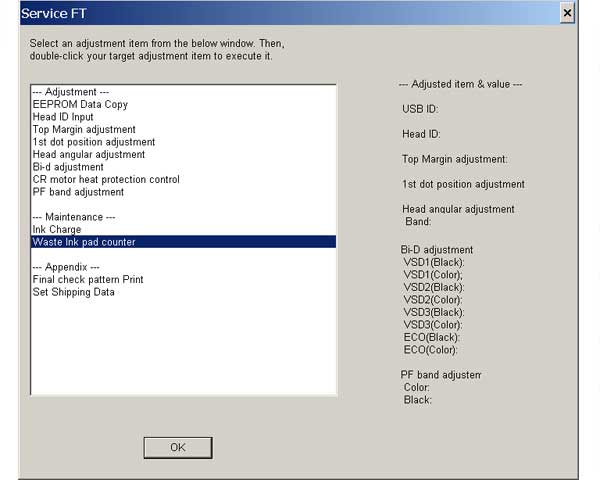
Epson DX4400, CX5600 Service Adjustment Program

$9.99
Epson <b>DX4400, CX5600</b>  Service Adjustment Program
   Click to enlarge
      

New Epson Stylus DX4400, CX5600 Service Adjustment Program


To learn more about service programs functions go to About Adjustment Programs

Download Zip archive. Unzip it by WinZip and run ServiceFT.exe program.

We have tested this program on DX4400 and CX5600 models!


Mark DeGrasse:
I used it for my Epson DX4400 on Windows XP and all worked fine without any change to date or so!!!
Many, many thanks!!


To use this program the best way you have to read Epson DX4400, CX5600 printers Service Manual first.

I want to:

Any questions about this product?

SEND US REQUEST by filling the form below.


Step 1
ADD TO CART
Step 2
CHECKOUT
Select payment method.
Step 3
Confirm the order.


We are in business since 2002 and do our best to give our customers perfect service!

Our customers reviews:

  FOUDHIL BOURAS REDA 2017-07-03 18:17:30  
  Does it work with Windows10? (Epson Stylus DX4400) Thanks in advance.
  hamid badi 2009-09-30 15:12:30  
  J'ai l'honneur de venir respectueusement demander à votre haute bien vaillance de bien vouloir d’accepter mes sentiments les plus distinguées.
  B M Tolar 2017-01-16 20:27:26  
  You guys are amazing! Thank you for providing this service. You\'ll save us thousands of dollars over the years.
  Randall Larsen 2020-05-23 17:18:16  
  I received my reset key for the printer and after entering it, printer was successfully reset. Thanks, Worked great.
  MANMOHAN MEENA 2015-05-29 11:20:48  
  I bought a key (25key) Use everything correctly
  sugiharto sugiharto 2009-11-10 10:33:31  
  I am looking for service manual include diagram/schema, part detail and placement thanks ========================== You can get it here - http://www.2manuals.com/product_info.php?products_id=485
  Mary-Ann Prinsloo 2022-07-19 12:17:16  
  Good day. I have to clean my printer head EVERY hour. Then it prints fine. Until I leave it for an hour. So this leads to waste pad full and I have to purchase a key every time. Is there another way to go around this problem please? I cannot afford to buy a key every week.

=======Reply ========
You have to make 2 things
- clean parking station first - then inks will not dry on printhead;
- use high quality inks.
  MAX PRESS 2020-08-08 18:54:44  
  I successfuly and easily replaced my waste kit. Experienced only one issue on XP635: an unexpected screw made the replacement a bit difficult. I reported this point, hoping the leaflet could be updated. Best regards and congrats for this smart product. Marc, France
  arbin zamora 2022-12-30 22:58:51  
  Just wanted to say thank you for a most helpful product which does exactly what it says. Followed all instructions, replaced waste ink pads and we have a working printer again. For very little outlay. Congratulations on running an excellent business. Have a good day,
Write review