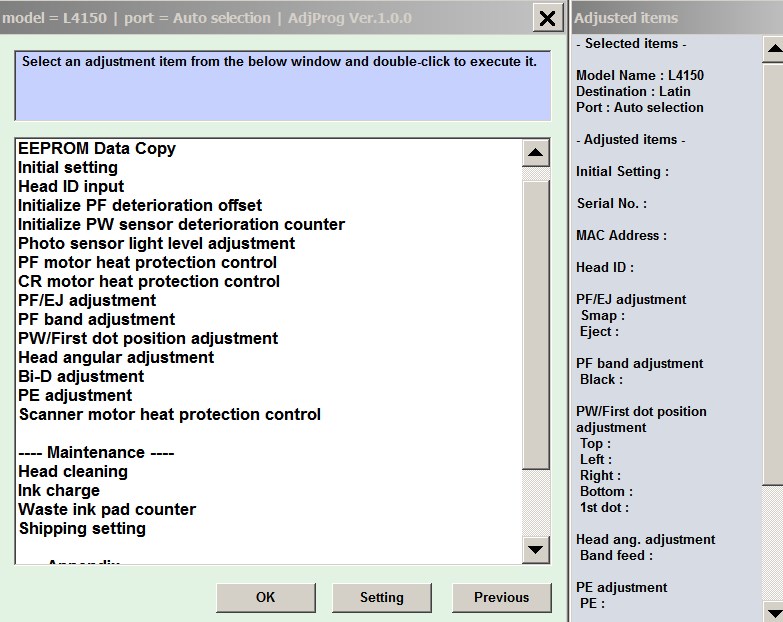
Epson L4150 series, L4160 series Adjustment Program for ONE PC

$14.99
Epson <b>L4150 series, L4160 series</b> Adjustment Program for ONE PC
   Click to enlarge
      

Epson L4150, L4160 Adjustment Program full version for ONE PC

This Epson L4150, L4160 Adjustment Program can be used under Windows XP, 7, 8, 10, 11
(or under higher versions [in Windows XP compatibility mode]) with USB connection only.

Supported models:
L4150, L4151, L4152, L4153, L4154, L4155, L4156, L4157, L4158, L4159
L4160, L4161, L4162, L4163, L4164, L4165, L4166, L4167, L4168, L4169

How to buy unlimited version for One PC:

1. Log In to Your 2Manuals account

2. Download HardWare ID Utility HWID.exe, run it and copy yours PC Hardware ID
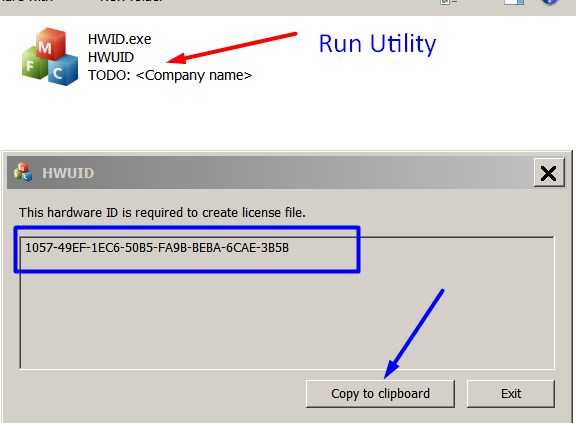
Note! You have to disable antivirus or put HWID.exe file to ignore list!

3. Put this item (License for One PC for L4150, L4160 ) in to your shopping cart

4. Go to payment page and enter HardWare ID in to specified field:
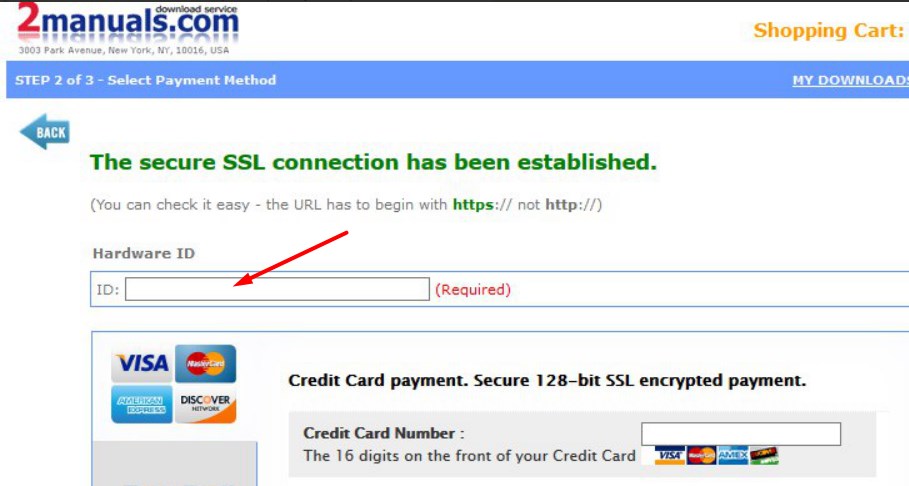

5. Make payment and You will get download link with Epson L4150, L4160 Program with the License file included

6. PutL4150, L4160 Adjustment Program to Antivirus Ignore list or disable Antivirus. Then Run AdjProg.exe.

With this Epson L4150, L4160 Adjustment Program You can make adjustment procedures, waste ink reset and Initial Ink Charge to clean and unclog printhead.

We recommend reading the Epson L4150, L4160 Service Manual

before using the adjustment utility.

Please contact us if you have not received your order.

I purchased the adjustment program last night and got to work on it today.
I had a clog in C and it would not clear. I ve had my L4150 for over 1 year and have been able to handle them until now.
I learned about this site from another site that has cleaner for the L4150 and said I need to buy this software first. I bought it and tried it with the epson ink that was in my printer. I ran the adjustment and it cleared C but then there were other clogs. Because they werent clogged before I started, I cleared them the normal way through the printers options. Had they not cleared, I would have ran the adjustment again.
I had tried everything to get C to clear for a week and this program did it in one try!

I would highly recommend this for clearing a stubborn clog. And now it is in my arsenal if I get another one that I cant clear down the road. By the way, it does not work if your printer is networked. Mine was so I had to move a computer into the room with my printer, directly connect to it and install the drivers. Then it work fine.
If you got a clog that you cant fix, just buy it.

Ivan Tilbury

Any questions about this product?

SEND US REQUEST by filling the form below.


Step 1
ADD TO CART
Step 2
CHECKOUT
Select payment method.
Step 3
Confirm the order.


We are in business since 2002 and do our best to give our customers perfect service!

Our customers reviews:

  Mary-Ann Prinsloo 2022-07-19 12:17:16  
  Good day. I have to clean my printer head EVERY hour. Then it prints fine. Until I leave it for an hour. So this leads to waste pad full and I have to purchase a key every time. Is there another way to go around this problem please? I cannot afford to buy a key every week.

=======Reply ========
You have to make 2 things
- clean parking station first - then inks will not dry on printhead;
- use high quality inks.
  Kirill Kubasov 2020-07-09 06:57:09  
  My Epson XP-821 has been reset successfully to 80%. Thanks so much for solving my problem!
  NORMA ZUBIA 2023-01-02 05:33:28  
  Thank you very,very much for resetting Waste-Counter to Zero (checked ok) and Key-Selling. I´m so glad, that my Printer is not to give up. It must not to go to Müll-Entsorgung! I´m so glad!
  Claudia Díaz 2020-06-14 01:34:36  
  This update helps to recognize compatible cartridges or continuous system with self-resetting chip that I stopped recognizing due to firmware update in Epson WF-7510 Printer.
  adeka maops 2008-10-29 06:25:33  
  help me to epson r250 adjustment program. please!!!!!!
  Michael Reed 2012-04-05 22:26:45  
  The reset key worked perfectly. The whole time to purchase a key, download the software, and reset my R2400 was about 5 minutes. Excellent product! Highly Recommended
  joeffrey marquez 2013-02-28 04:48:07  
  Epson PX830. A printer error has occurred. turn off the printer, then press On button to turn on. see your documentation. Can I reset this printer?
  svenn svenson 2012-03-05 19:14:52  
  THIS IS A MUST HAVE UTILITY This reset key worked perfectly for my Epson Artisan 800. I tried the Epson reset utility (free from Epson) many times. It would "reset" the counter to "40%", then upon turning printer off - on, it would revert to "0%" with the error message that the inkpads had reached their end of life. This also happened whenever I performed a head cleaning. For those of us who use a CIS (I am not affiliated with inkproducts.com - but have been using their CIS for a couple of years and LOVE the quality and service) - it is imperative to be able to reset this waste ink counter. I should also add, the waste ink pad issue is real - don't expect to simply reset the waste ink counter and go happily on your printing way - you will have a disaster and you will experience frequent head clogging. You MUST use an external waste ink disposal system - either make your own for $5 or buy one. THIS + the reset utility is what enables you to get the true value from your CIS-modified printer.
  Robin Griffiths 2012-11-22 08:48:30  
  BRILLIANT My Epson T11 stopped working with the ominous 2 lights flashing so I knew it was trouble and yes teh dreaded message came up about internal parts reaching the end of their servicabel life take it to (an expensive) service. Oh dear - A Google search brought up all sorts of so called download links for free re-set software but all of them didn't download the software but kept taking me to weird web sites. I was in despair of finding somethign that worked then came across 2manuals.com. I thought at first oh dear theres a cost involved. However I though well if it does work it will be worth it. Downloaded the software, plus updates, ordered the re-set key and hey presto a few seconds later the printer was up and going again. It was was every penny of the cost. Dont waste time trying to find so-called free solutions - total waste of time and so frustrating. Pay out for this and save the time and frustration AND it works! No fuss, no messign about no time wasting getting to dubious web site. A big THANK YOU I can highlym unreservedly reccomend this compnay for sorted out knotty printer problems
Write review
Shopping Cart more
Shopping Cart is empty


How to pay?
We accept
Credit Cards, PayPal
and Western Union payments


We accept M-Pesa
Pay By M-Pesa
How to Pay by M-Pesa


Buy here or find Resellers in your country:

Argentina

Pay in Argentina Peso

Algeria

EasyPrint-dz.com

Australia

Mir-Aus.com.au

Bangladesh

Pay in Bangladesh by BDT

Brasil

Pay in Brasilian Reals
ReseteadoresWIC
Brasil

Burundi

PrintersAfrica.com

China

Pay in Chineese Yuan

Cote D Ivoire

MonpcImprime.com

Columbia

Pay in Columbian Peso
ReseteadoresWIC

Dominicana

Rellenadodecartuchos.com

DR Congo

Buy in DR Congo

Ecuador

ReseteadoresWIC

Ethiopia

PrintersAfrica.com

France

InkCissPrinter

Ghana

Pay in Ghana Cedis

Germany

InkCissPrinter.com

Japan

Pay in Japaneese Yen

Iran

MahaShop.ir
FixPrinters.ir

Iraq

AlmohandsWorkshop

Indonezia

Pay in Indonesian Rupiahs
FastPrint.co.id

Italia

Inkspeed.it
Stampacontinua.it

Kenya

PrintersAfrica.com
MagiColors.biz

New Zealand

Mir-Aus.com.au

Philippines

Pay in Philippine Peso

Poland

Tusze.info
Progbit.pl
ResetPampersa.pl
ResetWIC.pl

Portugal

Printsemfim.com
InkCissPrinter.com

Romania

CissMarket.ro
Cartuseria.ro
AmDigital.ro

Rwanda

PrintersAfrica.com
Ciss-Solutions.com

Saudi Arabia

Alelm-Alamal.com

Soomaaliya

PrintersAfrica.com

South Sudan

PrintersAfrica.com

Spain

InkCissPrintert.com

Tanzania

PrintersAfrica.com

Turkiye

Cescesor.com

Uganda

PrintersAfrica.com

Vietnam

WIC.vn
ResetKey.net
Want to sell Reset Keys in Your country?
Notifications more
NotificationsNotify me of updates to Epson L4150 series, L4160 series Adjustment Program for ONE PC