Epson Sure Color
SC-P6500 / P6500D / P8500D / P8500DL
SC-T3700 / T3700D / T5700D / T7700D / T7700DL
NVRAM Viewer for ONE PC unlimited.
This Epson Sure Color NVRAM Viewer for:
SC-P6500 / P6500D / P8500D / P8500DL
SC-T3700 / T3700D / T5700D / T7700D / T7700DL
can be used under Windows 7, 8, 10, 11.
Description:
This application can be used to view various information about the printer stored in NVRAM that was previously backed up using the parameter backup feature in the service program.
It does not interact with the printer directly and requires the service program to obtain the data and store it in a local file.
The viewer provides basic printer information, replacement history, error history, and utilization history.
How to buy unlimited version for One PC:
1. Log In to Your 2Manuals account
2. Download HardWare ID Utility
HWID.exe,
run it and copy your PC Hardware ID
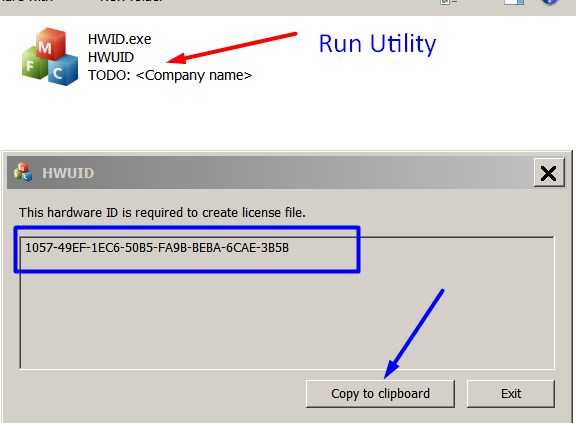
Note! You have to disable antivirus or put HWID.exe file to ignore list!
3. Put this item into your shopping cart
4. Go to payment page and enter Hardware ID into the specified field:
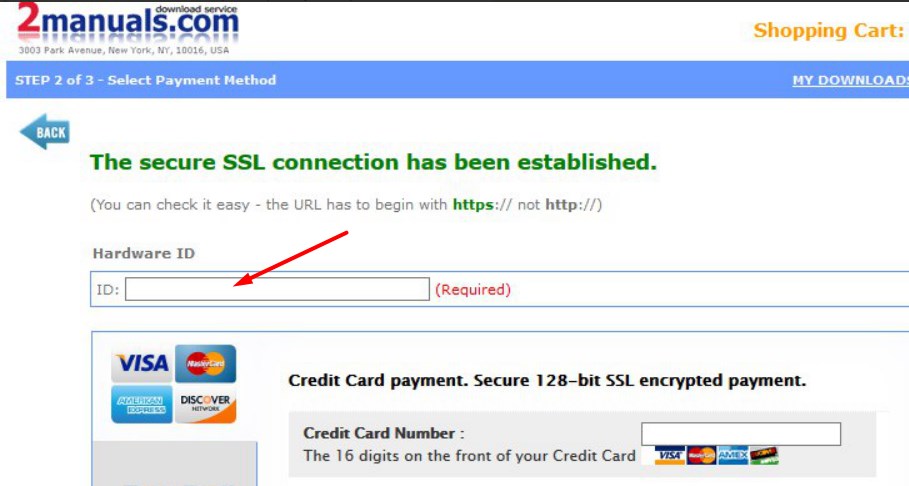
5. Make payment and you will get a download link with Epson Sure Color NVRAM Viewer and the License file included.
Download the ZIP archive to your PC and extract files to any folder on your computer.
6. Put Epson Sure Color NVRAM Viewer into the Antivirus Ignore list or disable Antivirus.
Then run NVRAMViewer_CH83.exe.
To get this NVRAM Viewer, you need to do the following:
- Download Epson Sure Color NVRAM Viewer.
-
Buy this item – License for ONE PC for Epson Sure Color NVRAM Viewer.
You'll be able to download the License file immediately after your payment transaction is complete.
This service program is required to create NVRAM backup files used by the Viewer.
Please
contact us
if you have not received your order.
|





 Total customers: 443534
 Customers online: 120








