CANON PIXMA iP3600, iP4600, MP190, MP240, MP250, MP260, MP480, MP540, MP560, MP620, MP630, MP640, MP980, MP990 Service Tool work under Windows OS only.
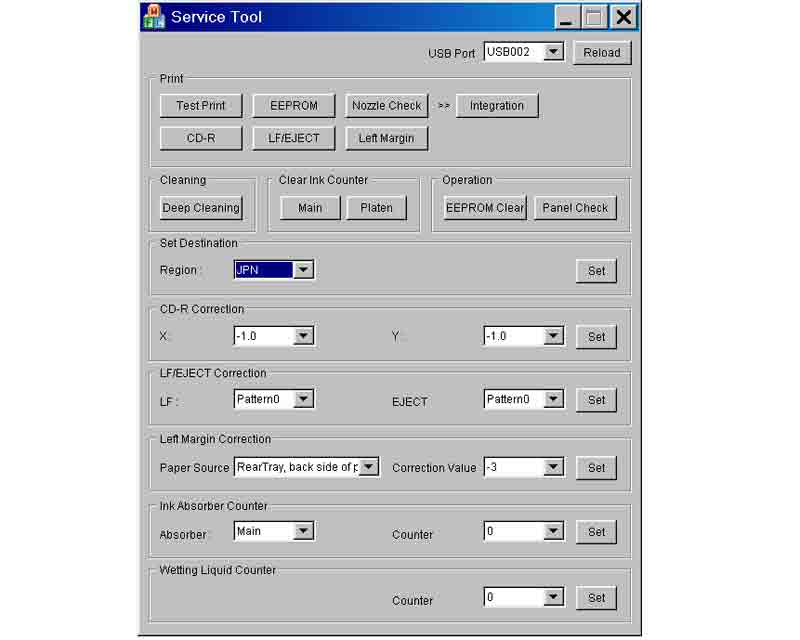
This Service Tool can make service adjustments and Reset procedures with the Ink Absorber Counter. To reset waste ink absorber counters you have to use Service Tool under Windows XP or in the compatibility mode:
1. Order and DOWNLOAD Service Tool V1050 for Canon iP3600, iP4600, MP190, MP240, MP250, MP260, MP480, MP540, MP560, MP620, MP630, MP640, MP980, MP990
2. Unzip downloaded file by WinZip.
3. Set the printer in Service Mode.
4. Run Service Utility.exe file
5. Select the connected USB port number from USB PORT
6. In the Ink Absorber Counter section of the Service Tool, select MAIN from the Absorber pull-down menu.
7. From the Counter Value(%) pull-down menu, select the value (in 10% increments) which is the closest to the actual counter value confirmed before replacement of the logic board, and click SET.
Print EEPROM information to confirm that the value is properly set to the EEPROM.
printers Service Tool for iP3600, iP4600, MP190, MP240, MP250, MP260, MP480, MP540, MP560, MP620, MP630, MP640, MP980, MP990
ZIP archive: 7 310 kB
|
|
|
|
|
Step 1
ADD TO CART |
Step 2
CHECKOUT
Select payment method. |
Step 3
Confirm the order. |
|
|
We are in business since 2002 and do our best to give our customers perfect service!
|
Our customers reviews:
| Johan de Wit | 2012-10-15 11:52:55 | | I don't believe...but real this program works perfect, can continue with printing.
Regard, from the Netherlands | | | Nicole Stinchcomb | 2023-03-28 20:58:48 | | Used my reset key for my Epson 2720 and it worked! Thanks! | |  | norman bautista | 2019-12-01 04:04:59 | | thanks team,, get back soon
thank you for your code i reset my printer in no time.. | | | Ramin Ram | 2014-05-27 21:42:06 | | Hi I have epson 9800. I need to adjustment program or resister counter for it.
Ramin | | | Alessandro Regoli | 2011-09-03 14:19:11 | | ok and the printer is' unlocked immediately
you are great thanks | | | Mark LAYPORT | 2025-11-29 04:21:41 | | OK Im here because Youtube directed me here to fix my Epson ET-2803 printer! I've downloaded your APP and tried to use it! ...There are a number of problems!!! ...First off, couldn't you find any smaller text!!?? Trying to read and follow your directs is near impossible!
Next up, your directions aren't very clear! You direct me to turn on my printer then to turn it off. And as I try to move forward I click on your direction and NOTHING happens, until the command times out. BUT IF I turn off my printer again (un-directed by you) the command tried to go through. UNTIL I get more directions to turn on my printer and not turn it off again. I've seen a line at the bottom of the screen there a line of text floats through saying that the computer has been reset per the Youtube site I'm supposed to get a congratulations of a successful at the finish, I never get that, because my last command (theoretically) never goes through, again just sitting there until it times out again.
IF your really trying to "help" people PLEASE fix you site! Because nothing seems to work correctly, I'm hesitant to buy any keys from you.
...Sincerly, Mark L | | | Rick Benavides | 2011-06-07 22:14:16 | | Thanks John,
You saved me alot of time and frustration dealing with that idiot I was talking with at Ebson, he didn't know sh$t about my printer, he began by telling me that my printer was like a human body and I was like WTF???, well anyway I eventually told him he was stupid and hung up on him, I called the place where I purchased my printer from and he gave me your website, everything is working fine now and you saved me from any down time I would have had taking to the service center!...thank you again! | | | YuanYuan Wang | 2008-01-19 13:27:07 | | Was pulling my hairs out when my R340 displayed the message "parts reaching end of service life, see manual". As I know these printers are not made to be "servicable", and I am not ready to pay another hundred pounds for a new printer, I was devastated. Thanks to this service program, it took away the warning message and I can continue using my R340 with the CISS. Phew!!
Please note that you DO need to redirect the waste ink or replace the waste ink pads or you may risk dealing with an over-spilled printer.
A wise investment into this program. Thank you. | | | adien sari | 2007-06-23 11:20:40 | | software reseter r350 free download yang gratis ya | |
|







 Total customers: 434609
 Customers online: 145








