CANON PIXMA iP3600, iP4600, MP190, MP240, MP250, MP260, MP480, MP540, MP560, MP620, MP630, MP640, MP980, MP990 Service Tool work under Windows OS only.
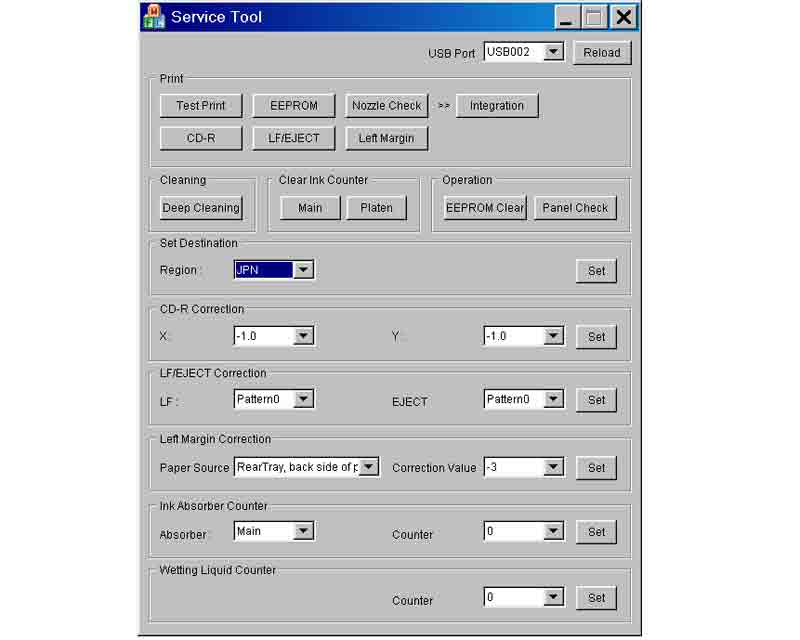
This Service Tool can make service adjustments and Reset procedures with the Ink Absorber Counter. To reset waste ink absorber counters you have to use Service Tool under Windows XP or in the compatibility mode:
1. Order and DOWNLOAD Service Tool V1050 for Canon iP3600, iP4600, MP190, MP240, MP250, MP260, MP480, MP540, MP560, MP620, MP630, MP640, MP980, MP990
2. Unzip downloaded file by WinZip.
3. Set the printer in Service Mode.
4. Run Service Utility.exe file
5. Select the connected USB port number from USB PORT
6. In the Ink Absorber Counter section of the Service Tool, select MAIN from the Absorber pull-down menu.
7. From the Counter Value(%) pull-down menu, select the value (in 10% increments) which is the closest to the actual counter value confirmed before replacement of the logic board, and click SET.
Print EEPROM information to confirm that the value is properly set to the EEPROM.
printers Service Tool for iP3600, iP4600, MP190, MP240, MP250, MP260, MP480, MP540, MP560, MP620, MP630, MP640, MP980, MP990
ZIP archive: 7 310 kB
|
|
|
|
|
Step 1
ADD TO CART |
Step 2
CHECKOUT
Select payment method. |
Step 3
Confirm the order. |
|
|
We are in business since 2002 and do our best to give our customers perfect service!
|
Our customers reviews:
| Johan de Wit | 2012-10-15 11:52:55 | | I don't believe...but real this program works perfect, can continue with printing.
Regard, from the Netherlands | | | Matt Sparks | 2019-07-01 22:27:51 | | This tool is badly wrtten, after downgrading using the wrong firmareware version I was unable to purchase another key as it thought it was a duplicate order, tried online help waited a hour and gave up, in total I have wasted £40 on a CISS system thats not reconized by the printer, and £20 on the WIC tool that although was my fault, I can remedy because I can't puchase another key | |  | eric strier | 2009-04-05 01:30:54 | | I must say that John provided excellent support and customer service to me when I really needed it. I will send people to this site when they have printer issues they want to fix themselves. Way to go, John. Thanks a lot! - Eric | | | raj nayak | 2009-12-24 09:07:30 | | | Pen Joe Pendi | 2007-07-12 17:04:22 | | | vijayanand swami | 2009-11-07 16:44:04 | | i have epson 4880c/ the masses display service req 000110033 | | | harvey yamith | 2011-06-18 01:23:14 | | Hi I would like to know how to find codes that ask me to reset the work force 500 and the Epson tx720wd thanks
======== 2MANUALS REPLY ===========
You can buy RESET KEYS here - http://www.2manuals.com/product_info.php?cPath=56_92&products_id=1138 | | | Michael Russo | 2026-01-08 22:17:23 | | This was one of the most satisfying on-line experience I have EVER experienced!
It started with some slightly suspicious message appearing on our (usually functional) 2019 Epson ET-2760 ink jet printer:
“The Inkpad Needs Service. Contact Epson.”
My wife, who has been the person diligently tending to the Epson, had surrendered because Epson was TOTALLY unresponsive.
So then it was my turn. I did the only thing I ever do when confronted with a potential fiasco like this: I entered the mysterious Epson message into my Google search engine. Up popped information about a "WIC Reset Utility" that seemed to make sense. I downloaded the TRIAL version, which would theoretically be able to “reset” the Epson’s Inkpad counter One Time. Say Wha?!?
Bottomline: It worked HEROICALLY, so I I have gone ahead and purchased the actual WIC Reset Utility software. I am imagining that if this message ever appears again I will now be able to work around it.
This software literally SAVED our old Epson printer, for which I will be eternally grateful.
NGUYEN VAN CHIEN is 100% The Real Deal!
Thank you kind sir for the wonderful technology you have created, and are sharing with the rest of a grateful world! | |
|







 Total customers: 445097
 Customers online: 212








