CANON PIXMA iP3600, iP4600, MP190, MP240, MP250, MP260, MP480, MP540, MP560, MP620, MP630, MP640, MP980, MP990 Service Tool work under Windows OS only.
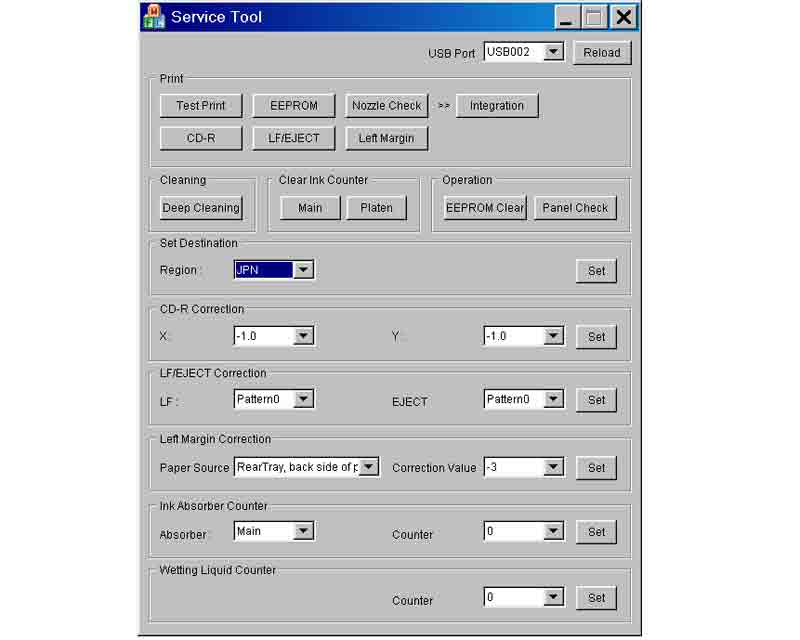
This Service Tool can make service adjustments and Reset procedures with the Ink Absorber Counter. To reset waste ink absorber counters you have to use Service Tool under Windows XP or in the compatibility mode:
1. Order and DOWNLOAD Service Tool V1050 for Canon iP3600, iP4600, MP190, MP240, MP250, MP260, MP480, MP540, MP560, MP620, MP630, MP640, MP980, MP990
2. Unzip downloaded file by WinZip.
3. Set the printer in Service Mode.
4. Run Service Utility.exe file
5. Select the connected USB port number from USB PORT
6. In the Ink Absorber Counter section of the Service Tool, select MAIN from the Absorber pull-down menu.
7. From the Counter Value(%) pull-down menu, select the value (in 10% increments) which is the closest to the actual counter value confirmed before replacement of the logic board, and click SET.
Print EEPROM information to confirm that the value is properly set to the EEPROM.
printers Service Tool for iP3600, iP4600, MP190, MP240, MP250, MP260, MP480, MP540, MP560, MP620, MP630, MP640, MP980, MP990
ZIP archive: 7 310 kB
|
|
|
|
|
Step 1
ADD TO CART |
Step 2
CHECKOUT
Select payment method. |
Step 3
Confirm the order. |
|
|
We are in business since 2002 and do our best to give our customers perfect service!
|
Our customers reviews:
| Johan de Wit | 2012-10-15 11:52:55 | | I don't believe...but real this program works perfect, can continue with printing.
Regard, from the Netherlands | | | TT Impact | 2016-02-29 16:56:49 | | Key worked as charm, almost wrote off this guy after 15k pages,
but it looks like it is back to business. | |  | Ultimo Benjamin | 2020-09-17 16:24:44 | | Fantastic product key that saved me from rushing out and buying a new printer, allowing me to wait for the parts to arrive in order to keep on working!
The very best value for money and thank you so much for the service! | | | yoni takie | 2005-02-14 10:20:07 | | Please send me service manuals of NP's IR's and other canon products. | | | NACHO GOMEZ | 2010-10-25 23:44:48 | I got the flashing lights and Service required message on my Epson R2400, as many others have before!
I spent hours online and eventually managed to download Epsons own
Adjustment Program. It showed me the waste ink settings but would not let me reset the counter, although I had disconnected the feed tubes and re-routed them to an external bottle.
Today I found 2Manuals.com and downloaded their WIC reset program. I thought It probably won\'t work but one key is only $9.99 so what the heck!
Well that was the best $9.99 I have ever spent - as soon as I entered the key and hit RESET the printer whirred into action, ink pumped into my waste bottle and I am back in action!
This has saved me a lot of money and the hassle of sending the printer to an Epson service centre. Truly a 5***** product! Chris Porteous, Prestatyn, U.K. | | | ray edmund regalado | 2017-04-04 02:00:12 | | thank you so much my L210 printer is working already...so fast....thank you so much for the trial
from philippines | | | deepak jha | 2012-11-19 09:36:35 | | respected,
send for me free of cost wic reset key so that i myself reset l 200 printer because its third counter is going to overflow soon
so i request you help me for this consideration i will ever obliged to you. | |
|





 Total customers: 445088
 Customers online: 323










