Activation Key for making Epson XP-440, XP-441, XP-446 Chipless Printers (for one device only)

$25.00
<b>Activation Key</b> for making Epson XP-440, XP-441, XP-446 Chipless Printers (for one device only)
   Click to enlarge
      

Activation Key for making Epson XP-440, XP-441, XP-446 Chipless!

Be sure Your printer can be modified to Chipless Version.

Don't buy Activation Key before You have checked if Your printers Firmware can be changed to Chipless! Make following steps.

Step 1
Download and extract Zip archive with XP-440, XP-441, XP-446 Firmware  - SO07I3 version

Step 2
Connect printer to PC (with Windows OS) by proper USB cable.
Disable all Epson processes and services. You can do this manually using task manager and administration tools or You can do this via WIC Reset Utility (install and run it, then select MENU Support -> Disable processes in the main menu).

Step 3
Upload Firmware to printer in the NORMAL MODE (do NOT use service mode yet just start the printer with the power button). Run EPFWUPD.EXE file and follow all steps until Firmware will upload in printer. 
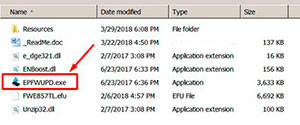
XP-440, XP-441   chipless firmware

When Firmware Update process is complete - printer will restart - usually it will take only a few minutes but can continue for 10-20 minutes in some rare cases. 
If process hangs or stops at 80-99% - replug power cable and start printer manually.

Now check current firmware version ( how to check ).
If firmware version is SO07I3 - firmware has been uploaded successfully. You can go to next Step.
If NO - You have to upload firmware in special Firmware Mode - go to Step by Step Guide how to put printer in Firmware Mode - find Your printers model!!

What do You have to do next after uploading chipless firmware?

1. Buy this Activation Key
2. Download License.exe application (Windows only) - download here
3. Run License.exe under Windows and press Activate Online button
4. Input Activation Key and press Ok!

Please keep in mind - there are 2 types of keys:
- Regular Activation Key (HAS expiration date of using);
- No Expiration date Activation Key (can be used whenever You want in 10 years).


Buy Activation Key after You have successfully uploaded Firmware to Your printer!

Prices and discounts:

Regular Activation Keys (HAS expiration date and couldn't be used after has expired):
1 Activation Key - $25
5 Activation Keys - $20 per Key
You can pay by Visa, MC etc. - Here
or by PayPal and other systems - Here

NO EXPIRATION Activation Keys (has NO expiration date - can be used whenever You want):
1 Activation Key - $27
5 Activation Keys - $22 per Key
You can pay by PayPal, Visa, MC etc. - Here

*The code is one-time use.

If You have any questions - You can read or place Your questions at Chipless thread at our Discussion Board - https://forum.2manuals.com/index.php?/topic/80414-chiplesssolutions-chipless-firmware-for-epson-printers-chip-virtual/


Step 1
ADD TO CART
Step 2
CHECKOUT
Select payment method.
Step 3
Confirm the order.


We are in business since 2002 and do our best to give our customers perfect service!

Our customers reviews:

  Preda Alexandru 2020-09-26 22:03:18  
  Can confirm that chipless procedure works! Thank You!
  Toshio Kawasome 2020-07-01 05:30:32  
  Thank you guys, my Epson XP-440 is working again - done the chipless procedure. Most grateful! Keep up the good work! Gabriel Jackson
  Riccardo Ritteri 2019-05-06 23:19:15  
  The license.exe utility doesn't recognize the printer XP-441.

Answer: Change USB Cable
  Muchtar Podungge 2013-01-31 19:02:31  
  Model - Epson SX235 Thanks for your prompt response - I\'ve downloaded the file and can now get on with repairing my printer! You provide a great service - I couldn\'t find this manual anywhere else. Regards, Muchtar
  Angelique Hahn 2015-09-25 22:32:04  
  oh all good now john! it was my first time using this and i’m very impressed! super happy with the result and how fast i could use my printer, yay! thanks again!
  Stan Thunder 2011-11-30 01:08:34  
  Always concerned that these things don't work but this time - really happy to say the long distance (USA-UK) fix worked perfectly. Thanks and kind regards
  Jakov Frumin 2009-01-05 22:37:02  
  ok
  Ron Lugo 2012-10-17 03:56:00  
  Wow! Your program works perfect under the 64bit environment. You are my savior style in terms of the time and effort. There is no epson service center in my area. Thank you so so much. I will advertise for you. God bless you.
  supri adie 2004-11-23 18:28:32  
  looking for information about manual service and maintenance of lq 1170 dot matrix printer
  Bob Heinrichs 2011-02-01 06:09:58  
  Thank-you for helping with resetting waste ink counter. Great service Had printer running in 2 minutes. Thanks again for saving me money and time. Bob
  mauro albanese 2020-10-22 13:26:46  
  Just over a week ago, I figured I was going to be in the market for a new printer. When the error message came up on my Epson XP-610 stating that "Parts inside the printer are at the end of their useful life" I initially was quite disappointed. However, after a quick Google search for that phrase, I came across the OctoInkjet website. After a little further research, I decided to give the trial waste ink counter reset code a shot - after all, what did I have to lose - and, somewhat to my surprise, it worked! Knowing that I then needed to purchase a new set of ink pads and a reset key to fully resolve my printer issues, I was pleasantly surprised at the low cost of purchasing both of these items together. I then placed my order, but knowing that the product was coming from overseas (I'm in the USA), I figured it would be a minimum of at least a few weeks before my printer pads arrived. But, lo and behold, the pads arrived on my doorstep in just over a week! I was thrilled and so I quickly replaced the pads in my printer with the new set (which, by the way, were a perfect fit and the instructions provided were excellent), ran the counter reset program applying the reset code I had purchased, and everything worked flawlessly! So now it feels like I have a brand new printer (although it's probably about 5 years old) and I can continue to purchase inexpensive third party ink cartridges (which I have always done), continuing to save me money for years to come. Thank you OctoInkjet!!! I will certainly be telling others to check out your product. P.S. - I seldom write product reviews so this shows how impressed I am with this product. I particularly love it when a solution is provided that overcomes "planned obsolescence" by the manufacturer.
Write review
Shopping Cart more
Shopping Cart is empty


How to pay?
We accept
Credit Cards, PayPal
and Western Union payments


We accept M-Pesa
Pay By M-Pesa
How to Pay by M-Pesa


Buy here or find Resellers in your country:

Argentina

Pay in Argentina Peso

Algeria

EasyPrint-dz.com

Australia

Mir-Aus.com.au

Bangladesh

Pay in Bangladesh by BDT

Brasil

Pay in Brasilian Reals
ReseteadoresWIC
Brasil

Burundi

PrintersAfrica.com

China

Pay in Chineese Yuan

Cote D Ivoire

MonpcImprime.com

Columbia

Pay in Columbian Peso
ReseteadoresWIC

Dominicana

Rellenadodecartuchos.com

DR Congo

Buy in DR Congo

Ecuador

ReseteadoresWIC

Ethiopia

PrintersAfrica.com

France

InkCissPrinter

Ghana

Pay in Ghana Cedis

Germany

InkCissPrinter.com

Japan

Pay in Japaneese Yen

Iran

MahaShop.ir
FixPrinters.ir

Iraq

AlmohandsWorkshop

Indonezia

Pay in Indonesian Rupiahs
FastPrint.co.id

Italia

Inkspeed.it
Stampacontinua.it

Kenya

PrintersAfrica.com
MagiColors.biz

New Zealand

Mir-Aus.com.au

Philippines

Pay in Philippine Peso

Poland

Tusze.info
Progbit.pl
ResetPampersa.pl
ResetWIC.pl

Portugal

Printsemfim.com
InkCissPrinter.com

Romania

CissMarket.ro
Cartuseria.ro
AmDigital.ro

Rwanda

PrintersAfrica.com
Ciss-Solutions.com

Saudi Arabia

Alelm-Alamal.com

Soomaaliya

PrintersAfrica.com

South Sudan

PrintersAfrica.com

Spain

InkCissPrintert.com

Tanzania

PrintersAfrica.com

Turkiye

Cescesor.com

Uganda

PrintersAfrica.com

Vietnam

WIC.vn
ResetKey.net
Want to sell Reset Keys in Your country?
Notifications more
NotificationsNotify me of updates to Activation Key for making Epson XP-440, XP-441, XP-446 Chipless Printers (for one device only)