Be sure Your printer can be modified to Chipless Version.
That means You can pass Step 4 of this guide.
Don't buy Activation Key BEFORE You have checked if Your printers Firmware can be changed to Chipless! Follow next 5 Steps.
Step 1
Download and extract Zip archive (How to unzip (extract) files from Zip archive?) with Epson XP-15000, XP-15010, EP-50V Firmware - NW07K7 version
Step 2
Connect printer to PC (under Windows OS) by proper USB cable.
Disable all Epson processes and services. You can do this manually using task manager and administration tools or You can do this via WIC Reset Utility (install and run it, then select MENU -> Support -> Disable processes).
Step 3
Upload Firmware to printer in the NORMAL MODE (do NOT use service mode yet just start the printer with the power button). Run EPFWUPD.EXE file and follow all steps until Firmware will upload in printer.
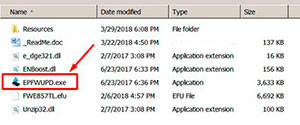
When Firmware Update process is complete - printer will restart - usually it will take only a few minutes but can continue for 10-20 minutes in some rare cases.
If process hangs or stops at 80-99% - replug power cable and start printer manually.
Step 4
Now check current firmware version ( how to check ).
If firmware version is
NW07K7
- firmware has been uploaded successfully. You can go to next Step.
If NO - restart the printer and try once more time.
What do You have to do next after uploading chipless firmware?
Step 5
1. Buy this Activation Key
2. Download License.exe application (Windows only). Password to extract - 12345.
3. Run License.exe under Windows and press Activate Online button
4. Input Activation Key and press Ok!
Please keep in mind - there are 2 types of keys:
- Regular Activation Key (HAS expiration date of using);
- No Expiration date Activation Key (can be used whenever You want in 10 years).
Buy Activation Key in case You have uploaded Firmware to Your printer successfully!
Prices and discounts:
Regular Activation Keys (HAS expiration date and couldn't be used after has expired):
1 Activation Key - $50
5 Activation Keys - $48 per Key
10 Activation Keys - $45 per Key
You can pay by PayPal, Visa, MC etc. :
Here or Here
NO EXPIRATION Activation Keys (has NO expiration date - can be used whenever You want):
1 Activation Key - $55
5 Activation Keys - $53 per Key
20 Activation Keys - $50 per Key
You can pay by PayPal, Visa, MC etc. :
Here
*The code is one-time use.
If You have any questions - You can read or place Your questions at Chipless thread at our Discussion Board - https://forum.2manuals.com/index.php?/topic/80414-chiplesssolutions-chipless-firmware-for-epson-printers-chip-virtual/
|

|
|
|
|
Step 1 ADD TO CART |
Step 2 CHECKOUT Select payment method. |
Step 3 Confirm the order. |
|
|
We are in business since 2002 and do our best to give our customers perfect service!
|
| john Liang | 2018-08-16 18:24:01 | I took a gamble last week by buying a Epson Pro 4900 for less than $140 thinking if I could not get it going, I can at least take the remaining ink out of the cartridge and use it on my other printers.
The initial nozzle test was not so bad for a printer that was unused for about 1 year, I got six Nozzles firing at around 90% not bad, the next thing I did was the popular Windex treatment, I ran 4 sessions of Windex treatment on the printhead, first one lasted 1 hour, second one lasted 2 hours and third one lasted 4 hours and the last one lasted 8 hours, I got a fully soaked paper towel in my last two treatments, I ran a series of power clean on the non firing nozzles but the Green nozzle remain clogged.
At this stage I thought this program may be my last chance to rescue this printer. I bought the program at 6 pm today, I ran the CL1 clean on OR/GR channel and the green nozzle remain clogged, I then ran the CL2 clean on the same nozzles and the same result, at this point I thought maybe this printer is completely dead but I will give CL3 a shot, I went for dinner when CL3 clean was performed on the printer. I came back immediately printed the nozzle check I got the perfect Nozzle pattern on almost every single colour nozzle except Cyan which has a few bar missing, a quick CL1 clean on Cyan/Magenta fix that.
The next thing I did was to run a quick paper profile on this printer with X-rite software, I printed two test pattern page to calibrate the printer, then come the first real print on my Epson Stylus Pro 4900 it was absolutely brilliant, the best printer I have ever own and the IQ on one of the cheapest glossy media I could find was simply breath taking.
I have to say without this software my $140 purchase would probably end up in the rubbish dump.
I must say I was skeptical about the truthfulness of the success that other has with this software but with myself actually tried this software, I have no reservation but to recommend that anyone who has a clogged Epson Pro 4900 to give this program a shot it may just save your printer.
On the scale of 10 I would probably give it a 11 and it is more than just good! | |  | Patrick Blom Bachstein | 2016-02-25 19:28:33 | So had my Epson Pro 4900 disconnected from powersupply for about a month and a half, due to new facilities in my studio. Powered it up, printed a nozzle check, and banged my head against the wall! Only magenta and light cyan did appear, and two broken lines of photo black. Did the Windex trick 5-8 times, and at the 16. nozzlecheck, 9 colours appeared, BUT some actually has got worse, the more Windex the head had.
Preparing myself on making a stronger brew for the cleaning (a lot of Googling and reading!), I came across the Service Program. Reluctant to spill ~ 150 ml of ink, I first moved along (also, the website seemed shady, however, alot of mentions on various foras).
Today I decided \'What the heck, 30 bucks, if it doesn\'t work, I\'ll survive\', so I purchased a license, installed on a laptop (with USB connection instead of network), and chose the option to prime the left channels first - and WOW: EVERY nozzle on that side now fired, and made an (99%) perfect nozzle check. So did the other side, when finished filling the lines again.
So: 5 f*cking huge stars from me! :)
Thank you for this wonderful utility! | |  | fernando rocha | 2025-01-02 21:35:28 | | It works. Just purchased a one time counter reset license for my Epson L380.
Immediately after payment with credit card (electronic version for web shopping) , I got the key number and used to reset the printer.
Worked like a charm | |  | cruz daniel | 2008-01-23 09:12:26 | | hola nesecito este programa para resetear la impresora epson c92 | |  | Tim Nichols | 2012-08-11 05:20:43 | | I was leery about paying the $9.99 for a key. After speaking to Epson "Specialist" and being told "Your machine must have issues beyond repair, but we can sell you a new one for $190" I decided to go ahead and try this software. A++ I would recommend this to anyone wishing self repair an epson printer. I have a RX595 , I use a CCS and when I received the waste pad error I was heartbroken. I love this printer. I tried bypassing waste pad but still got the error. This software is well worth the $$
Thank you | |
|




