Activation Key for making Epson WF-C5290 Chipless Printer (for one device only)

$70.00 $50.00
<b>Activation Key</b> for making Epson WF-C5290 Chipless Printer (for one device only)
   Click to enlarge
      

Be sure Your printer can be modified to Chipless Version.
That means You can pass Step 4 of this guide.

Don't buy Activation Key BEFORE You have checked if Your printers Firmware can be changed to Chipless! Follow next 5 Steps.

Step 1
Download and extract Zip archive (How to unzip (extract) files from Zip archive?) with Epson WF-C5290 Firmware  - CT14I9 version

Step 2
Connect printer to PC (under Windows OS) by proper USB cable.
Disable all Epson processes and services. You can do this manually using task manager and administration tools or You can do this via WIC Reset Utility (install and run it, then select MENU -> Support -> Disable processes).

Step 3
Upload Firmware to printer in the NORMAL MODE (do NOT use service mode yet just start the printer with the power button). Run EPFWUPD.EXE file and follow all steps until Firmware will upload in printer. 
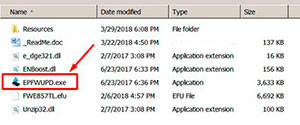
WF-C5290   chipless firmware

When Firmware Update process is complete - printer will restart - usually it will take only a few minutes but can continue for 10-20 minutes in some rare cases. 
If process hangs or stops at 80-99% - replug power cable and start printer manually.

Step 4
Now check current firmware version ( how to check ).
If firmware version is CT14I9 - firmware has been uploaded successfully. You can go to next Step.
If NO - restart the printer and try once more time.

What do You have to do next after uploading chipless firmware?

Step 5
1. Buy this Activation Key
2. Download License.exe application (Windows only). Password to extract - 12345.
3. Run License.exe under Windows and press Activate Online button
4. Input Activation Key and press Ok!

Please keep in mind - there are 2 types of keys:
- Regular Activation Key (HAS expiration date of using);
- No Expiration date Activation Key (can be used whenever You want in 10 years).


Buy Activation Key in case You have uploaded Firmware to Your printer successfully!

Prices and discounts:

Regular Activation Keys (HAS expiration date and couldn't be used after has expired):
1 Activation Key - $50
5 Activation Keys - $48 per Key
10 Activation Keys - $45 per Key
20 Activation Keys - $40 per Key
50 Activation Keys - $35 per Key
100 Activation Keys - $30 per Key
You can pay by PayPal, Visa, MC etc. :
Here or Here

NO EXPIRATION Activation Keys (has NO expiration date - can be used whenever You want):
1 Activation Key - $55
5 Activation Keys - $53 per Key
20 Activation Keys - $50 per Key
You can pay by PayPal, Visa, MC etc. :
Here

*The code is one-time use.

If You have any questions - You can read or place Your questions at Chipless thread at our Discussion Board - https://forum.2manuals.com/index.php?/topic/80414-chiplesssolutions-chipless-firmware-for-epson-printers-chip-virtual/


Step 1
ADD TO CART
Step 2
CHECKOUT
Select payment method.
Step 3
Confirm the order.


We are in business since 2002 and do our best to give our customers perfect service!

  George Chege 2016-02-16 20:03:14  
  The key you provided worked exactly as advertised and I was able to unlock our PP-100 and resume use. Thank you so much for your response and excellent product!
  job mwangi 2016-02-18 18:14:15  
  Awesome. I made a mistake ordering 2 codes (I needed just 1). They called me (I'm in Italy) to ask if it was an erroneous "double click"...and they deleted the second order. I still can't believe it. That's PURE QUALITY. (Of course the whole thing works and the printer is doing his work). THANX!
  michael thomas 2016-02-20 23:16:31  
  Guy gave me an printer Epson Pro 4900.
The printhead was completely clogged.
Used your adjustment program initial ink charge and got an immediate 100% clear nozzle check.
Wish everything was this easy...Thanks
  Patrick Blom Bachstein 2016-02-25 19:28:33  
  So had my Epson Pro 4900 disconnected from powersupply for about a month and a half, due to new facilities in my studio. Powered it up, printed a nozzle check, and banged my head against the wall! Only magenta and light cyan did appear, and two broken lines of photo black. Did the Windex trick 5-8 times, and at the 16. nozzlecheck, 9 colours appeared, BUT some actually has got worse, the more Windex the head had.
Preparing myself on making a stronger brew for the cleaning (a lot of Googling and reading!), I came across the Service Program. Reluctant to spill ~ 150 ml of ink, I first moved along (also, the website seemed shady, however, alot of mentions on various foras).

Today I decided \'What the heck, 30 bucks, if it doesn\'t work, I\'ll survive\', so I purchased a license, installed on a laptop (with USB connection instead of network), and chose the option to prime the left channels first - and WOW: EVERY nozzle on that side now fired, and made an (99%) perfect nozzle check. So did the other side, when finished filling the lines again.
So: 5 f*cking huge stars from me! :)
Thank you for this wonderful utility!
  TT Impact 2016-02-29 16:56:49  
  Key worked as charm, almost wrote off this guy after 15k pages, but it looks like it is back to business.
  David Wrather 2016-03-31 22:39:24  
  I have been struggling with a clogged head on my Epson Pro 4900 for weeks.
The Windex-on-a-papertowel-overnight solution has worked before; however, it was not clearing the nozzles this time.
Thanks to John\'s link ( http://forum.luminous-landscape.com/index.php?topic=77073.0 ) for guiding me to 2manuals.com!!
I purchased the SP4900 program and it was GREAT!
I used the Adjustments (Individual) program on Section 2 Head Related Checks and Adjustments, first at level CL3 then CL2 for the clogged colours channels and voila, my head is now fully functional again.
I have only browsed through the other SP4900 subroutines, but they will provide me with a full suite of maintenance routines that could be very useful in the future.

This program was fantastic. The only inconvenience was that it is a Windows .exe file and I am a Mac OSX user. I had to launch Windows 7 Pro in Fusion and conduct the maintenance; however, with so many Mac users needing this type of help for the Epson Pro printers, it would be great to have an OSX program option too. That being said, if you can run Windows on your computer and have an Epson Pro 4900, I highly recommend this indespensible program. At $29.99 it is a steal compared to calling in a technician.
Keep up the super product support, John!! Thanks.
Write review
Shopping Cart more
Shopping Cart is empty


How to pay?
We accept
Credit Cards, PayPal
and Western Union payments


We accept M-Pesa
Pay By M-Pesa
How to Pay by M-Pesa


Buy here or find Resellers in your country:

Argentina

Pay in Argentina Peso

Algeria

EasyPrint-dz.com

Australia

Mir-Aus.com.au

Bangladesh

Pay in Bangladesh by BDT

Brasil

Pay in Brasilian Reals
ReseteadoresWIC
Brasil

Burundi

PrintersAfrica.com

China

Pay in Chineese Yuan

Cote D Ivoire

MonpcImprime.com

Columbia

Pay in Columbian Peso
ReseteadoresWIC

Dominicana

Rellenadodecartuchos.com

DR Congo

Buy in DR Congo

Ecuador

ReseteadoresWIC

Ethiopia

PrintersAfrica.com

France

InkCissPrinter

Ghana

Pay in Ghana Cedis

Germany

InkCissPrinter.com

Japan

Pay in Japaneese Yen

Iran

MahaShop.ir
FixPrinters.ir

Iraq

AlmohandsWorkshop

Indonezia

Pay in Indonesian Rupiahs
FastPrint.co.id

Italia

Inkspeed.it
Stampacontinua.it

Kenya

PrintersAfrica.com
MagiColors.biz

New Zealand

Mir-Aus.com.au

Philippines

Pay in Philippine Peso

Poland

Tusze.info
Progbit.pl
ResetPampersa.pl
ResetWIC.pl

Portugal

Printsemfim.com
InkCissPrinter.com

Romania

CissMarket.ro
Cartuseria.ro
AmDigital.ro

Rwanda

PrintersAfrica.com
Ciss-Solutions.com

Saudi Arabia

Alelm-Alamal.com

Soomaaliya

PrintersAfrica.com

South Sudan

PrintersAfrica.com

Spain

InkCissPrintert.com

Tanzania

PrintersAfrica.com

Turkiye

Cescesor.com

Uganda

PrintersAfrica.com

Vietnam

WIC.vn
ResetKey.net
Want to sell Reset Keys in Your country?
Notifications more
NotificationsNotify me of updates to Activation Key for making Epson WF-C5290 Chipless Printer (for one device only)