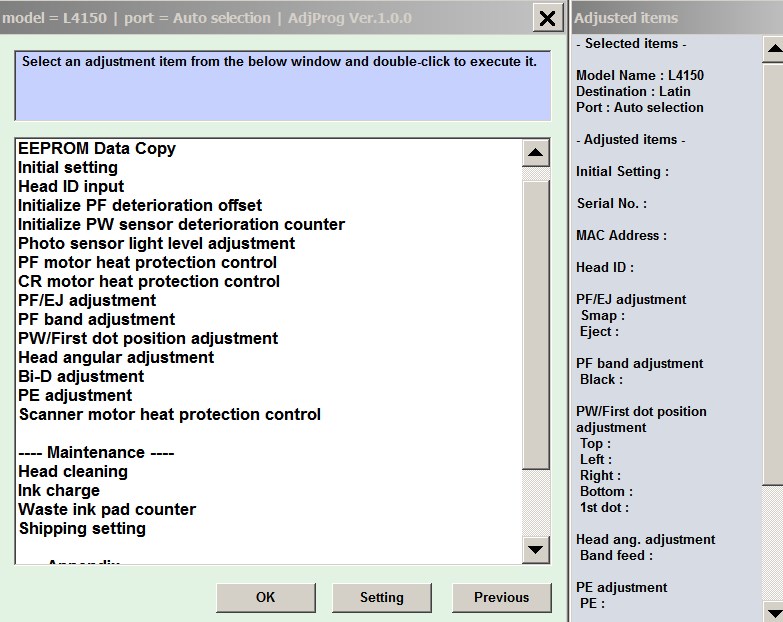
Epson L4150 series, L4160 series Adjustment Program for ONE PC

$14.99
Epson <b>L4150 series, L4160 series</b> Adjustment Program for ONE PC
   Click to enlarge
      

Epson L4150, L4160 Adjustment Program full version for ONE PC

This Epson L4150, L4160 Adjustment Program can be used under Windows XP, 7, 8, 10, 11
(or under higher versions [in Windows XP compatibility mode]) with USB connection only.

Supported models:
L4150, L4151, L4152, L4153, L4154, L4155, L4156, L4157, L4158, L4159
L4160, L4161, L4162, L4163, L4164, L4165, L4166, L4167, L4168, L4169

How to buy unlimited version for One PC:

1. Log In to Your 2Manuals account

2. Download HardWare ID Utility HWID.exe, run it and copy yours PC Hardware ID
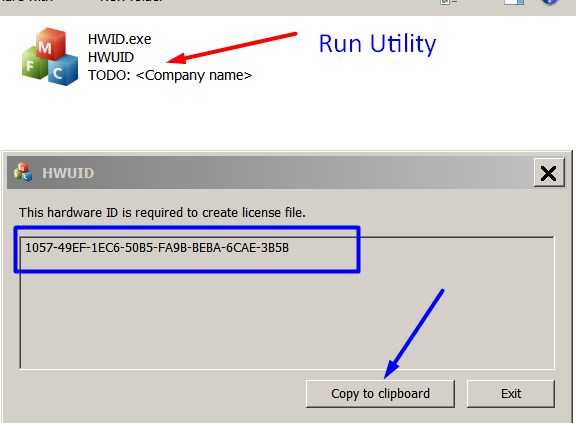
Note! You have to disable antivirus or put HWID.exe file to ignore list!

3. Put this item (License for One PC for L4150, L4160 ) in to your shopping cart

4. Go to payment page and enter HardWare ID in to specified field:
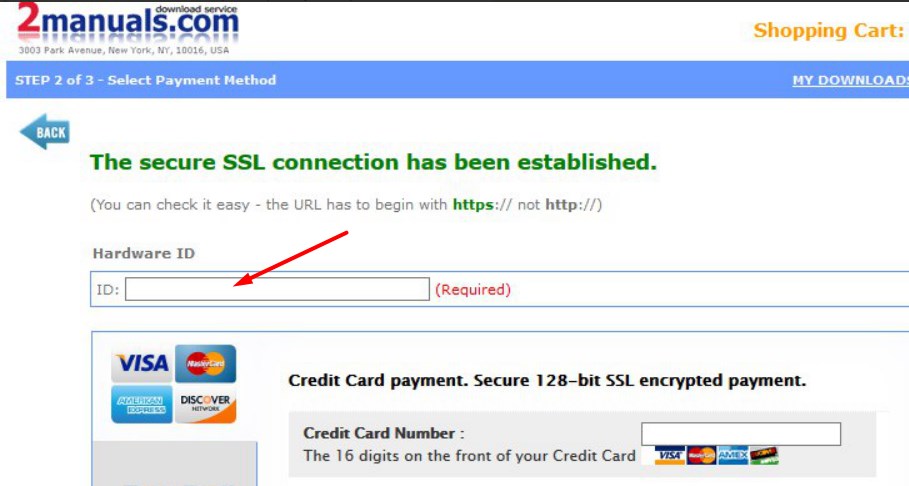

5. Make payment and You will get download link with Epson L4150, L4160 Program with the License file included

6. PutL4150, L4160 Adjustment Program to Antivirus Ignore list or disable Antivirus. Then Run AdjProg.exe.

With this Epson L4150, L4160 Adjustment Program You can make adjustment procedures, waste ink reset and Initial Ink Charge to clean and unclog printhead.

We recommend reading the Epson L4150, L4160 Service Manual

before using the adjustment utility.

Please contact us if you have not received your order.

I purchased the adjustment program last night and got to work on it today.
I had a clog in C and it would not clear. I ve had my L4150 for over 1 year and have been able to handle them until now.
I learned about this site from another site that has cleaner for the L4150 and said I need to buy this software first. I bought it and tried it with the epson ink that was in my printer. I ran the adjustment and it cleared C but then there were other clogs. Because they werent clogged before I started, I cleared them the normal way through the printers options. Had they not cleared, I would have ran the adjustment again.
I had tried everything to get C to clear for a week and this program did it in one try!

I would highly recommend this for clearing a stubborn clog. And now it is in my arsenal if I get another one that I cant clear down the road. By the way, it does not work if your printer is networked. Mine was so I had to move a computer into the room with my printer, directly connect to it and install the drivers. Then it work fine.
If you got a clog that you cant fix, just buy it.

Ivan Tilbury

Any questions about this product?

SEND US REQUEST by filling the form below.


Step 1
ADD TO CART
Step 2
CHECKOUT
Select payment method.
Step 3
Confirm the order.


We are in business since 2002 and do our best to give our customers perfect service!

Our customers reviews:

  Mary-Ann Prinsloo 2022-07-19 12:17:16  
  Good day. I have to clean my printer head EVERY hour. Then it prints fine. Until I leave it for an hour. So this leads to waste pad full and I have to purchase a key every time. Is there another way to go around this problem please? I cannot afford to buy a key every week.

=======Reply ========
You have to make 2 things
- clean parking station first - then inks will not dry on printhead;
- use high quality inks.
  Anonymous 2015-08-12 04:18:50  
  very easy! Buy Key, Open Program, Enter Key. You are all set!
Make sure to actually check your waste ink pads or install an external tank. Great I can finally squeeze the life out of my printer. Epson scam artist want you to send it back so they can sell as a refurbished model. I really don\'t know why epson doesn\'t just make this program available them self for free? Until then I can pay $10 instead of a new epson. Tested on WF7510. Owner of Epson WF7110 - New arrival looks to be good so far Epson WF7510 - Good Scanner Epson WF7010 - Work Horse Epson WF1100 - Second worse Epson WF30 - worst one Epson c88 - Ancient
  jose jesuratnam 2024-02-10 13:35:49  
  Dear Team. I am using Epson Xp520 Printer. Printer had an Error E-11 "An Inkpad needs service". Purchased Wicrest Key and Inkpad from Printerpotty. At First i was not able to do the Reset. Software was not working when i click Test connection or Read waste counter. .Installed all Printer drivers of Win 11. Version i installed WIC reset Utility V.5.90 (Nov.20.2023) .I have disabled some of monitors which was recommended by wicrest tool .it did not worked. same problem when i click on read counter progam is not working. .i removed USB cable from my laptop and again connected. The reading counter shows the counter reading and i have reseted the Waste counter. Thank you so much...!
  ramdas.spj@gmail.com kumar 2021-01-06 20:18:19  
  Tried other sites, but they did not work. This one worked like a charm, wish I had found this one first.
  HADAD HADDAD 2023-06-04 19:35:41  
  please reset my key my key is 522EDAZCZ9Z2273C thank you

-----------Reply-----------
Key is for one use only and can not be reset.
You need new key.
  Wesley Pritchard 2003-11-10 00:29:10  
  This program is a definate must have if you want to service your own printer. Using this program along with the servive manual (440,640,740) will help you to determine what the problem is. The program shows print head voltages, waste ink counter and reset, and recover print head functions just to name a few of the useful functions that this program has to offer. It returned my printer from a paperweight into a working Epson 640 in minutes. Even if your printer is working properly you can use this program ensure it will keep working. For less than $6.00 it is worth having.
  BEHZAD TAJIK 2012-04-28 12:54:54  
  I have been able to reset my counter now. Nice doing business with you.
  Alan Page 2017-07-23 03:33:02  
  brilliant - absolutely brilliant. Thank you. Thought I would have to trash my printer and the unused ink cartridges. Only hiccup was needing to disable my security protection to install this wonderful product. Used it as a trial - which proved it worked - then bought the key to finish the job. I am wrapped as you have saved me hundreds of dollars as there is nothing wrong with the quality of the printing. Cheers, Alan.
Write review
Shopping Cart more
Shopping Cart is empty


How to pay?
We accept
Credit Cards, PayPal
and Western Union payments


We accept M-Pesa
Pay By M-Pesa
How to Pay by M-Pesa


Buy here or find Resellers in your country:

Argentina

Pay in Argentina Peso

Algeria

EasyPrint-dz.com

Australia

Mir-Aus.com.au

Bangladesh

Pay in Bangladesh by BDT

Brasil

Pay in Brasilian Reals
ReseteadoresWIC
Brasil

Burundi

PrintersAfrica.com

China

Pay in Chineese Yuan

Cote D Ivoire

MonpcImprime.com

Columbia

Pay in Columbian Peso
ReseteadoresWIC

Dominicana

Rellenadodecartuchos.com

DR Congo

Buy in DR Congo

Ecuador

ReseteadoresWIC

Ethiopia

PrintersAfrica.com

France

InkCissPrinter

Ghana

Pay in Ghana Cedis

Germany

InkCissPrinter.com

Japan

Pay in Japaneese Yen

Iran

MahaShop.ir
FixPrinters.ir

Iraq

AlmohandsWorkshop

Indonezia

Pay in Indonesian Rupiahs
FastPrint.co.id

Italia

Inkspeed.it
Stampacontinua.it

Kenya

PrintersAfrica.com
MagiColors.biz

New Zealand

Mir-Aus.com.au

Philippines

Pay in Philippine Peso

Poland

Tusze.info
Progbit.pl
ResetPampersa.pl
ResetWIC.pl

Portugal

Printsemfim.com
InkCissPrinter.com

Romania

CissMarket.ro
Cartuseria.ro
AmDigital.ro

Rwanda

PrintersAfrica.com
Ciss-Solutions.com

Saudi Arabia

Alelm-Alamal.com

Soomaaliya

PrintersAfrica.com

South Sudan

PrintersAfrica.com

Spain

InkCissPrintert.com

Tanzania

PrintersAfrica.com

Turkiye

Cescesor.com

Uganda

PrintersAfrica.com

Vietnam

WIC.vn
ResetKey.net
Want to sell Reset Keys in Your country?
Notifications more
NotificationsNotify me of updates to Epson L4150 series, L4160 series Adjustment Program for ONE PC