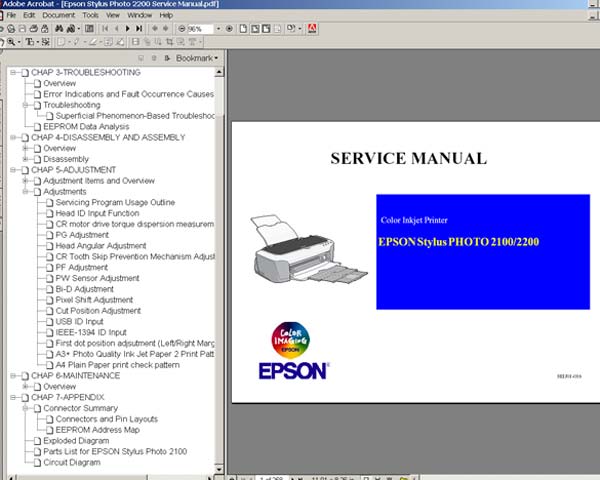
Epson Stylus Photo 2100, 2200, PM4000PX Printers Service Manual

$9.99
Epson Stylus Photo 2100, 2200, PM4000PX Printers  Service Manual
   Click to enlarge
      

This manual describes basic functions, theory of electrical and mechanical operations, maintenance and repair procedures of EPSON Stylus PHOTO 2100, 2200, PM4000PX . The instructions and procedures included herein are intended for the experienced repair technicians, and attention should be given to the precautions on the preceding page.

The chapters are organized as follows:

CHAPTER 1. PRODUCT DESCRIPTIONS
Provides a general overview and specifications of the product

CHAPTER 2. OPERATING PRINCIPLES
Describes the theory of electrical and mechanical operations of the product

CHAPTER 3. TROUBLESHOOTING
Provides the step-by-step procedures for troubleshooting

CHAPTER 4. DISASSEMBLY AND ASSEMBLY
Describes the step-by-step procedures for disassembling and assembling the product

CHAPTER 5. ADJUSTMENTS
Provides Epson-approved methods for adjustment

CHAPTER 6. MAINTENANCE
Provides preventive maintenance procedures and the lists of Epson-approved lubricants and adhesives required for servicing the product

APPENDIX
Provides the following additional information for reference:
• Connector Pin Assignments
• Component Layout
• Exploded Diagrams
• Electrical Board Circuit Diagrams


FORMAT: High resolution PDF document!
ZIP archive: 10 367 kB

I want to:

Any questions about this product?

SEND US REQUEST by filling the form below.


Step 1
ADD TO CART
Step 2
CHECKOUT
Select payment method.
Step 3
Confirm the order.


We are in business since 2002 and do our best to give our customers perfect service!

Our customers reviews:

  saad ali 2010-05-29 19:57:11  
  install incoder strip and printhead carrage and timing belt
  saad ali 2010-05-29 19:40:22  
  i want to install timing belt and carrage and incoder strip
  Richard Bustamante 2007-06-05 15:55:05  
  Muy bueno espero conseguirlo para poder reparar mi impresora
  Mike Danilovic 2005-08-25 07:56:41  
  Great things! I had some problems with my Epson 2100. The printer stopped to work. However, when I read the manual it was possible for me to disable the indicator of the problem and now the printer works well again. The service program is also a great think! Thanks.
  roberto zabeo 2020-01-21 05:34:46  
  I am looking for the solution of printer problem and I see this website wish will help me out I m so thankfull for the help of solution because I was already looking for free key but is nothing I only see an offer from 2manuals.com and it is really helps me othersways when I m can do it will recommendation to other people to using this way to solve out in same problem and in next time will be carefull to using printer. when we dont know how to reset printer and i found 2manuals.com to help me adn guide me to how do this
  Kristal Serna 2024-09-16 20:30:45  
  It's really easy to use and has saved me tons of money over buying new printers. I've reset my current printers several times and have used them for over 5 years thanks to these reset keys.
  Aferinyt Afyka 2004-05-14 00:33:54  
  All appears to be fine . Many Thanks for your help.
  Julius Gee 2004-06-23 19:41:01  
  Excellent! I had an old 51 sitting around but no way to find out what was wrong. the error codes(blinks) are worth the 7bills I paid.
  bobby florez 2004-01-15 06:12:01  
  Congratulation, the web site is very good. i hope to find all my information in this place.
  Michele Strigini 2019-01-05 01:10:04  
  I was skeptical in using this tool, but to my surprise and delight it worked like a charm using the serial key (trial) for a quick 10%reset of my Epson Artisan 830. Yes, meaning that if you don't buy the key, it will only reset your printer 10% of the way. My counters are now at 89.99% and 90.00%. It states these counters will reach maximum soon. I only wanted to use the fax option of this printer since I bought a new printer with fill tanks that hasn't arrived yet. This product worked perfectly. I wish I knew about it this software tool before buying a new printer......
Write review
Shopping Cart more
Shopping Cart is empty


How to pay?
We accept
Credit Cards, PayPal
and Western Union payments


We accept M-Pesa
Pay By M-Pesa
How to Pay by M-Pesa


Buy here or find Resellers in your country:

Argentina

Pay in Argentina Peso

Algeria

EasyPrint-dz.com

Australia

Mir-Aus.com.au

Bangladesh

Pay in Bangladesh by BDT

Brasil

Pay in Brasilian Reals
ReseteadoresWIC
Brasil

Burundi

PrintersAfrica.com

China

Pay in Chineese Yuan

Cote D Ivoire

MonpcImprime.com

Columbia

Pay in Columbian Peso
ReseteadoresWIC

Dominicana

Rellenadodecartuchos.com

DR Congo

Buy in DR Congo

Ecuador

ReseteadoresWIC

Ethiopia

PrintersAfrica.com

France

InkCissPrinter

Ghana

Pay in Ghana Cedis

Germany

InkCissPrinter.com

Japan

Pay in Japaneese Yen

Iran

MahaShop.ir
FixPrinters.ir

Iraq

AlmohandsWorkshop

Indonezia

Pay in Indonesian Rupiahs
FastPrint.co.id

Italia

Inkspeed.it
Stampacontinua.it

Kenya

PrintersAfrica.com
MagiColors.biz

New Zealand

Mir-Aus.com.au

Philippines

Pay in Philippine Peso

Poland

Tusze.info
Progbit.pl
ResetPampersa.pl
ResetWIC.pl

Portugal

Printsemfim.com
InkCissPrinter.com

Romania

CissMarket.ro
Cartuseria.ro
AmDigital.ro

Rwanda

PrintersAfrica.com
Ciss-Solutions.com

Saudi Arabia

Alelm-Alamal.com

Soomaaliya

PrintersAfrica.com

South Sudan

PrintersAfrica.com

Spain

InkCissPrintert.com

Tanzania

PrintersAfrica.com

Turkiye

Cescesor.com

Uganda

PrintersAfrica.com

Vietnam

WIC.vn
ResetKey.net
Want to sell Reset Keys in Your country?
Notifications more
NotificationsNotify me of updates to Epson Stylus Photo 2100, 2200, PM4000PX Printers Service Manual