Epson Stylus TX210, TX213, TX219, TX410, TX419, TX550W, SX210, SX215, SX410, SX415, SX510W, SX515W, NX215, NX415, NX510, NX515, ME OFFICE 510 printers Service Manual
New!

$9.99
Epson Stylus TX210, TX213, TX219, TX410, TX419, TX550W, SX210, SX215, SX410, SX415, SX510W, SX515W, NX215,  NX415, NX510, NX515, ME OFFICE 510 printers Service Manual <br><font color=red>New!</font>
   Click to enlarge
      

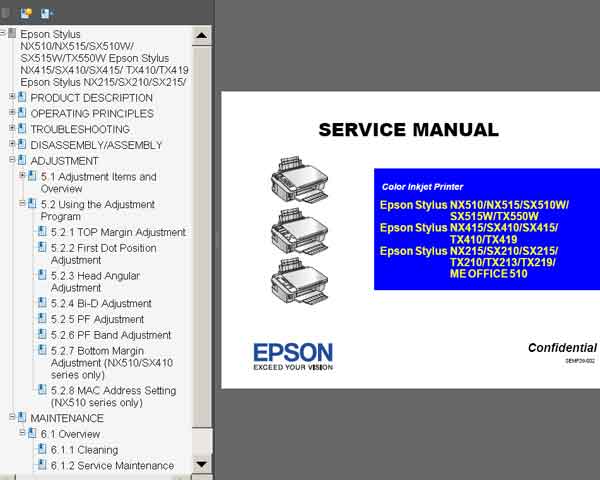
This Epson Stylus TX210, TX213, TX219, TX410, TX419, TX550W, SX210, SX215, SX410, SX415, SX510W, SX515W, NX215, NX415, NX510, NX515, ME OFFICE 510 Service Manual describes functions, theory of electrical and mechanical operations, maintenance and repair procedures of the printer.


CONTENTS of Epson Stylus TX210, TX213, TX219, TX410, TX419, TX550W, SX210, SX215, SX410, SX415, SX510W, SX515W, NX215, NX415, NX510, NX515, ME OFFICE 510 Service Manual

Chapter 1 PRODUCT DESCRIPTION

Chapter 2 OPERATING PRINCIPLES

Chapter 3 TROUBLESHOOTING

Chapter 4 DISASSEMBLY/ASSEMBLY

Chapter 5 ADJUSTMENT

Chapter 6 MAINTENANCE

FORMAT: High resolution PDF document!
Zip archive: 9 026 kB

I want to:

Any questions about this product?

SEND US REQUEST by filling the form below.


Step 1
ADD TO CART
Step 2
CHECKOUT
Select payment method.
Step 3
Confirm the order.


We are in business since 2002 and do our best to give our customers perfect service!

Our customers reviews:

  fred perry 2010-07-30 17:24:22  
  Thank you for such complete service manual. I am service engeneer.
  Rainer Kleber 2021-10-26 23:25:03  
  Just want to say thank you for a most helpful product which does exactly what it says. Followed all instructions, replaced waste ink pads and we have a working printer again. For very little outlay. Congratulations on running an excellent business. Have a good day, Rainer Kleber
  Robin Griffiths 2012-11-22 08:48:30  
  BRILLIANT My Epson T11 stopped working with the ominous 2 lights flashing so I knew it was trouble and yes teh dreaded message came up about internal parts reaching the end of their servicabel life take it to (an expensive) service. Oh dear - A Google search brought up all sorts of so called download links for free re-set software but all of them didn't download the software but kept taking me to weird web sites. I was in despair of finding somethign that worked then came across 2manuals.com. I thought at first oh dear theres a cost involved. However I though well if it does work it will be worth it. Downloaded the software, plus updates, ordered the re-set key and hey presto a few seconds later the printer was up and going again. It was was every penny of the cost. Dont waste time trying to find so-called free solutions - total waste of time and so frustrating. Pay out for this and save the time and frustration AND it works! No fuss, no messign about no time wasting getting to dubious web site. A big THANK YOU I can highlym unreservedly reccomend this compnay for sorted out knotty printer problems
  Georgia Dippel 2016-12-07 21:59:08  
  My Epson R260 quit working- read up online what the cause was (counters in printer). I downloaded the WIC Utility package and sure enough the counter was at 100.70%. I downloaded the Reset Key- at first it didn't work. Turned the printer off & on as instructed. Still didn't work. Finally I turned the monitoring on- reset the printer. Then turned monitoring off again and reset the printer & it finally worked. I think the monitoring just got hung up somehow- computers!!! I'm very thankful I'm good for another few years. It only cost $9.99 instead of the price of buying another printer (and I have all these ink cartridges that would go to waste)- OR a repair bill & would be without it while being fixed. Would I buy another Epson printer- NO- but would I recommend 2manuals for the fix- Definitely.
  Peter Eichberg 2011-10-24 01:36:03  
  I just bought the Epson Artisan 800 ink pad resetting software and it did the trick and totally reset the ink pad counter just like advertised. However, I must give anyone who uses the software a piece of advice. The product will not work wirelessly. You MUST connect your printer via the printer's USB connection. The printed material that comes with the download does not mention this. I had to play around with the printer before I realized there had to be a USB connection. Once I figured this out it was a snap to get the printer to reset and the error I was getting has now stopped appearing! I could not be happier with my purchase and I must admit I was a skeptic when I first bought the download. You guys are terrific and I will never fail to but again from 2Manuals.com. Peter
  Paul Inouye 2016-12-16 20:41:53  
  Thanks for the program and manual. I was able to revive a 2 year old 4900. I had 100% blockage in 8 of the 11 heads, and over 50% blockage in the last three.... I ran the ink charge with cleaning fluid. Now I have 100% of the nozzle check pattern on ALL of the heads. I was blown away. I thought for sure I was going to pay for a new head. So, thank you. I also have a an older Epson Stylus Pro 4000. It has been sitting a while and the heads are dried up. Do you have the same program and manual for this printer? I would like to try to revive it as well. If you do could you just send me a link? Thanks again
  Richard Bustamante 2007-06-05 15:55:05  
  Muy bueno espero conseguirlo para poder reparar mi impresora
  Alexander Molinar 2019-09-27 22:53:46  
  Printer reset with key then failed waste counter back to 100% after test print. Key no longer works!

2Manuals reply:
There is bug in Epson Photo 1390, 14000, 1410 firmware that put waste counter overflow back again after reset. This problem can be solved by updating printers firmware. Here is step by step manual how to fix it - www.2manuals.com/1400fw_update.php
Write review
Shopping Cart more
Shopping Cart is empty


How to pay?
We accept
Credit Cards, PayPal
and Western Union payments


We accept M-Pesa
Pay By M-Pesa
How to Pay by M-Pesa


Buy here or find Resellers in your country:

Argentina

Pay in Argentina Peso

Algeria

EasyPrint-dz.com

Australia

Mir-Aus.com.au

Bangladesh

Pay in Bangladesh by BDT

Brasil

Pay in Brasilian Reals
ReseteadoresWIC
Brasil

Burundi

PrintersAfrica.com

China

Pay in Chineese Yuan

Cote D Ivoire

MonpcImprime.com

Columbia

Pay in Columbian Peso
ReseteadoresWIC

Dominicana

Rellenadodecartuchos.com

DR Congo

Buy in DR Congo

Ecuador

ReseteadoresWIC

Ethiopia

PrintersAfrica.com

France

InkCissPrinter

Ghana

Pay in Ghana Cedis

Germany

InkCissPrinter.com

Japan

Pay in Japaneese Yen

Iran

MahaShop.ir
FixPrinters.ir

Iraq

AlmohandsWorkshop

Indonezia

Pay in Indonesian Rupiahs
FastPrint.co.id

Italia

Inkspeed.it
Stampacontinua.it

Kenya

PrintersAfrica.com
MagiColors.biz

New Zealand

Mir-Aus.com.au

Philippines

Pay in Philippine Peso

Poland

Tusze.info
Progbit.pl
ResetPampersa.pl
ResetWIC.pl

Portugal

Printsemfim.com
InkCissPrinter.com

Romania

CissMarket.ro
Cartuseria.ro
AmDigital.ro

Rwanda

PrintersAfrica.com
Ciss-Solutions.com

Saudi Arabia

Alelm-Alamal.com

Soomaaliya

PrintersAfrica.com

South Sudan

PrintersAfrica.com

Spain

InkCissPrintert.com

Tanzania

PrintersAfrica.com

Turkiye

Cescesor.com

Uganda

PrintersAfrica.com

Vietnam

WIC.vn
ResetKey.net
Want to sell Reset Keys in Your country?
Notifications more
NotificationsNotify me of updates to Epson Stylus TX210, TX213, TX219, TX410, TX419, TX550W, SX210, SX215, SX410, SX415, SX510W, SX515W, NX215, NX415, NX510, NX515, ME OFFICE 510 printers Service Manual
New!