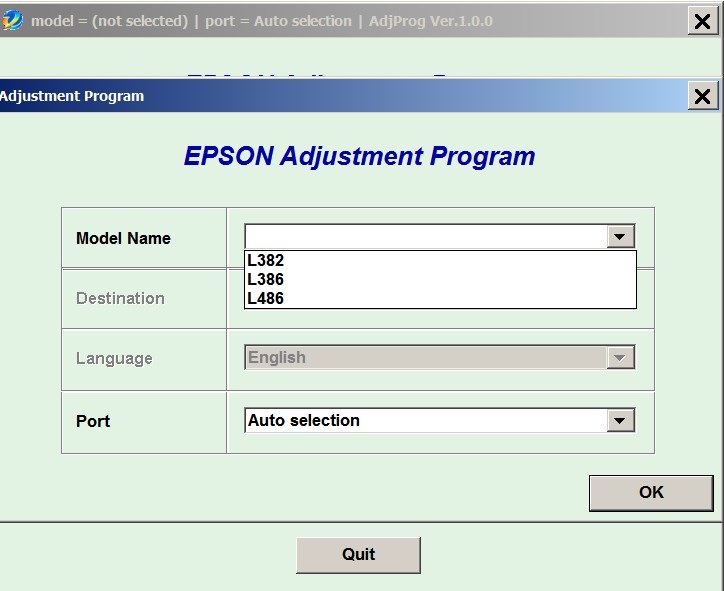
License for 1 PC for Epson L382, L386, L486 Adjustment Program Full Reset Version

$19.99
License for 1 PC for Epson <b>L382, L386, L486</b> Adjustment Program Full Reset Version
   Click to enlarge
      

License for 1 PC for Epson L382, L386, L486 Adjustment Program (EURO)

This Epson L382, L386, L486 adjustment program can be used under Windows XP, 7, 8, 10 with USB connection only. Download here. Password - 12345

How to buy unlimited version for One PC:

1. Log In to Your 2Manuals account

2. Download HardWare ID Utility HWID.exe, run it and copy yours PC Hardware ID
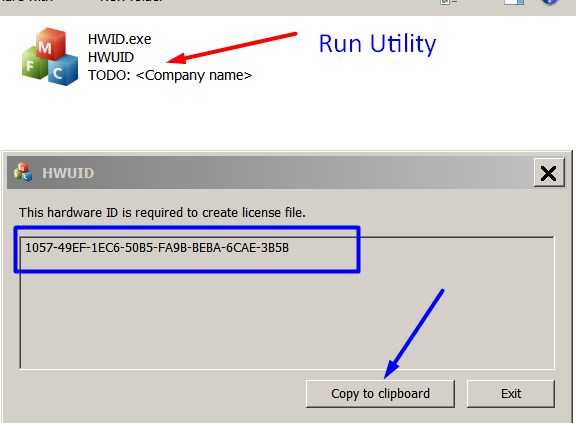
Note! You have to disable antivirus or put HWID.exe file to ignore list!

3. Put this item (License for One PC) in to your Shopping cart

4. Go to payment page and enter HardWare ID in to specified field:
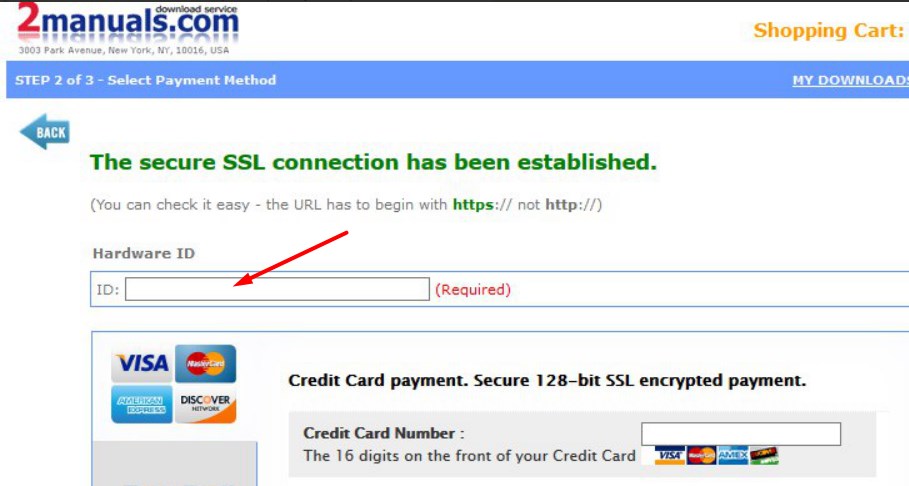

5. Make payment and You will get download link with Epson L382, L386, L486 Adjustment Program with the License file included

6. Put Adjustment Program to Antivirus Ignore list or disable Antivirus. Then Run AdjProg.exe.

With this Epson Adjustment Program You can make adjustment procedures, Initial Ink Charge to clean and unclog printhead and Waste Ink Pad Counter Reset unlimited times.

To get this adjustment program you need to do the following:

  1. Purchase the utility from 2manuals.com.
  2. You'll be able to download program immediately after your payment transaction is complete.

We recommend reading the Epson L382, L386, L486 Service Manual

before using the adjustment utility.

Please contact us if you have not received your order.


Any questions about this product?

SEND US REQUEST by filling the form below.


Step 1
ADD TO CART
Step 2
CHECKOUT
Select payment method.
Step 3
Confirm the order.


We are in business since 2002 and do our best to give our customers perfect service!

Our customers reviews:

  calin catalin 2019-10-16 09:54:35  
  You sell me adjustment program for Epson l382 but I cant reset waste ink You made me buy the program for the epson l382. reset function forwaste ink pad is not functioning
REPLY:
As you can see in program description - L382 Adjustment program is for making printer adjustments only.
For waste reset use WIC utility.
  Krzysztof Luczak 2016-07-25 04:01:38  
  And after proceeding the counter reset my Epson printer works fine! So thank you very much for your very good service. Many greetings from Germany
  safuan samad 2018-07-17 20:59:31  
  Your printers are pieces of shit, I'm sure that HP will be happy to know they have even more customers. The firmware is a piece of shit, the software isn't good either. And as for the support team, well lets just say that their not even worth anything, as any complications I have had(and others) haven't had any help from them. So you can thank yourselves for the loss, and give a big round of applause to any companies your in competition with.
  dave hardik yogeshbhai 2006-12-03 22:47:49  
  Just wanted to THANK YOU for letting me download that manual. I REALLY appreciate it. You know how kids are when they get on a computer they think they know everything and don\'t know anything. So Thanks Again AL HART
  jose jesuratnam 2024-02-10 13:35:49  
  Dear Team. I am using Epson Xp520 Printer. Printer had an Error E-11 "An Inkpad needs service". Purchased Wicrest Key and Inkpad from Printerpotty. At First i was not able to do the Reset. Software was not working when i click Test connection or Read waste counter. .Installed all Printer drivers of Win 11. Version i installed WIC reset Utility V.5.90 (Nov.20.2023) .I have disabled some of monitors which was recommended by wicrest tool .it did not worked. same problem when i click on read counter progam is not working. .i removed USB cable from my laptop and again connected. The reading counter shows the counter reading and i have reseted the Waste counter. Thank you so much...!
  Theuns Vorster 2019-09-30 19:00:12  
  I had a G3400 with the 5B00 error. I purchased the Rest Key and I am printing again. Thank you very much...
  ca pa 2011-04-02 00:32:24  
  Buy the key, and after few minuts the counter was reset. SUPER, the online live support is useful with very kind person.
  Mohamed abbas 2007-07-04 11:55:01  
  It worked out! Thanx!!!
Write review
Shopping Cart more
Shopping Cart is empty


How to pay?
We accept
Credit Cards, PayPal
and Western Union payments


We accept M-Pesa
Pay By M-Pesa
How to Pay by M-Pesa


Buy here or find Resellers in your country:

Argentina

Pay in Argentina Peso

Algeria

EasyPrint-dz.com

Australia

Mir-Aus.com.au

Bangladesh

Pay in Bangladesh by BDT

Brasil

Pay in Brasilian Reals
ReseteadoresWIC
Brasil

Burundi

PrintersAfrica.com

China

Pay in Chineese Yuan

Cote D Ivoire

MonpcImprime.com

Columbia

Pay in Columbian Peso
ReseteadoresWIC

Dominicana

Rellenadodecartuchos.com

DR Congo

Buy in DR Congo

Ecuador

ReseteadoresWIC

Ethiopia

PrintersAfrica.com

France

InkCissPrinter

Ghana

Pay in Ghana Cedis

Germany

InkCissPrinter.com

Japan

Pay in Japaneese Yen

Iran

MahaShop.ir
FixPrinters.ir

Iraq

AlmohandsWorkshop

Indonezia

Pay in Indonesian Rupiahs
FastPrint.co.id

Italia

Inkspeed.it
Stampacontinua.it

Kenya

PrintersAfrica.com
MagiColors.biz

New Zealand

Mir-Aus.com.au

Philippines

Pay in Philippine Peso

Poland

Tusze.info
Progbit.pl
ResetPampersa.pl
ResetWIC.pl

Portugal

Printsemfim.com
InkCissPrinter.com

Romania

CissMarket.ro
Cartuseria.ro
AmDigital.ro

Rwanda

PrintersAfrica.com
Ciss-Solutions.com

Saudi Arabia

Alelm-Alamal.com

Soomaaliya

PrintersAfrica.com

South Sudan

PrintersAfrica.com

Spain

InkCissPrintert.com

Tanzania

PrintersAfrica.com

Turkiye

Cescesor.com

Uganda

PrintersAfrica.com

Vietnam

WIC.vn
ResetKey.net
Want to sell Reset Keys in Your country?
Notifications more
NotificationsNotify me of updates to License for 1 PC for Epson L382, L386, L486 Adjustment Program Full Reset Version