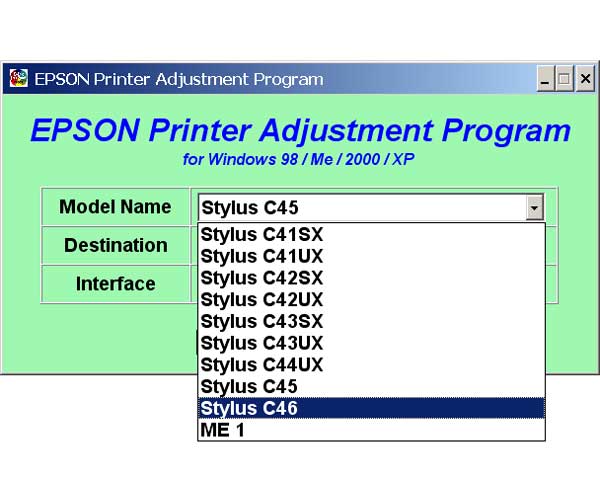
Epson C44, C45, C46 Printers Service Program

$8.99
Epson C44, C45, C46 Printers Service Program
   Click to enlarge
      

You can run this program under Windows XP, Windows Vista, Windows 7 in compatibility mode. It is easy!

Lets get to know how to set it up.

To configure the compatibility mode for an application, just locate the installation directory and right click on the .exe file (program you want to run), selecting Properties from the menu.

Select the Compatibility tab:


Windows 7 compatibility mode


You can choose to run the program in Windows 95, Windows 98 or Windows XP compatibility mode.

FOR THIS PROGRAM please use the WINDOWS XP compatibility mode!!!


Download the program and run in compatibility mode!

I want to:

Any questions about this product?

SEND US REQUEST by filling the form below.


Step 1
ADD TO CART
Step 2
CHECKOUT
Select payment method.
Step 3
Confirm the order.


We are in business since 2002 and do our best to give our customers perfect service!

Our customers reviews:

  george prionidis 2009-02-11 00:00:35  
  thank you for fast respond I will recommend you to all my friends in Iran and Emirate UAE You are the best and god be with you!
  Garnett Stokes 2011-01-09 12:37:59  
  My Epson R2880 stopped printing and showed alternating ink and paper flashing lights. I had an extended warranty that I purchased with the printer but because I didn\'t register the warranty within 30 days I was told by Mack Camera that they would not honor the warranty. So after much research and web surfing I found myself at 2manuals. I wasn\'t even sure that the wic was the problem and I had serious doubts about spending more money on what could just be another scam like the extended warranty was. However like one reviewer said, what was $9.99. Well I downloaded the program, obtained the $9.99 pin code, loaded the software, and exactly as the video shows I was up and running. I couldn\'t believe it when the printer sprung to life and was ready to print. Hey, try it. You\'ll be glad you did.
  Juha Ahonen 2024-03-25 19:33:49  
  Erittäin hieno asia kun saa tälläisiä nollaus avaimia edullisesti. Paikallinen huolto ilmoitti että tulostin on romua kun mustetyyny tulee täyteen ja tulostin lopettaa toimintansa. Tutkin hieman internetin tietoja ja löysin tämän sivusaton sekä youtube videon. Homma hoitui ja tulostin tulostaa taas. Kiitos paljon!
  Mervyn Scott 2025-07-24 01:57:20  
  Instruction videos very helpful, reset key worked great. Thanks.
  kennet bo 2009-01-25 21:14:51  
  realy worked. Thank you!
  Jack Vikati 2025-03-17 02:23:07  
  Reset key itself WORKS, hurrah! 5 stars. BUT . . . it was a struggle to get the download. Our MacBook which is a few years old does not allow the download to be installed because Apple blocks "unrecognized developers." That should be taken care of or a warning should be placed on all promotional materials related to WIC RESET KEY. I was able to get the download onto my old Apple desktop which has not had operating system updates. That's how I finally purchased the reset key. Please tell me why the whole business of the reset key, after replacing the ink pads, is not an example of contrived malicious obsolescence? I was tied up for hours, cursing the Epson company, and a breath away from buying a new printer, adding plastic waste into our environment. I liken my experience to changing a car's oil filter and then needing a code to start the car again.
  Sergio Carlo Bianchi 2019-07-20 19:34:55  
  My Epson XP-760 works again with Waste Ink Counter Reset! Thank you very much
  Ignacio Lucatero 2020-12-06 16:45:37  
  Trial for my 1500w worked a treat. So simple to use.
Write review