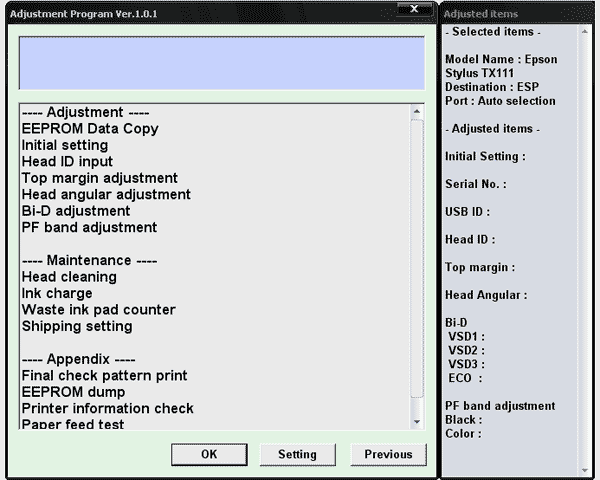
Epson TX111 Service Adjustment Program

$9.99
Epson <b>TX111</b> Service Adjustment Program
   Click to enlarge
      

The Epson Adjustment Program for Epson TX111 can be used under Windows only (Millenium, 2000, XP, Vista [in compatibility mode]).

To find out how to use this utility to reset the waste ink counter we recommend reading the:
5 Clicks Reset Procedure

To get this adjustment program, for the Epson TX111 you need to do the following:

  1. Purchase the utility from 2manuals.com.
  2. You'll get download link on-line and in the email message.

We recommend reading the Epson TX111 Service Manual before using the adjustment utility.

Please contact us if you have not received your order.

Any questions about this product?

SEND US REQUEST by filling the form below.


Step 1
ADD TO CART
Step 2
CHECKOUT
Select payment method.
Step 3
Confirm the order.


We are in business since 2002 and do our best to give our customers perfect service!

Our customers reviews:

  ko pink 2014-06-18 13:23:30  
  thank that is fine.next i am down other counter reset software.
  sugiharto sugiharto 2009-11-10 10:33:31  
  I am looking for service manual include diagram/schema, part detail and placement thanks ========================== You can get it here - http://www.2manuals.com/product_info.php?products_id=485
  Karen Stack 2023-04-26 15:08:02  
  I downloaded Epson's maintenance utility and couldn't get it to work. Found the WIC Reset Utility and it worked like a charm! Will buy the full reset key when I get my kit.
  alain dehay 2011-01-13 01:08:00  
  so quick so useful answer in realy good time everything working thanks mate worked a charm - will definately recommend you to my friends
  giuseppe moffa 2020-06-10 15:13:35  
  after only cleaning the printer (Canon G3400) three times in a short period, the waste counter was on 100% (almost new printer). tried the free tools which you can download to reset the counter, they all didn't work. Finally decided to buy the key here and didn't believe it would work. But it did, i can use my printer again and I am happy.
  EDERLYN MCGUIGAN 2020-06-06 04:21:19  
  thank you so much my printer is now resetting very thank you so much....
  Alexey Scherbenko 2020-01-15 16:42:26  
  HELLO!!! Today I bought a key for updating the firmware of my SC P-600 printer. After activ ating the key, WIC started updating the firmware and the message "ROM is not writeable" popped up on the printer screen. Now when I power on printer - I get "Recovery mode". What can I do now?!

======Answer========

Please read how easily and quickly it can be solved -
www.wic.support/epson-wf-3720-stuck-in-recovery-mode-quick-and-esy-solution/
  yasuyuki kawasaki 2020-06-13 17:31:24  
  thanks guys ..i couldnt sort this problem out until i came across your site
  essa albadi 2015-04-03 22:02:09  
  All I can say is THANK YOU!! Thank you for allowing me to roll back (downgrade) my Epson XP-410 printer\'s firmware with ease!! A couple of clicks, and I was downgraded. This allowed me to use non-oem cartridges that would not work no matter what I tried with current firmware (Epson updated firmware just to battle the use of non-oem cartridges). The money spent will be saved with the very first refill of these refillable cartridges I bought. I was skeptical, but it really was THAT easy! Winning the battle against Epson!! First time I\'ve ever paid for a \"hack\", well worth it!
Write review