Licence for 1 PC for Epson L1110, L3100, L3101, L3110, L3111, L3116, L3150, L3151, L3156, L5190 Adjustment Program V 1.0.2 (EURO)
This Epson L1110, L3100, L3101, L3110, L3111, L3116, L3150, L3151, L3156, L5190 adjustment program can be used under Windows XP, 7, 8, 10 with USB connection only. Download here. Password - 12345
How to buy unlimited version for One PC:
1. Log In to Your 2Manuals account
2. Download HardWare ID Utility HWID.exe, run it and copy yours PC Hardware ID
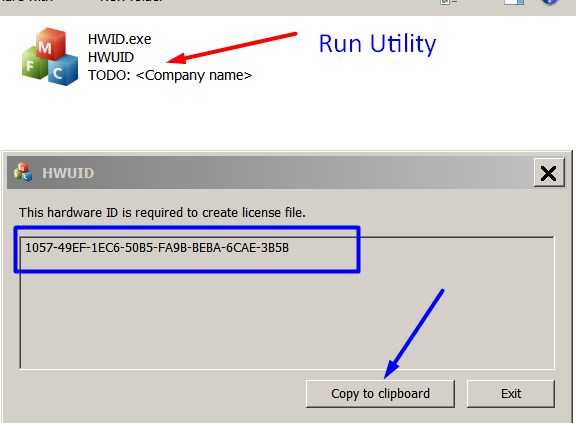
Note! You have to disable antivirus or put HWID.exe file to ignore list!
3. Put this item (License for One PC) in to your Shopping cart
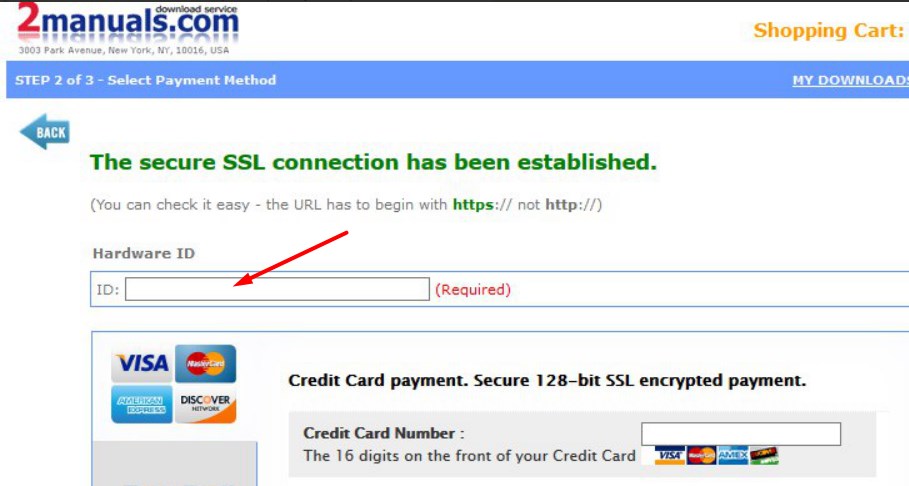
4. Go to payment page and enter HardWare ID in to specified field:
5. Make payment and You will get download link with Epson L1110, L3100, L3101, L3110, L3111, L3116, L3150, L3151, L3156, L5190 Adjustment Program with the License file included
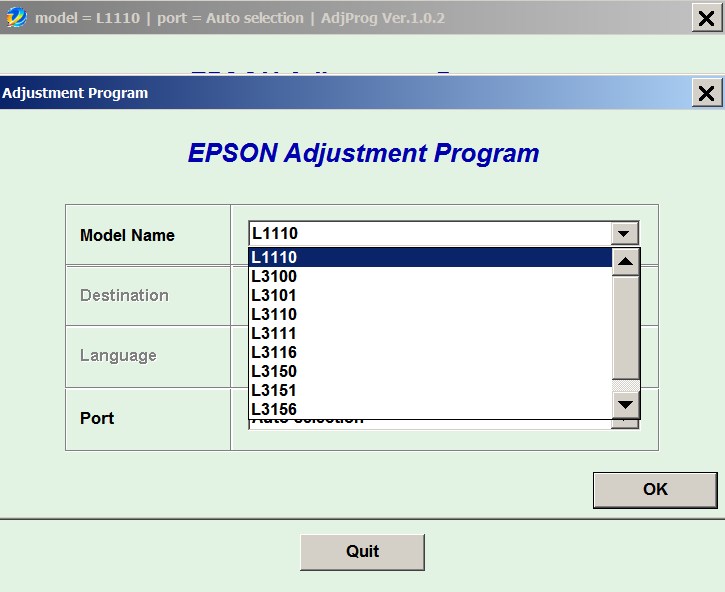
6. Put Adjustment Program to Antivirus Ignore list or disable Antivirus. Then Run AdjProg.exe.
With this Epson Adjustment Program You can make adjustment procedures, Initial Ink Charge to clean and unclog printhead and Waste Ink Pad Counter Reset unlimited times.
To get this adjustment program you need to do the following:
- Purchase the utility from 2manuals.com.
- You'll be able to download program immediately after your payment transaction is complete.
before using the adjustment utility.
Please contact us if you have not received your order.
I purchased the adjustment program last night and got to work on it today.
I had a clog in C and it would not clear. I ve had my printer for over 2 years and have been able to handle them until now.
I learned about this site from another site that has cleaner for the L1110 and said I need to buy this software first. I bought it and tried it with the epson ink that was in my printer. I ran the adjustment and it cleared C but then there were other clogs. Because they werent clogged before I started, I cleared them the normal way through the printers options. Had they not cleared, I would have ran the adjustment again.
I had tried everything to get C to clear for a week and this program did it in one try!
I would highly recommend this for clearing a stubborn clog. And now it is in my arsenal if I get another one that I cant clear down the road. By athe way, it does not work if your printer is networked. Mine was so I had to move a computer into the room with my printer, directly connect to it and install the drivers. Then it work fine.
If you got a clog that you cant fix, just buy it.
Ivan Tilbury
|
|
|
|
|
Step 1
ADD TO CART |
Step 2
CHECKOUT
Select payment method. |
Step 3
Confirm the order. |
|
|
We are in business since 2002 and do our best to give our customers perfect service!
|
Our customers reviews:
| ramesh eete | 2023-02-10 07:45:41 | | Epson L5190 model is the best printer colour print and black print is good quality - good program! | | | Yıldırım Oran | 2006-09-01 11:47:41 | | Toshiba 2060 service manuels ihtiyacım var. Anlıyor musunuz. | |  | Jean Carivenc | 2018-08-31 13:47:47 | | I have searched for this SL-D700 Adjustment Program for few years - couldnt find nowhere.
Now I get license for this program and reset driver counter. Thank you so much!!!!!! | | | MIZIKE G. | 2025-11-14 16:23:29 | | 11-14-2025 - I JUST USED THE DOWNLOADED UTLITY PROGRAM AND BOUGHT THEIR $9.99 CODE FOR PURPOSE OF RESETTING THE INK WASTE COUNTER BULLSHIT ( EPSON ET-4550 SEVERAL YEARS OLD ) WHICH I NEVER HEARD OF UNTIL LAST WEEK WHEN THE PRINTER WOULDN'T DO ANYTHING BUT TELL ME TO CONTACT EPSON. LOL- NOPE - CHAT GTP GAVE ME THE INFO FROM HERE, USED IT AND WORKED - TOOK ABOUT 5 MINUTES - ( I HOWEVER - DIDNT ACTUALLY CLEAN OR EMPTY THE INK WASTE OR WHATEVER - IM HOPING FOR THE BEST, ASSUMING ITS OLD ENOUGH THAT IT HAS DRYED ON ITS OWN. - THIS PART ISNT RECCOMENDED TO MY UNDERSTANDING - BUT ILL FIND OUT I SUPPOSE) BUT LONG STORY SHORT - EAST TO USE DOWNLOADED UTILITY, AND RESET KEY FOR 10 BUCKS WORKED - ABOUT 5 MINUTES OR LESS PROCESS. REAL SHIT - MIZIKE | | | paulo ishikawa | 2014-12-28 09:00:00 | | tnx so much! =) i just reset my epson L1300, it only took 1-2mins and my printer is now back online | | | R. Zeiss | 2021-04-24 03:18:01 | | It worked on my MX892 !!! Thank you. It reset the Ink Absorber Counter, and my printer was alive again. | | | carlos silva | 2012-06-01 17:43:10 | | I am very happy with the tool.
You saved me an expensive printer service by Epson! | | | SAUL ACOSTA | 2010-09-26 01:51:12 | | That was very simply to use. I saved my printer life in 5 minutes. Thank you! | | | Mervyn Scott | 2013-09-03 06:14:42 | | Your product worked like a dream.
I have been having a horrible problem using ideas from other sources and your solution worked immediately and fast!
Excellent program, you save my wallet and time...!!!
Epson Artisan 810 | |
|







 Total customers: 436605
 Customers online: 90








