License for 1 PC for Epson L6570, L6580 Adjustment Program Full Reset Version

$19.99
License for 1 PC for Epson <b>L6570, L6580</b> Adjustment Program Full Reset Version
   Click to enlarge
      

Licence for 1 PC for Epson L6570, L6580 Adjustment Program V 1.0.3 (EURO)

This Epson L6570, L6580 adjustment program can be used under Windows XP, 7, 8, 10 with USB connection only. Download here. Password - 12345

How to buy unlimited version for One PC:

1. Log In to Your 2Manuals account

2. Download HardWare ID Utility HWID.exe, run it and copy yours PC Hardware ID
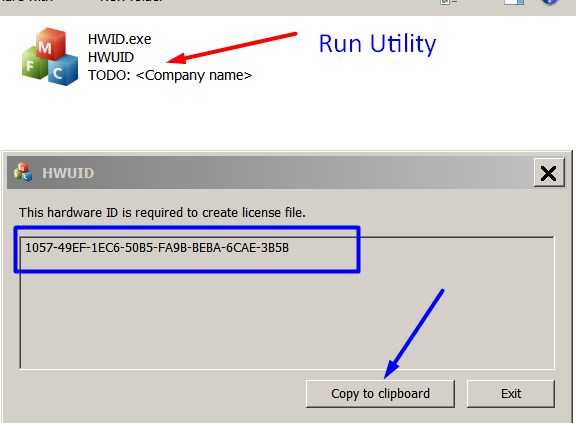
Note! You have to disable antivirus or put HWID.exe file to ignore list!

3. Put this item (License for One PC) in to your Shopping cart

4. Go to payment page and enter HardWare ID in to specified field:
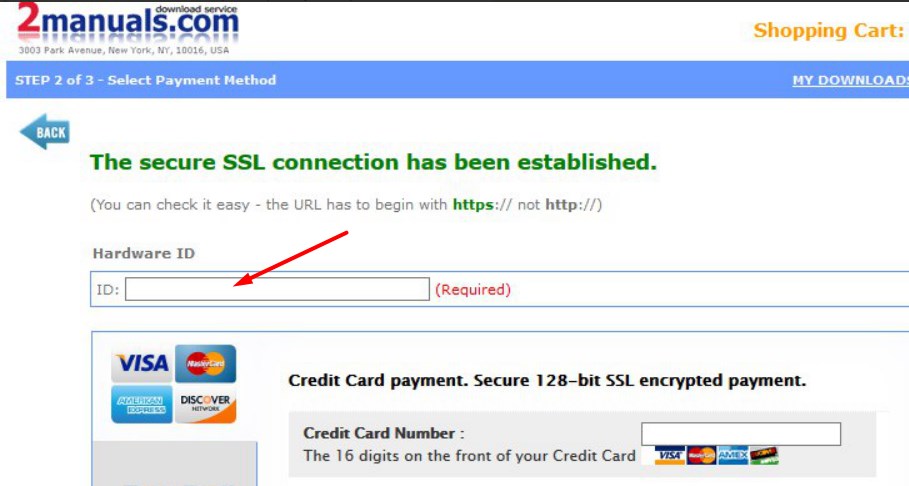

5. Make payment and You will get download link with Epson L6570, L6580 Adjustment Program with the License file included

6. Put Adjustment Program to Antivirus Ignore list or disable Antivirus. Then Run AdjProg.exe.

With this Epson Adjustment Program You can make adjustment procedures, Initial Ink Charge to clean and unclog printhead and PLATEN Waste Ink Pad Counter Reset unlimited times.
Keep in mind - this model has separate Maintenance Tans with chip that can be reset by Chip Resetter only! Any software can reset maintenance chip.

To get this adjustment program you need to do the following:

  1. Purchase the utility from 2manuals.com.
  2. You'll be able to download program immediately after your payment transaction is complete.

We recommend reading the Epson L6570, L6580 Service Manual

before using the adjustment utility.

Please contact us if you have not received your order.


Any questions about this product?

SEND US REQUEST by filling the form below.


Step 1
ADD TO CART
Step 2
CHECKOUT
Select payment method.
Step 3
Confirm the order.


We are in business since 2002 and do our best to give our customers perfect service!

  NACHO GOMEZ 2010-10-25 23:44:48  
  I got the flashing lights and Service required message on my Epson R2400, as many others have before!
I spent hours online and eventually managed to download Epsons own Adjustment Program. It showed me the waste ink settings but would not let me reset the counter, although I had disconnected the feed tubes and re-routed them to an external bottle.
Today I found 2Manuals.com and downloaded their WIC reset program. I thought It probably won\'t work but one key is only $9.99 so what the heck!
Well that was the best $9.99 I have ever spent - as soon as I entered the key and hit RESET the printer whirred into action, ink pumped into my waste bottle and I am back in action!

This has saved me a lot of money and the hassle of sending the printer to an Epson service centre. Truly a 5***** product! Chris Porteous, Prestatyn, U.K.
  Marcos A da Silva 2011-09-30 05:17:12  
  Funcionou perfeito na minha RX-595! Valeu apena comprar a chave para resetar minha impressora! Recomendo!!!
  yisi vera 2023-09-29 02:43:40  
  Aun que puede parecer mentira es 1000000000 VERDADERO, aprovecha y compra mas de 1 clave por que si funcona y claro no olviden cambiar las almohadillas porque su impresora funcionara pero empezara a chorrear tinta.MUCHAS GRACIAS.
  Andrew Hamrick 2024-04-25 21:57:58  
  Epson XP- 630. Epson Corp. was no help. Got printer up and running in a few minutes with WIC Support Reset Key. Thanks, an absolute life saver.
  Ferruccio Porta 2012-11-20 20:28:59  
  Il programma con il codice ricevuto funzione benissimo, la stampante si è resettata. Saluti Porta Ferruccio
  Gustavo Martinez 2017-01-21 13:05:47  
  thank You Very Much For This File ... its help me so much with my printer
  Gr Kennedy 2020-05-31 10:34:19  
  I don't like throwing something (a printer in this case) away and consuming our earth's resources (buying a new printer) just because Epson make it difficult for me to avoid doing this. I wish Epson would make products that can be maintained by the product owner and this way contributes to the well being of our planet. This reset utility worked 'as described' and now, having cleaned my ink pads, I can get more value from the printer I already own. Thanks for this reset software.
Write review
Shopping Cart more
Shopping Cart is empty


How to pay?
We accept
Credit Cards, PayPal
and Western Union payments


We accept M-Pesa
Pay By M-Pesa
How to Pay by M-Pesa


Buy here or find Resellers in your country:

Argentina

Pay in Argentina Peso

Algeria

EasyPrint-dz.com

Australia

Mir-Aus.com.au

Bangladesh

Pay in Bangladesh by BDT

Brasil

Pay in Brasilian Reals
ReseteadoresWIC
Brasil

Burundi

PrintersAfrica.com

China

Pay in Chineese Yuan

Cote D Ivoire

MonpcImprime.com

Columbia

Pay in Columbian Peso
ReseteadoresWIC

Dominicana

Rellenadodecartuchos.com

DR Congo

Buy in DR Congo

Ecuador

ReseteadoresWIC

Ethiopia

PrintersAfrica.com

France

InkCissPrinter

Ghana

Pay in Ghana Cedis

Germany

InkCissPrinter.com

Japan

Pay in Japaneese Yen

Iran

MahaShop.ir
FixPrinters.ir

Iraq

AlmohandsWorkshop

Indonezia

Pay in Indonesian Rupiahs
FastPrint.co.id

Italia

Inkspeed.it
Stampacontinua.it

Kenya

PrintersAfrica.com
MagiColors.biz

New Zealand

Mir-Aus.com.au

Philippines

Pay in Philippine Peso

Poland

Tusze.info
Progbit.pl
ResetPampersa.pl
ResetWIC.pl

Portugal

Printsemfim.com
InkCissPrinter.com

Romania

CissMarket.ro
Cartuseria.ro
AmDigital.ro

Rwanda

PrintersAfrica.com
Ciss-Solutions.com

Saudi Arabia

Alelm-Alamal.com

Soomaaliya

PrintersAfrica.com

South Sudan

PrintersAfrica.com

Spain

InkCissPrintert.com

Tanzania

PrintersAfrica.com

Turkiye

Cescesor.com

Uganda

PrintersAfrica.com

Vietnam

WIC.vn
ResetKey.net
Want to sell Reset Keys in Your country?
Notifications more
NotificationsNotify me of updates to License for 1 PC for Epson L6570, L6580 Adjustment Program Full Reset Version





