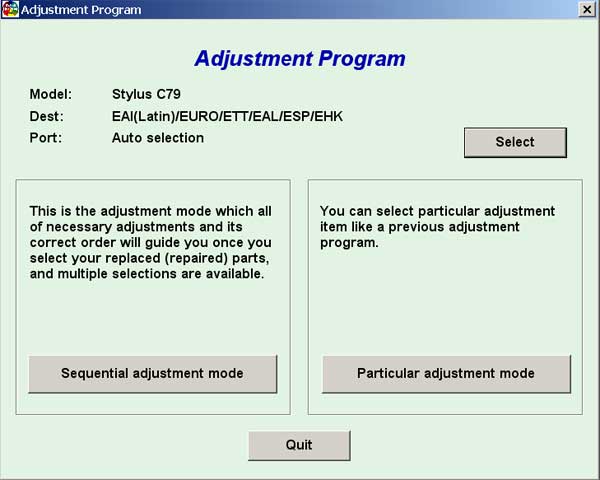
Epson C79 Service Adjustment Program

$9.99
Epson C79 Service Adjustment Program
   Click to enlarge
      

EPSON Stylus C79 Service Adjustment Program.

Under Windows XP only.

To learn more about service program functions go to About Adjustment Programs (in the right column)

Please unzip by WinZip after downloading. Then READ carefuly README file with instructions.

File size - 1 479 kB

You can run this program under Windows XP, Windows Vista, Windows 7 in compatibility mode. It is easy!

Lets get to know how to set it up.

To configure the compatibility mode for an application, just locate the installation directory and right click on the .exe file (program you want to run), selecting Properties from the menu.

Select the Compatibility tab:


Windows 7 compatibility mode


You can choose to run the program in Windows 95, Windows 98 or Windows XP compatibility mode.

FOR THIS PROGRAM please use the WINDOWS XP compatibility mode!!!


Download the program and run in compatibility mode!

I want to:

Any questions about this product?

SEND US REQUEST by filling the form below.


Step 1
ADD TO CART
Step 2
CHECKOUT
Select payment method.
Step 3
Confirm the order.


We are in business since 2002 and do our best to give our customers perfect service!

Our customers reviews:

  nando pires 2010-01-19 00:42:39  
  Thak you. Now working printer.
  nando pires 2010-01-19 00:40:28  
  Good site. Good program!
  joe sanabria 2012-11-21 20:22:04  
  Hi john: I wouldlike to let you know that i bought another reset key from yoy site and it worked with onother workforce 840 I owned. i think the problem with the other printer workforce 840 was that I used the reset key epson has in their website some times and probably it bloked the printer. Just for you to know and to let you know this time worked with another 840 I own Thank you for your understanding and for refunding the money when did not work. It says a lot of you business reputation
  Frank Topping 2011-02-24 20:39:33  
  I'm not going to lie I was very dubious, but the proof is in the pudding it does work and I'm a happy bunny. My printer is the Epson Photo PX810FW one of the newer models so feel confident in using this system.
  Sarvesh Singh 2019-06-28 11:48:53  
  i purchase a waste ink pad reset key .but reset key is not working properly.and i pay the full payment. but product key is expired so please give me a new product key which is working properly. and i request to you that you must give the genuine key . which is that costumer will satisfied in first time. please give me a quick response. thank you. ============Answer:============ You Reset Key is NOT used yet!!! Please use it with WIC!
  bruno andrade 2008-02-20 08:44:45  
  This is good
  Art Fix 2011-06-06 09:34:43  
  My Epson 1280 started getting the dreaded flashing panel lights. The printer quit working all together. I found on the web, that the cause was the ink waste counter had topped out and the printer required service to reset the counter. Then I found this site and downloaded the manual and the service application. Ran the program and quickly reset the counter now all is well again! Worked like a dream. Thank you! Art @ artsgraphics.com
  oscar vargas 2006-07-10 13:40:55  
  Thank you for good work! (\'http://www.2manuals.com/popup_image.php?pID=127\')
  Marcos A da Silva 2011-09-30 05:17:12  
  Funcionou perfeito na minha RX-595! Valeu apena comprar a chave para resetar minha impressora! Recomendo!!!
  asep suhendar 2010-06-30 18:43:28  
  The printer\'s ink pads are at the end of their service life. The program worked perfect.
Write review