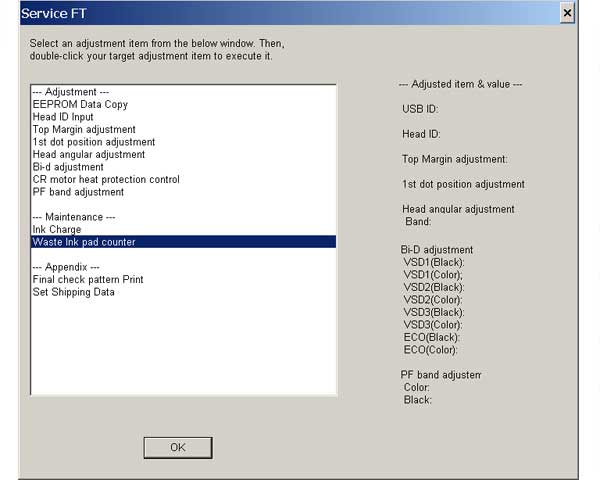
Epson DX4400, CX5600 Service Adjustment Program

$9.99
Epson <b>DX4400, CX5600</b>  Service Adjustment Program
   Click to enlarge
      

New Epson Stylus DX4400, CX5600 Service Adjustment Program


To learn more about service programs functions go to About Adjustment Programs

Download Zip archive. Unzip it by WinZip and run ServiceFT.exe program.

We have tested this program on DX4400 and CX5600 models!


Mark DeGrasse:
I used it for my Epson DX4400 on Windows XP and all worked fine without any change to date or so!!!
Many, many thanks!!


To use this program the best way you have to read Epson DX4400, CX5600 printers Service Manual first.

I want to:

Any questions about this product?

SEND US REQUEST by filling the form below.


Step 1
ADD TO CART
Step 2
CHECKOUT
Select payment method.
Step 3
Confirm the order.


We are in business since 2002 and do our best to give our customers perfect service!

Our customers reviews:

  FOUDHIL BOURAS REDA 2017-07-03 18:17:30  
  Does it work with Windows10? (Epson Stylus DX4400) Thanks in advance.
  hamid badi 2009-09-30 15:12:30  
  J'ai l'honneur de venir respectueusement demander à votre haute bien vaillance de bien vouloir d’accepter mes sentiments les plus distinguées.
  siddayya siddu 2010-09-14 14:30:00  
  thank you for parts manual next time I will use your service, I will introduce more friends to explore your services. thanks a lot.
  Alfredo Llerena 2020-02-20 17:11:29  
  I must admit I was very skeptical about all this !!! And above all - There we go, they want the Credit Card details !!!

I don't even know the current exchange rate but proceeded thinking nothing will come of this ....

Within minutes I was sent the RESET CODE along with the RECEIPT FOR PAYMENT !

It worked like a charm !

The FIRST , but definitely not the LAST time I will be using this site !

Thank you !
Anthony Campbell
Printamedic (South Africa)
Cell: 073 580 8517
  toan le ngoc 2020-10-01 01:52:47  
  I am very, very grateful that this helped me in resetting the school printer. it is very hassle (avoiding corona virus spread) in my part to carry the printer from my place transporting via boat to the city (travelling for at least an hour by the sea) but with your help it solved my problem we can now continue the printing of the modules and self learning materials of the children since the classes will start on October 5. good job!
  richard haynes 2020-05-11 23:57:36  
  Thank you so much for the reset. I was able to clean my ink pads, and then using your reset utility, reset my printer and now it works perfectly! So much better than buying a new printer!
  Michael Adamek 2011-07-19 04:45:43  
  I have an epson artisan 800. I tried using the epson waste ink counter reset tool, but it was worthless. I used the 2manual reset utility and it worked perfect, resetting the counters to zero. It was so easy to complete.
Write review