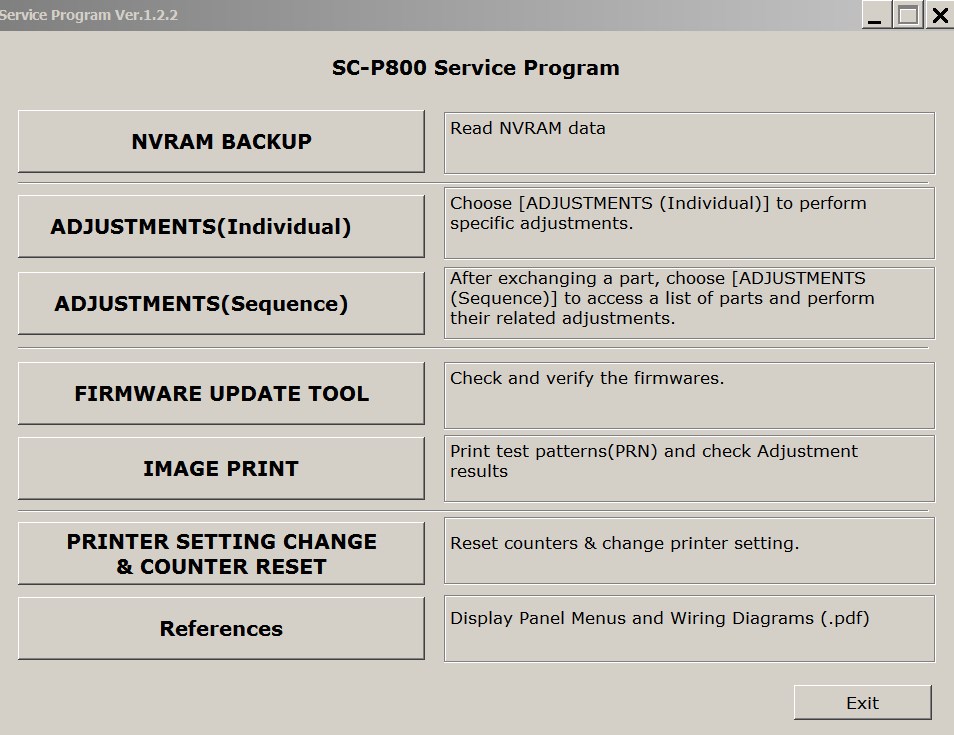
Epson Sure Color SC-P800 Ver.1.2.2 Service Adjustment Program New!

$19.99
Epson <b>Sure Color SC-P800 </b>  Ver.1.2.2 Service Adjustment Program  <font color=red>New!</font>
   Click to enlarge
      

Epson Sure Color SC-P800 Ver.1.2.2 Service Adjustment Program

Pay by PayPal here

This adjustment program is developed for making printers adjustments and maintenance

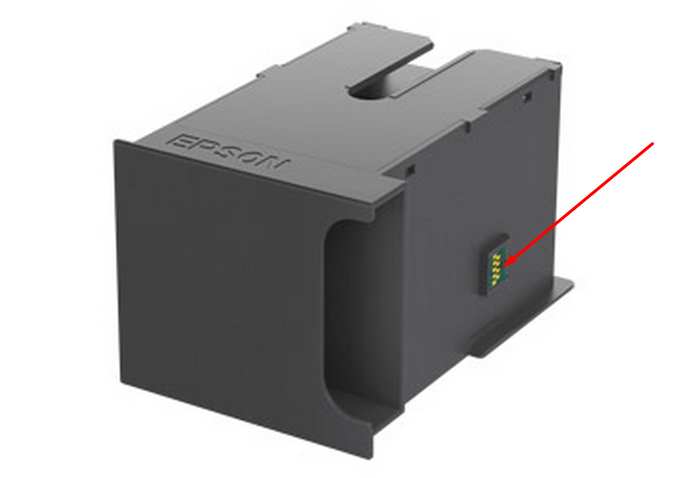
This printer models have separate Waste Ink Maintenance Box with its own IC chip. You can replace Waste Ink Maintenance Box or reset the chip on the Waste Ink Maintenance Box. Read more about how to reset the Waste Ink Maintenance Box.
The Epson Adjustment Program for New models Epson Sure Color SC-P800 can be used under Windows only (Millenium, 2000, XP, Vista, 7, 8, 10, 11 [in compatibility mode]).

To get this adjustment program, for the Epson Sure Color SC-P800 you need to do the following:

  1. Purchase the utility from 2manuals.com.
  2. You'll get download link on-line and in the email message too
We recommend reading the Epson Sure Color SC-P800 Service Manual before using the adjustment utility.

For this models - P800, P807, PX3V Chipless Firmware is available:
P800, P807, PX3V chipless firmware

Please contact us if you have not received your order.

I want to:

Any questions about this product?

SEND US REQUEST by filling the form below.


Step 1
ADD TO CART
Step 2
CHECKOUT
Select payment method.
Step 3
Confirm the order.


We are in business since 2002 and do our best to give our customers perfect service!

Our customers reviews:

  Elizabeth McLain 2020-02-24 00:13:12  
  Absolute lifesaver. Saved me about $100 and 2 hours driving.
  Luca Pala 2020-11-20 08:23:27  
  tHIS SAVES MY DAY. Used code TRIAL it really works! :D
   2013-09-13 16:54:01  
  Quick and easy. i have an XP600 and Artisan 725 that were showing the 'waste inkpad error'. I bough 2 keys and solved a 2 week headache in 10 minutes.
  mauro albanese 2020-10-22 13:26:46  
  Just over a week ago, I figured I was going to be in the market for a new printer. When the error message came up on my Epson XP-610 stating that "Parts inside the printer are at the end of their useful life" I initially was quite disappointed. However, after a quick Google search for that phrase, I came across the OctoInkjet website. After a little further research, I decided to give the trial waste ink counter reset code a shot - after all, what did I have to lose - and, somewhat to my surprise, it worked! Knowing that I then needed to purchase a new set of ink pads and a reset key to fully resolve my printer issues, I was pleasantly surprised at the low cost of purchasing both of these items together. I then placed my order, but knowing that the product was coming from overseas (I'm in the USA), I figured it would be a minimum of at least a few weeks before my printer pads arrived. But, lo and behold, the pads arrived on my doorstep in just over a week! I was thrilled and so I quickly replaced the pads in my printer with the new set (which, by the way, were a perfect fit and the instructions provided were excellent), ran the counter reset program applying the reset code I had purchased, and everything worked flawlessly! So now it feels like I have a brand new printer (although it's probably about 5 years old) and I can continue to purchase inexpensive third party ink cartridges (which I have always done), continuing to save me money for years to come. Thank you OctoInkjet!!! I will certainly be telling others to check out your product. P.S. - I seldom write product reviews so this shows how impressed I am with this product. I particularly love it when a solution is provided that overcomes "planned obsolescence" by the manufacturer.
  sabir ali 2018-05-01 02:18:31  
  The procedure was easy. I used the trial version, and my printer is now working. I will buy the reset key next time. I recommend this fix. Thank you....
  Gary Ouellet 2011-12-01 05:23:29  
  Thanks, it worked exactly as the instructions provided. The only matter now is to get a kit for the waste ink. No wonder the ink is so expensive - so much goes to waste. Where can I get a kit to store the wasted ink? Thanks again, Gary
Write review
Shopping Cart more
Shopping Cart is empty


How to pay?
We accept
Credit Cards, PayPal
and Western Union payments


We accept M-Pesa
Pay By M-Pesa
How to Pay by M-Pesa


Buy here or find Resellers in your country:

Argentina

Pay in Argentina Peso

Algeria

EasyPrint-dz.com

Australia

Mir-Aus.com.au

Bangladesh

Pay in Bangladesh by BDT

Brasil

Pay in Brasilian Reals
ReseteadoresWIC
Brasil

Burundi

PrintersAfrica.com

China

Pay in Chineese Yuan

Cote D Ivoire

MonpcImprime.com

Columbia

Pay in Columbian Peso
ReseteadoresWIC

Dominicana

Rellenadodecartuchos.com

DR Congo

Buy in DR Congo

Ecuador

ReseteadoresWIC

Ethiopia

PrintersAfrica.com

France

InkCissPrinter

Ghana

Pay in Ghana Cedis

Germany

InkCissPrinter.com

Japan

Pay in Japaneese Yen

Iran

MahaShop.ir
FixPrinters.ir

Iraq

AlmohandsWorkshop

Indonezia

Pay in Indonesian Rupiahs
FastPrint.co.id

Italia

Inkspeed.it
Stampacontinua.it

Kenya

PrintersAfrica.com
MagiColors.biz

New Zealand

Mir-Aus.com.au

Philippines

Pay in Philippine Peso

Poland

Tusze.info
Progbit.pl
ResetPampersa.pl
ResetWIC.pl

Portugal

Printsemfim.com
InkCissPrinter.com

Romania

CissMarket.ro
Cartuseria.ro
AmDigital.ro

Rwanda

PrintersAfrica.com
Ciss-Solutions.com

Saudi Arabia

Alelm-Alamal.com

Soomaaliya

PrintersAfrica.com

South Sudan

PrintersAfrica.com

Spain

InkCissPrintert.com

Tanzania

PrintersAfrica.com

Turkiye

Cescesor.com

Uganda

PrintersAfrica.com

Vietnam

WIC.vn
ResetKey.net
Want to sell Reset Keys in Your country?
Notifications more
NotificationsNotify me of updates to Epson Sure Color SC-P800 Ver.1.2.2 Service Adjustment Program New!