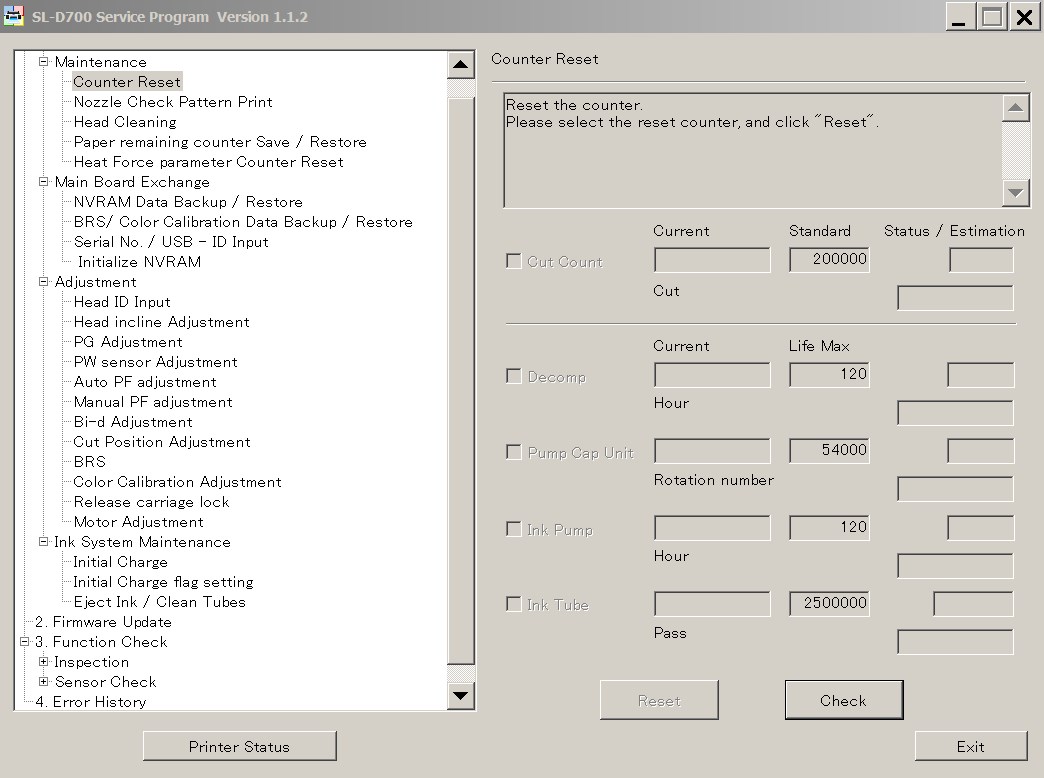
Epson Sure Lab SL-D700 ADJUSTMENT PROGRAM Ver.1.1.2
This adjustment program is developed for making printers adjustments and maintenance such as:
1. Adjustment / Maintenance
Maintenance
- Counter Reset
- Nozzle Check Pattern Print
- Head Cleaning
- Paper Reamining Counter Save / Restore
- Heat Force Parameter Counter Reset
Main Board Exchange
- NVRAM Data Backup / Restore
- BRS / Color Calibration Data Backup / Restore
- Serial No. / USB - ID input
- Initialize NVRAM
Adjustment
- Head ID Input
- Head Incline Adjustment
- PG Adjustment
- PW Sensor Adjustment
- Auto PF Adjustment
- Manual PF Adjustment
- Bi-d Adjustment
- Cut Position Adjustment
- BRS
- Color Calibration Adjustment
- Release Carriage Lock
- Motor Adjustment
Ink System Maintenance
- Initial Charge
- Initial Charge flag setting
- Eject Ink / Clean Tubes
2. Firmware Update
3. Function Check
Inspection
- APG Check
- AID Inspection
Sensor Check
- Sensor Check
4. Error History
The Epson Adjustment Program for Epson Sure Lab SL-D700
can be used under Windows only (Millenium, 2000, XP, Vista, 7, 8, 10 [in compatibility mode]).
We recommend reading the
Epson SL-D700 Service Manual
before using this adjustment utility.
Note - We dont sell Epson SL-D700 free resetter
You can download free DEMO version of Epson SL-D700 Adjustment Program to see if it is what You need - download here
|

|
|
|
|
Step 1 ADD TO CART |
Step 2 CHECKOUT Select payment method. |
Step 3 Confirm the order. |
|
|
We are in business since 2002 and do our best to give our customers perfect service!
|
Our customers reviews:
| Jean Carivenc | 2018-08-31 13:47:47 | | I have searched for this SL-D700 Adjustment Program for few years - couldnt find nowhere.
Now I get license for this program and reset driver counter. Thank you so much!!!!!! | | | Felipe Freitas | 2015-05-20 22:51:38 | | Thanks you, reseted a Epson l1300 ink waste counter sucessfully, who sold me the printer wanted to charge me $25 and I would still have to take the printer to his office. | |  | mauro albanese | 2020-10-22 13:26:46 | | Just over a week ago, I figured I was going to be in the market for a new printer. When the error message came up on my Epson XP-610 stating that "Parts inside the printer are at the end of their useful life" I initially was quite disappointed. However, after a quick Google search for that phrase, I came across the OctoInkjet website. After a little further research, I decided to give the trial waste ink counter reset code a shot - after all, what did I have to lose - and, somewhat to my surprise, it worked! Knowing that I then needed to purchase a new set of ink pads and a reset key to fully resolve my printer issues, I was pleasantly surprised at the low cost of purchasing both of these items together. I then placed my order, but knowing that the product was coming from overseas (I'm in the USA), I figured it would be a minimum of at least a few weeks before my printer pads arrived. But, lo and behold, the pads arrived on my doorstep in just over a week! I was thrilled and so I quickly replaced the pads in my printer with the new set (which, by the way, were a perfect fit and the instructions provided were excellent), ran the counter reset program applying the reset code I had purchased, and everything worked flawlessly! So now it feels like I have a brand new printer (although it's probably about 5 years old) and I can continue to purchase inexpensive third party ink cartridges (which I have always done), continuing to save me money for years to come. Thank you OctoInkjet!!! I will certainly be telling others to check out your product. P.S. - I seldom write product reviews so this shows how impressed I am with this product. I particularly love it when a solution is provided that overcomes "planned obsolescence" by the manufacturer. | |  | wahid ahmady | 2013-02-19 16:37:42 | | This worked a treat, many thanks. Epson, just like most other printer manufacturers just want to rip us all off. Thanks to you guys it can be avoided in part.
All the best | |  | Andy McAtear | 2024-12-07 11:27:42 | | This little app is a life saver.
Got up at 6 am this morning as I needed to print out some important documents for later today, only to find that all the lights were flashing on my printer. A quick search on the web pointed me to this site and the app informed me that my ink pad was full. A few clicks later and my printer is like new again.
Many thanks. | |  | Hugo Daniel Musso | 2015-10-19 17:13:35 | I have an Epson PX710w it is a brilliant printer, happy was I...but then....
the now infamous \"end of life\" message appeared.
After hours of research I found that Epson had a free download to reset and service printer, I downloaded only to find it did not work.
On contacting epsonuk I was told that there is no reset utility or program for uk Epson printers and that I must take it to my local Epson service centre.... this would cost £80 plus vat and parts! more than a new printer.
After advice from forums and many ebay offers of a \"genuine\" reset utility/key, I found 2manuals.com.
through them I \"chatted\" with John who assured me it would work, despite Epson uk advice, and so proceeded to purchase.
from start to finish it took less than ten minutes and I now have a fully working printer for a Meer $10 (about £8)
I cannot recommend this company any higher ..... thank you very much 2manuals and John and one up on big greedy corporation\'s.
Andrew in UK | |  | Sabrina Mandelli | 2019-09-20 10:56:10 | | Thank you, thank you...counter resetted...woww...thank you so much!!!!!Sabrina | |  | Peter Sam | 2009-08-11 10:29:23 | | YES YOU ARE A GENIOUS THANKS A LOT! THE PROGRAM IS WORKING NOW! | |  | david simpson | 2012-10-29 03:26:46 | | Brilliant stuff,very informative,well illustrated,althought i have an electronice background anyone could follow this very easily,a lot of thought & effort gone into this,welldone | |
|