License for 1 PC for Epson XP-2100, XP-2101, XP-2105 series Adjustment Program (Latin)
How to buy unlimited version for One PC:
1. Log In to Your 2Manuals account
2. Download HardWare ID Utility HWID.exe, run it and copy yours PC Hardware ID
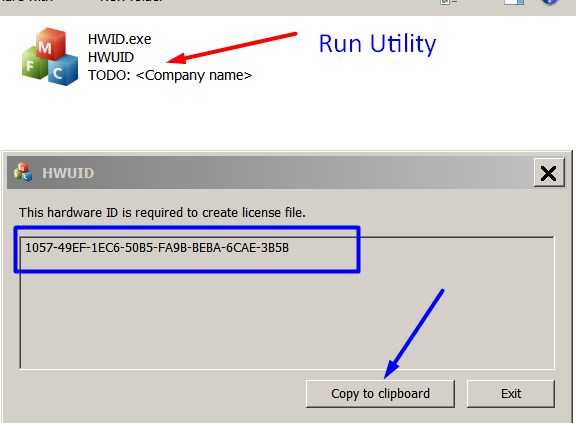
Note! You have to disable antivirus or put HWID.exe file to ignore list!
3. Put this item (License for One PC) in to your Shopping cart
4. Go to payment page and enter HardWare ID in to specified field:
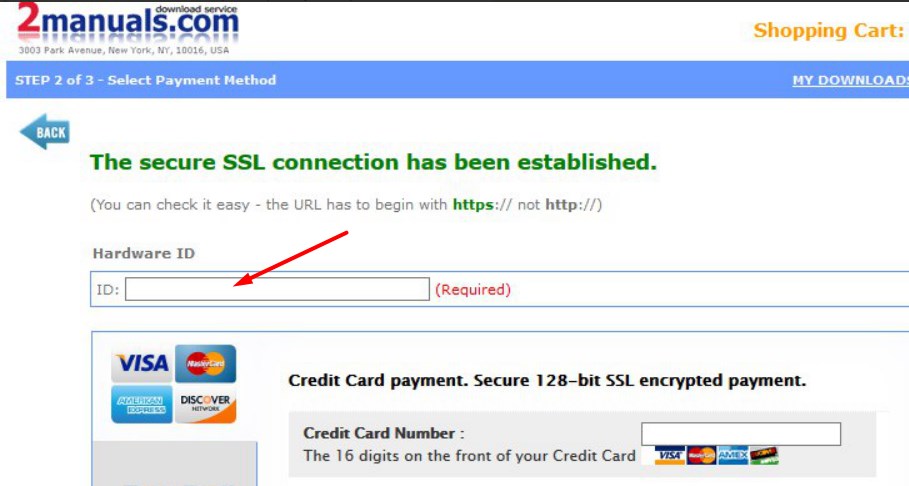
5. Make payment and You will get download link with Epson XP-2100, XP-2101, XP-2105 Adjustment Program with the License file included
6. Put Adjustment Program to Antivirus Ignore list or disable Antivirus. Then Run AdjProg.exe.
With this Epson Adjustment Program You can make adjustment procedures, Initial Ink Charge to clean and unclog printhead and Waste Ink Pad Counter Reset unlimited times.
What next?
- Download Epson XP-2100 Adjustment Program here -
- Purchase License for one printer
- You'll get License by email immediately after your payment transaction is complete.
before using the adjustment utility.
We dont have Free Epson XP-2101, XP-2105 resetter.
|

|
|
|
|
Step 1 ADD TO CART |
Step 2 CHECKOUT Select payment method. |
Step 3 Confirm the order. |
|
|
We are in business since 2002 and do our best to give our customers perfect service!
|
| Warren Ryland | 2013-07-21 10:09:23 | | The reset utility works great for my Artisan 700.
Thank you SO SO SO much for making this available for Mac. You can\'t imagine how much hassle you\'ve saved me - trying to get a Windows machine to run a reset utility on... Excellent service altogether. Many thanks from Ireland! | |  | Priscilla Villalobos | 2020-07-23 13:18:55 | | Good morning.
I have two questions, if you´re so kind to help me.
1) The expiration date key. Does it mean once we get it, we have a period to use it? Or what the expiration date referenced to?
2) If the printer has a problem and we have to format it again, will the key information lost and we need a new one, or does it be able to be used again?.
Many thanks !
Esther | |  | johnny grinyer | 2013-03-02 00:11:10 | | Well i\'d like to say thank you for your support now our printer Epson 1410 was reset already and we continue our printing now. good program to reset the counters of the printer it was very great... | |  | JOSEPH MORWA | 2018-07-15 02:04:21 | | I made the mistake of upgrading the firmware in my Epson XP-434. That caused my ink cartridges to not be recognized. I found this WIC Reset Utility after after searching for original firmware version.
I bought the key and plugged it into the utility, and bingo 10 minutes later I was up and running.
Thanks a bunch 2manuals.com! | |  | Abrahim Khalil | 2025-03-18 02:17:56 | | Ich habe das WIC Reset Utility verwendet, um den Tintenabfallzähler meines Epson-Druckers zurückzusetzen. Das Tool hat problemlos funktioniert und der Drucker läuft jetzt wieder normal. Sehr zu empfehlen, wenn man nicht zum Servicecenter gehen möchte. Einfach zu bedienen und sehr effizient.“ | |  | mauro albanese | 2020-10-22 13:26:46 | | Just over a week ago, I figured I was going to be in the market for a new printer. When the error message came up on my Epson XP-610 stating that "Parts inside the printer are at the end of their useful life" I initially was quite disappointed. However, after a quick Google search for that phrase, I came across the OctoInkjet website. After a little further research, I decided to give the trial waste ink counter reset code a shot - after all, what did I have to lose - and, somewhat to my surprise, it worked! Knowing that I then needed to purchase a new set of ink pads and a reset key to fully resolve my printer issues, I was pleasantly surprised at the low cost of purchasing both of these items together. I then placed my order, but knowing that the product was coming from overseas (I'm in the USA), I figured it would be a minimum of at least a few weeks before my printer pads arrived. But, lo and behold, the pads arrived on my doorstep in just over a week! I was thrilled and so I quickly replaced the pads in my printer with the new set (which, by the way, were a perfect fit and the instructions provided were excellent), ran the counter reset program applying the reset code I had purchased, and everything worked flawlessly! So now it feels like I have a brand new printer (although it's probably about 5 years old) and I can continue to purchase inexpensive third party ink cartridges (which I have always done), continuing to save me money for years to come. Thank you OctoInkjet!!! I will certainly be telling others to check out your product. P.S. - I seldom write product reviews so this shows how impressed I am with this product. I particularly love it when a solution is provided that overcomes "planned obsolescence" by the manufacturer. | |
|




