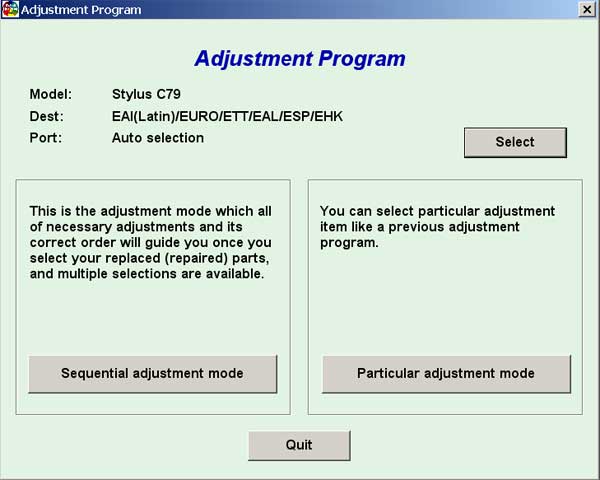
Epson C79 Service Adjustment Program

$9.99
Epson C79 Service Adjustment Program
   Click to enlarge
      

EPSON Stylus C79 Service Adjustment Program.

Under Windows XP only.

To learn more about service program functions go to About Adjustment Programs (in the right column)

Please unzip by WinZip after downloading. Then READ carefuly README file with instructions.

File size - 1 479 kB

You can run this program under Windows XP, Windows Vista, Windows 7 in compatibility mode. It is easy!

Lets get to know how to set it up.

To configure the compatibility mode for an application, just locate the installation directory and right click on the .exe file (program you want to run), selecting Properties from the menu.

Select the Compatibility tab:


Windows 7 compatibility mode


You can choose to run the program in Windows 95, Windows 98 or Windows XP compatibility mode.

FOR THIS PROGRAM please use the WINDOWS XP compatibility mode!!!


Download the program and run in compatibility mode!

I want to:

Any questions about this product?

SEND US REQUEST by filling the form below.


Step 1
ADD TO CART
Step 2
CHECKOUT
Select payment method.
Step 3
Confirm the order.


We are in business since 2002 and do our best to give our customers perfect service!

Our customers reviews:

  nando pires 2010-01-19 00:42:39  
  Thak you. Now working printer.
  nando pires 2010-01-19 00:40:28  
  Good site. Good program!
  Naser Khalil 2018-02-26 09:27:43  
  Dear Sir, I need this Service Manual for D3000 and i couldn't fine away how to add this to my shopping card. please Advice.
  Giuseppe Palumbo 2018-02-28 11:30:18  
  IT WORKED!!!!! I just wanted to say THANK YOU SO MUCH!!!!! WOW. Smarties like the ones that started/involved in this company is what makes life a little easier. Thank you SO MUCH once again!!!! VERY Sincerely,Marissa Smith
  Farhan Hossein 2018-03-04 06:43:56  
  Nevermind. Did more research and to resolve the error, aside the firmware downgrade, I removed the ink, unplugged the printer, turned the printer back on, and placed the Ink's in individually pressing done after each ink. Doing this I was able to get it back up and running again. Thanks!
  sachin mishra 2018-03-10 10:06:46  
  very good i like it i am so happy i realy like it it is very usefull i support it software
  Philip Apostol 2018-03-13 21:24:29  
  Wow, It's amazing, I can use my canon g2000 again! Thank you!
  ali khalaf 2018-04-04 17:10:19  
  LIFE SAVER! This program help me solve all the problem for my printer. I Love all of you developers!
  FATIH AKINCI 2018-04-19 20:11:07  
  Very practical and safe program, total guarantee. He used it several times
Write review