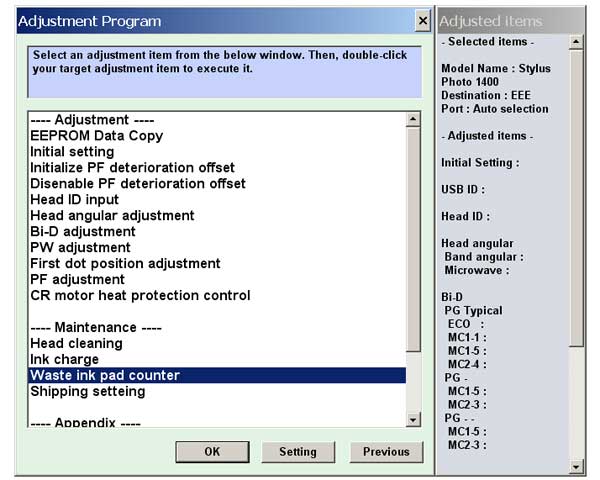
Epson Photo 1400 Printer Service Adjustment Program

$9.99
Epson Photo 1400 Printer Service Adjustment Program
   Click to enlarge
      

Epson Photo 1400 ADJUSTMENT PROGRAM (EEE) Ver.1.0.1

can be used under Windows only (Millenium, 2000, XP).

This adjustment program is developed for making printers adjustments and maintenance such as:

Adjustment
- EEPROM Data Copy
- Initial Setting
- Initialize PF deterioration offset
- Disable PF deterioration offset
- Head ID input
- Bi-D adjustment
- Head angular adjustment
- PF adjustment
- PW adjustment
- First dot position adjustment
- PF band adjustment
- CR motor heat protection control

Maintenance
- Head cleaning
- Ink charge
- Waste Ink Pad Counter
- Shipping setting
- CD-R check pattern print
- Final check pattern print
- EEPROM dump
- Printer information check

If You need Waste Ink Counters reset - please use the WIC Reset Utility - Download here

To get this adjustment program, for the Epson 1400 you need to do the following:

  1. Purchase the utility from 2manuals.com.
  2. You'll get download link on-line and in the email message.

We recommend reading the Epson 1400 Service Manual before using the adjustment utility.

Please contact us if you have not received your order.

You can run this program under Windows XP, Windows Vista, Windows 7

I want to:

Any questions about this product?

SEND US REQUEST by filling the form below.


Step 1
ADD TO CART
Step 2
CHECKOUT
Select payment method.
Step 3
Confirm the order.


We are in business since 2002 and do our best to give our customers perfect service!

Our customers reviews:

  eric strier 2009-04-05 01:30:54  
  I must say that John provided excellent support and customer service to me when I really needed it. I will send people to this site when they have printer issues they want to fix themselves. Way to go, John. Thanks a lot! - Eric
  fer mon 2011-08-06 16:16:20  
  NECESITARĶA LA LLAVE PARA LIMPIAR UNA EPSON STYLUS PHOTO RX-585
  Keith Doyna 2015-01-25 23:28:18  
  All I can say is THANK YOU!! Thank you for allowing me to roll back (downgrade) my Epson XP-410 printer\'s firmware with ease!! A couple of clicks, and I was downgraded. This allowed me to use non-oem cartridges that would not work no matter what I tried with current firmware (Epson updated firmware just to battle the use of non-oem cartridges). The money spent will be saved with the very first refill of these refillable cartridges I bought. I was skeptical, but it really was THAT easy! Winning the battle against Epson!! First time I\'ve ever paid for a \"hack\", well worth it!
  sunday omebe 2013-08-28 10:58:28  
  Quick and easy. i have an XP600 and Artisan 725 that were showing the \'waste inkpad error\'. I bough 2 keys and solved a 2 week headache in 10 minutes. Thanks for doing what you do and doing a Great Job in helping people Your the Best Thanks
  Andr1212 Sam 2009-08-29 12:14:11  
  I ordered from you the service manual for my R2880 printer which showed me that I needed the adjustment program which I also ordered and now my printer operates correctly again!!! Thanks
  Sergio Carlo Bianchi 2019-07-20 19:34:55  
  My Epson XP-760 works again with Waste Ink Counter Reset! Thank you very much
  radhouani hatem 2012-11-14 03:17:36  
  hi i want to get reset key for epson sx235w i haven\'t a cdredit card tell me wat can i do? please call me at hradhouani@ymail.com thank you ======== Admin =========== Hello! You can pay by Western Union or Moneybookers.
  Silvia Brandmeier 2021-10-25 17:32:04  
  It is end of October 2021. I just have bought the second reset key in my printers life. The first one I bought in 2015 !!! That means my printer had already it's life prolonged by 6 years and goes now into the second reset cycle. Keep up the good work to prevent valuable electronic hardware becoming garbage. I never had any trouble in 6 years with the ink waste pad after resetting the counter for the first time.
Write review