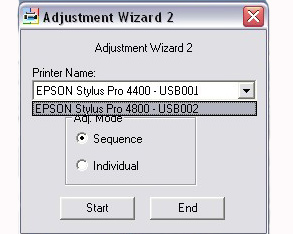
Epson Stylus Pro 4400, 4800 Printers Service Adjustment Program

$19.99
Epson Stylus Pro 4400, 4800 Printers Service Adjustment Program
   Click to enlarge


The Epson Stylus Pro 4400, 4800 Printers Service Adjustment Program .

To use this program the best way you have to read Epson Pro 4400, 4450, 4800, 4880 printers Service Manual first - Epson Pro 4400, 4450, 4800, 4880 printers Service Manual.

You can run this program under Windows XP, Windows Vista, Windows 7, 8, 10 in compatibility mode. It is easy!

Lets get to know how to set it up.

To configure the compatibility mode for an application, just locate the installation directory and right click on the .exe file (program you want to run), selecting Properties from the menu.

Select the Compatibility tab:


Windows 7 compatibility mode


You can choose to run the program in Windows 95, Windows 98 or Windows XP, 7, 8, 10 compatibility mode.

FOR THIS PROGRAM please use the WINDOWS XP compatibility mode!!!


Download the program and run in compatibility mode!

I want to:

Any questions about this product?

SEND US REQUEST by filling the form below.


Step 1
ADD TO CART
Step 2
CHECKOUT
Select payment method.
Step 3
Confirm the order.


We are in business since 2002 and do our best to give our customers perfect service!

Our customers reviews:

  loay ahmad 2011-03-25 02:10:12  
  Worked perfect!
  Devid Moretton 2015-01-25 19:50:30  
  I found the problem, why the reset diidnt work. it was in depending of the epson status monitor. I was going to the task manager and stopped the status monitor. The problem was \\\"The printer statut manager\\\" After stopping status monitor, the reset was work probably. Thanks
  michel jacquemin 2022-07-12 15:53:28  
  I just bought a reset key, everything works perfectly on a Epson XP 520. Just one thing, one key for several reset will be better.
Thank you for your job.
  Nicole Stinchcomb 2023-03-28 20:58:48  
  Used my reset key for my Epson 2720 and it worked! Thanks!
  YuanYuan Wang 2008-01-19 13:27:07  
  Was pulling my hairs out when my R340 displayed the message "parts reaching end of service life, see manual". As I know these printers are not made to be "servicable", and I am not ready to pay another hundred pounds for a new printer, I was devastated. Thanks to this service program, it took away the warning message and I can continue using my R340 with the CISS. Phew!! Please note that you DO need to redirect the waste ink or replace the waste ink pads or you may risk dealing with an over-spilled printer. A wise investment into this program. Thank you.
  dave hardik yogeshbhai 2006-12-03 22:49:16  
  Good heavens -- that\'s not just good service, it\'s frighteningly good! I hope you do get to sleep once in a while . . . . Many thanks, and take good care! Dave
  C. Woloszynowicz 2025-01-08 01:42:36  
  Bei meinem Epson Premium Expression XP830 hat es super geklappt :-)
  Luca Pala 2020-11-20 08:23:27  
  tHIS SAVES MY DAY. Used code TRIAL it really works! :D
  Ivan Tilbury 2015-09-08 06:01:35  
  I purchased the epson adjustment program last night and got to work on it today.
I had a clog in C and it would not clear. I ve had my 4900 for over 2 years and have been able to handle them until now.
I learned about this site from another site that has cleaner for the 4900 and said I need to buy this software first. I bought it and tried it with the epson ink that was in my printer. I ran the adjustment and it cleared C but then there were other clogs. Because they werent clogged before I started, I cleared them the normal way through the printers options. Had they not cleared, I would have ran the adjustment again.
I had tried everything to get C to clear for a week and this program did it in one try!

I would highly recommend this for clearing a stubborn clog. And now it is in my arsenal if I get another one that I cant clear down the road. By the way, it does not work if your printer is networked. Mine was so I had to move a computer into the room with my printer, directly connect to it and install the drivers. Then it work fine.
If you got a clog that you cant fix, just buy it.
Write review
Shopping Cart more
Shopping Cart is empty


How to pay?
We accept
Credit Cards, PayPal
and Western Union payments


We accept M-Pesa
Pay By M-Pesa
How to Pay by M-Pesa


Buy here or find Resellers in your country:

Argentina

Pay in Argentina Peso

Algeria

EasyPrint-dz.com

Australia

Mir-Aus.com.au

Bangladesh

Pay in Bangladesh by BDT

Brasil

Pay in Brasilian Reals
ReseteadoresWIC
Brasil

Burundi

PrintersAfrica.com

China

Pay in Chineese Yuan

Cote D Ivoire

MonpcImprime.com

Columbia

Pay in Columbian Peso
ReseteadoresWIC

Dominicana

Rellenadodecartuchos.com

DR Congo

Buy in DR Congo

Ecuador

ReseteadoresWIC

Ethiopia

PrintersAfrica.com

France

InkCissPrinter

Ghana

Pay in Ghana Cedis

Germany

InkCissPrinter.com

Japan

Pay in Japaneese Yen

Iran

MahaShop.ir
FixPrinters.ir

Iraq

AlmohandsWorkshop

Indonezia

Pay in Indonesian Rupiahs
FastPrint.co.id

Italia

Inkspeed.it
Stampacontinua.it

Kenya

PrintersAfrica.com
MagiColors.biz

New Zealand

Mir-Aus.com.au

Philippines

Pay in Philippine Peso

Poland

Tusze.info
Progbit.pl
ResetPampersa.pl
ResetWIC.pl

Portugal

Printsemfim.com
InkCissPrinter.com

Romania

CissMarket.ro
Cartuseria.ro
AmDigital.ro

Rwanda

PrintersAfrica.com
Ciss-Solutions.com

Saudi Arabia

Alelm-Alamal.com

Soomaaliya

PrintersAfrica.com

South Sudan

PrintersAfrica.com

Spain

InkCissPrintert.com

Tanzania

PrintersAfrica.com

Turkiye

Cescesor.com

Uganda

PrintersAfrica.com

Vietnam

WIC.vn
ResetKey.net
Want to sell Reset Keys in Your country?
Notifications more
NotificationsNotify me of updates to Epson Stylus Pro 4400, 4800 Printers Service Adjustment Program