

Canon General Tool for iP1200, iP1600, iP2200 printers

$9.99
<b>Canon  General Tool</b> for iP1200, iP1600, iP2200 printers
   Click to enlarge
      

CANON PIXMA iP1200, iP1600, iP2200 General Tool
To reset waste ink pads counters you have to use iP1600 Service Tool:

1. Order and DOWNLOAD Service Tool for Canon iP1200, 1600, 2200
2. Unzip downloaded file by WinZip.
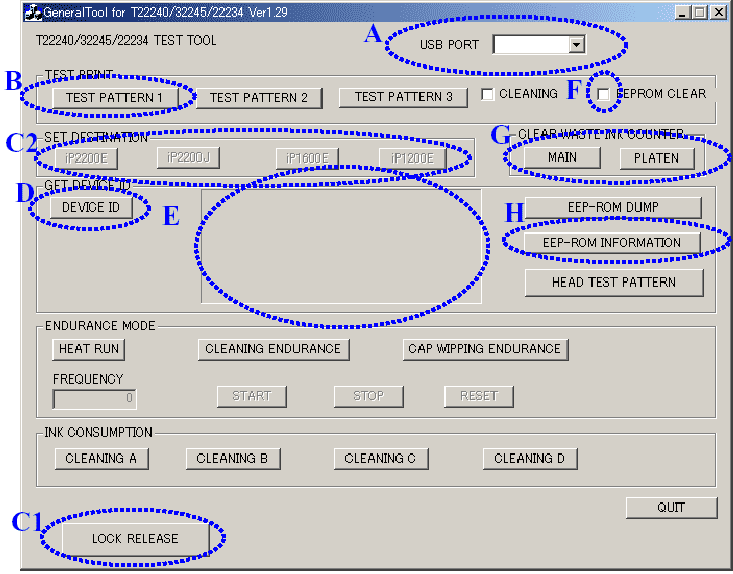
3. Run GeneralTool.exe file
4. Select the connected USB port number from USB PORT
5. Click LOCK RELEASE, and select the applicable model name in SET DESTINATION
6. In CLEAR WASTE INK COUNTER, select MAIN or PLATEN. The selected waste ink counter will be reset. MAIN resets the main waste ink counter, PLATEN resets the platen waste ink counter. If both the main and platen waste ink absorbers are replaced, reset both the main and platen waste ink counters.
iP1200, 1600, 2200 printers Service Tool

ZIP archive: 9 697 kB

I want to:

Any questions about this product?

SEND US REQUEST by filling the form below.


Step 1
ADD TO CART
Step 2
CHECKOUT
Select payment method.
Step 3
Confirm the order.


We are in business since 2002 and do our best to give our customers perfect service!

Our customers reviews:

  Vadimka Vadimka 2010-05-03 12:54:42  
  Спасибо. Все скачалось то что нужно!
  ed dy 2007-06-15 00:30:52  
  Canon service manual for iP1200, ip1600 worked out fine!!
  ary sasmita 2006-08-27 02:03:31  
  Worked fine!
  Heri Putra Kelana 2006-05-12 05:06:13  
  please confirmation canon ip1200,1600,2200 printer service tools.
  Manish Lama 2024-08-08 13:27:09  
  this helps me remove all wasted of printer. this helps me remove all wasted of printer. this helps me remove all wasted of printer. this helps me remove all wasted of printer. this helps me remove all wasted of printer. this helps me remove all wasted of printer. this helps me remove all wasted of printer.
  nigel howlett 2017-06-29 13:43:08  
  reset my very reliable Epson R285 first time. now I can print again Thanks
  FERNANDO LEGANIA 2020-07-16 23:25:24  
  XP322 ran out of copies and froze up. I read up that it was an Epson device to sell more printers but discovered your site just before treating it to a display of bad temper. The 20% of extra time will make the replacement question easier and i can use my stock of ink up on this 4 year old printer. I may even use your services to zero life the counter as it isn't a bad device really. Thank you so much.
  Fernando Fernando 2008-03-08 09:09:51  
  waiting waiting waiting waiting
  david miranda 2016-04-07 16:43:28  
  My Epson Stylus R280 is printing again! This was my favorite printer for photos and quick single-sided jobs. It printed and printed until the dreaded message and alternating flashing orange lights appeared.

I was skeptical that WicReset could do anything because of the flashing lights. I downloaded the Windows version (XP), virus scanned it and after it passed, installed it. I first tried the trial reset that sets the waste counters to 90%. That worked immediately. I bought a key. That worked immediately and now my printer is working like new and waste counters are near 0.

I use a continuous ink system (CIS) on my Epson printers... have for years. This software also has a nice utility to charge the cartridges and clean the heads. My R280 printer sat for a while after the counters reached limit and the ink lines filled with air. I used the WicReset utility to charge & clean, and now it prints like new.

This software is easy to use and guides you step by step. I encountered no difficulties and everything worked first time. It is very good that there are smart engineers out there who took the time to reverse-engineer Epson\'s awful ink pad limitations.

One note of caution, and this has nothing to do with WicReset... I print so much and fear my ink pads will truly overflow, so I\'ll be installing a waste ink tank on my printers. I had one on an ancient R200 printer and it worked great. This is an essential accessory for CIS printers.

Thank you WicReset.
  Gordon MacKenzie 2023-08-08 09:54:16  
  You guys are legends for providing this service. It's fucking rediculous customers have to use hacked firmware just to use their own fucking printers. Thanks again.
  CASATI MARCO 2020-04-28 10:28:44  
  good morning Sirs, Before to purchase the service Adjustment program full I would like to know if it is suitable for Epson Printer Stylus Photo PX730WD model C432A and if, in this porgram, is there the decompressing managing for print head?
Write review



