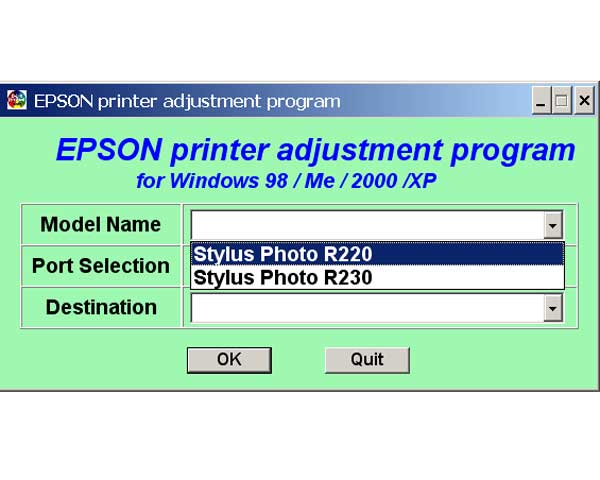
Epson R220, R230 Printers Service Adjustment Program

$9.99
Epson R220, R230 Printers Service Adjustment Program
   Click to enlarge
      

The Epson Adjustment Program for Epson R220 can be used under Windows only (Millenium, 2000, XP, Vista [in compatibility mode]).

To find out how to use this utility to reset the waste ink counter we recommend reading the:
5 Clicks Reset Procedure

To get this adjustment program, for the Epson R220 you need to do the following:

  1. Purchase the utility from 2manuals.com.
  2. You'll get download link on-line and in the email message.

We recommend reading the Epson R220 Service Manual before using the adjustment utility.

Please contact us if you have not received your order.

You can run this program under Windows XP, Windows Vista, Windows 7 in compatibility mode. It is easy!

Lets get to know how to set it up.

To configure the compatibility mode for an application, just locate the installation directory and right click on the .exe file (program you want to run), selecting Properties from the menu.

Select the Compatibility tab:


Windows 7 compatibility mode


You can choose to run the program in Windows XP compatibility mode.

FOR THIS PROGRAM please use the WINDOWS XP compatibility mode!!!


Download the program and run in compatibility mode!

I want to:

Any questions about this product?

SEND US REQUEST by filling the form below.


Step 1
ADD TO CART
Step 2
CHECKOUT
Select payment method.
Step 3
Confirm the order.


We are in business since 2002 and do our best to give our customers perfect service!

Our customers reviews:

  armando ro 2007-05-18 22:04:53  
  please service adjustment program for r220 the epson
  Jack Wilson 2007-04-21 23:00:22  
  JUST A NOTE TO THANKYOU FOR A BRILLIANT WEBSITE SERVICE Had an Epson R220, locked Within three minutes of buying the adjustment software for R220, printer was rejuvenated and lept into life doin handstands!!! Excellent-well done!!! SRS
  duncan taylor 2013-06-18 14:53:42  
  Model epson BX630 - Epson offfered no help when i asked what i could do after getting waste ink error after 3 months worked a treat saved me trashing a perfectly good working printer. Eco friendly recyle that old printer. Many thanks guys Dunc in the uk
  Devid Moretton 2015-01-25 19:50:30  
  I found the problem, why the reset diidnt work. it was in depending of the epson status monitor. I was going to the task manager and stopped the status monitor. The problem was \\\"The printer statut manager\\\" After stopping status monitor, the reset was work probably. Thanks
  JOSEPH MORWA 2018-07-15 02:04:21  
  I made the mistake of upgrading the firmware in my Epson XP-434. That caused my ink cartridges to not be recognized. I found this WIC Reset Utility after after searching for original firmware version. I bought the key and plugged it into the utility, and bingo 10 minutes later I was up and running. Thanks a bunch 2manuals.com!
  Richard Bustamante 2007-06-05 15:55:05  
  Muy bueno espero conseguirlo para poder reparar mi impresora
  safuan samad 2018-07-17 20:59:31  
  Your printers are pieces of shit, I'm sure that HP will be happy to know they have even more customers. The firmware is a piece of shit, the software isn't good either. And as for the support team, well lets just say that their not even worth anything, as any complications I have had(and others) haven't had any help from them. So you can thank yourselves for the loss, and give a big round of applause to any companies your in competition with.
Write review