Activation Key for making Epson WF-3720, WF-3721, WF-3723, WF-3725, WF-3730, WF-3733, PX-M680F Chipless Printers (for one device only)

$30.00
<b>Activation Key</b> for making Epson WF-3720, WF-3721, WF-3723, WF-3725, WF-3730, WF-3733, PX-M680F Chipless Printers (for one device only)
   Click to enlarge
      

Be sure Your printer can be modified to Chipless Version.
That means You can pass Step 4 of this guide.

Don't buy Activation Key BEFORE You have checked if Your printers Firmware can be changed to Chipless! Follow next 5 Steps.

Step 1
Download and extract Zip archive (How to unzip (extract) files from Zip archive?) with Epson WF-3720, WF-3721, WF-3723, WF-3725, WF-3730, WF-3733, PX-M680F Firmware  - CL30J5 version

Step 2
Connect printer to PC (under Windows OS) by proper USB cable.
Disable all Epson processes and services. You can do this manually using task manager and administration tools or You can do this via WIC Reset Utility (install and run it, then select MENU -> Support -> Disable processes).

Step 3
Upload Firmware to printer in the NORMAL MODE (do NOT use service mode yet just start the printer with the power button). Run EPFWUPD.EXE file and follow all steps until Firmware will upload in printer. 
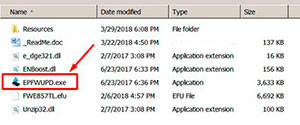
WF-3720, WF-3721, WF-3723, WF-3725, WF-3730, WF-3733, PX-M680F  chipless firmware

When Firmware Update process is complete - printer will restart - usually it will take only a few minutes but can continue for 10-20 minutes in some rare cases. 
If process hangs or stops at 80-99% - replug power cable and start printer manually.

Step 4
Now check current firmware version ( how to check).
If firmware version is CL30J5 - firmware has been uploaded successfully. You can go to next Step.
If NO - restart the printer and try once more time.

What do You have to do next after uploading chipless firmware?

Step 5
1. Buy this Activation Key
2. Download License.exe application (Windows only). Password to extract - 12345.
3. Run License.exe under Windows and press Activate Online button
4. Input Activation Key and press Ok!

Please keep in mind - there are 2 types of keys:
- Regular Activation Key (HAS expiration date of using);
- No Expiration date Activation Key (can be used whenever You want in 10 years).


Buy Activation Key in case You have uploaded Firmware to Your printer successfully!

Prices and discounts:

Regular Activation Keys (HAS expiration date and couldn't be used after has expired):
1 Activation Key - $30
5 Activation Keys - $27 per Key
10 Activation Keys - $25 per Key
You can pay by Visa, MC etc. - Here
or by PayPal and other systems. - Here

NO EXPIRATION Activation Keys (has NO expiration date - can be used whenever You want):
1 Activation Key - $33
5 Activation Keys - $30 per Key
10 Activation Keys - $28 per Key
You can pay by PayPal, Visa, MC etc. : Here

*The code is one-time use.

If You have any questions - You can read or place Your questions at Chipless thread at our Discussion Board - https://forum.2manuals.com/index.php?/topic/80414-chiplesssolutions-chipless-firmware-for-epson-printers-chip-virtual/

I want to:


Step 1
ADD TO CART
Step 2
CHECKOUT
Select payment method.
Step 3
Confirm the order.


We are in business since 2002 and do our best to give our customers perfect service!

Our customers reviews:

  Darren Townsend 2020-10-14 21:53:29  
  I purchased four activation keys total, but I had an issue using one. John at tech support got it straightened out and I was able to complete the install on the printer. Now I can set up the CISS unit for Sublimation printing. I'm very happy, and can testify that this product works to unlock the firmware of your printer. (Epson WF-3720)
  TT Impact 2016-02-29 16:56:49  
  Key worked as charm, almost wrote off this guy after 15k pages, but it looks like it is back to business.
  Len Foster 2011-11-27 16:38:24  
  Brilliant stuff! Have tried everything over the last few days to reset my R265, and finally found your site! Brought a key, bit of a problem with my email account, tried another one, got the key, reset the R265 AFTER washing out the inkpads, now everything is working as it should. Many thanks.
  Abel Guerrero 2020-04-26 15:45:55  
  Thank you so much. After days, weeks of search online (and lots of non working trials), I finally found your website and your reset did work. Fab!
  Margaret Scheperle 2013-01-04 01:13:05  
  Sure wish your live support was online. I could understand it being down on New Year's Eve, but not today. I sent an email to this effect also, but no reply. The reset key worked, thanks. For just half a day, however. Not what I expected for $9.99. Please advise.
  harvey yamith 2011-06-18 01:23:14  
  Hi I would like to know how to find codes that ask me to reset the work force 500 and the Epson tx720wd thanks ======== 2MANUALS REPLY =========== You can buy RESET KEYS here - http://www.2manuals.com/product_info.php?cPath=56_92&products_id=1138
  fouzi fouzi 2010-04-24 03:13:02  
  Thank you. for the program. It worked on TX106 printer. Reset waste ink counter in few minutes. Not go to epson customer service. Good.
  Michele Strigini 2019-01-05 01:10:04  
  I was skeptical in using this tool, but to my surprise and delight it worked like a charm using the serial key (trial) for a quick 10%reset of my Epson Artisan 830. Yes, meaning that if you don't buy the key, it will only reset your printer 10% of the way. My counters are now at 89.99% and 90.00%. It states these counters will reach maximum soon. I only wanted to use the fax option of this printer since I bought a new printer with fill tanks that hasn't arrived yet. This product worked perfectly. I wish I knew about it this software tool before buying a new printer......
  Patrick Blom Bachstein 2016-02-25 19:28:33  
  So had my Epson Pro 4900 disconnected from powersupply for about a month and a half, due to new facilities in my studio. Powered it up, printed a nozzle check, and banged my head against the wall! Only magenta and light cyan did appear, and two broken lines of photo black. Did the Windex trick 5-8 times, and at the 16. nozzlecheck, 9 colours appeared, BUT some actually has got worse, the more Windex the head had.
Preparing myself on making a stronger brew for the cleaning (a lot of Googling and reading!), I came across the Service Program. Reluctant to spill ~ 150 ml of ink, I first moved along (also, the website seemed shady, however, alot of mentions on various foras).

Today I decided \'What the heck, 30 bucks, if it doesn\'t work, I\'ll survive\', so I purchased a license, installed on a laptop (with USB connection instead of network), and chose the option to prime the left channels first - and WOW: EVERY nozzle on that side now fired, and made an (99%) perfect nozzle check. So did the other side, when finished filling the lines again.
So: 5 f*cking huge stars from me! :)
Thank you for this wonderful utility!
Write review
Shopping Cart more
Shopping Cart is empty


How to pay?
We accept
Credit Cards, PayPal
and Western Union payments


We accept M-Pesa
Pay By M-Pesa
How to Pay by M-Pesa


Buy here or find Resellers in your country:

Argentina

Pay in Argentina Peso

Algeria

EasyPrint-dz.com

Australia

Mir-Aus.com.au

Bangladesh

Pay in Bangladesh by BDT

Brasil

Pay in Brasilian Reals
ReseteadoresWIC
Brasil

Burundi

PrintersAfrica.com

China

Pay in Chineese Yuan

Cote D Ivoire

MonpcImprime.com

Columbia

Pay in Columbian Peso
ReseteadoresWIC

Dominicana

Rellenadodecartuchos.com

DR Congo

Buy in DR Congo

Ecuador

ReseteadoresWIC

Ethiopia

PrintersAfrica.com

France

InkCissPrinter

Ghana

Pay in Ghana Cedis

Germany

InkCissPrinter.com

Japan

Pay in Japaneese Yen

Iran

MahaShop.ir
FixPrinters.ir

Iraq

AlmohandsWorkshop

Indonezia

Pay in Indonesian Rupiahs
FastPrint.co.id

Italia

Inkspeed.it
Stampacontinua.it

Kenya

PrintersAfrica.com
MagiColors.biz

New Zealand

Mir-Aus.com.au

Philippines

Pay in Philippine Peso

Poland

Tusze.info
Progbit.pl
ResetPampersa.pl
ResetWIC.pl

Portugal

Printsemfim.com
InkCissPrinter.com

Romania

CissMarket.ro
Cartuseria.ro
AmDigital.ro

Rwanda

PrintersAfrica.com
Ciss-Solutions.com

Saudi Arabia

Alelm-Alamal.com

Soomaaliya

PrintersAfrica.com

South Sudan

PrintersAfrica.com

Spain

InkCissPrintert.com

Tanzania

PrintersAfrica.com

Turkiye

Cescesor.com

Uganda

PrintersAfrica.com

Vietnam

WIC.vn
ResetKey.net
Want to sell Reset Keys in Your country?
Notifications more
NotificationsNotify me of updates to Activation Key for making Epson WF-3720, WF-3721, WF-3723, WF-3725, WF-3730, WF-3733, PX-M680F Chipless Printers (for one device only)