Epson Sure Lab SL-D700, DX-100 Ver.1.1.2 Service Adjustment Program New!


Epson <b>Sure Lab SL-D700, DX-100  </b>  Ver.1.1.2 Service Adjustment Program <font color=red>New!</font>
   Click to enlarge
      

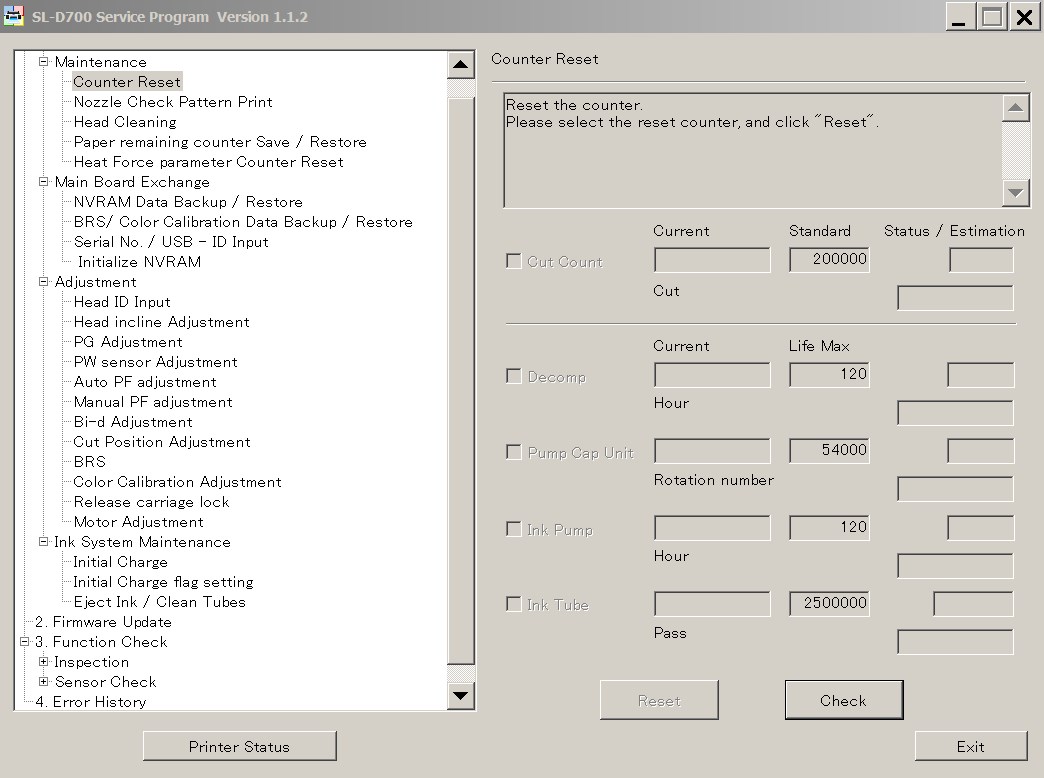
Epson Sure Lab SL-D700 ADJUSTMENT PROGRAM Ver.1.1.2

This adjustment program is developed for making printers adjustments and maintenance such as:

1. Adjustment / Maintenance

Maintenance
- Counter Reset
- Nozzle Check Pattern Print
- Head Cleaning
- Paper Reamining Counter Save / Restore
- Heat Force Parameter Counter Reset
Main Board Exchange
- NVRAM Data Backup / Restore
- BRS / Color Calibration Data Backup / Restore
- Serial No. / USB - ID input
- Initialize NVRAM
Adjustment
- Head ID Input
- Head Incline Adjustment
- PG Adjustment
- PW Sensor Adjustment
- Auto PF Adjustment
- Manual PF Adjustment
- Bi-d Adjustment
- Cut Position Adjustment
- BRS
- Color Calibration Adjustment
- Release Carriage Lock
- Motor Adjustment
Ink System Maintenance
- Initial Charge
- Initial Charge flag setting
- Eject Ink / Clean Tubes

2. Firmware Update

3. Function Check

Inspection
- APG Check
- AID Inspection
Sensor Check
- Sensor Check

4. Error History

The Epson Adjustment Program for Epson Sure Lab SL-D700 can be used under Windows only (Millenium, 2000, XP, Vista, 7, 8, 10 [in compatibility mode]).

We recommend reading the Epson SL-D700 Service Manual before using this adjustment utility.

Note - We dont sell Epson SL-D700 free resetter

You can download free DEMO version of Epson SL-D700 Adjustment Program to see if it is what You need - download here

Buy License for SL-D700 Adjustment Program


Step 1
ADD TO CART
Step 2
CHECKOUT
Select payment method.
Step 3
Confirm the order.


We are in business since 2002 and do our best to give our customers perfect service!

Our customers reviews:

  Jean Carivenc 2018-08-31 13:47:47  
  I have searched for this SL-D700 Adjustment Program for few years - couldnt find nowhere. Now I get license for this program and reset driver counter. Thank you so much!!!!!!
  Alexander Molinar 2019-09-27 22:53:46  
  Printer reset with key then failed waste counter back to 100% after test print. Key no longer works!

2Manuals reply:
There is bug in Epson Photo 1390, 14000, 1410 firmware that put waste counter overflow back again after reset. This problem can be solved by updating printers firmware. Here is step by step manual how to fix it - www.2manuals.com/1400fw_update.php
  TAMMY OAKLEY-PRIOR 2011-04-27 22:42:22  
  Excellent! Thank you! What a brilliant utility!..................................................................................................
  Jack Wilson 2007-04-21 23:00:22  
  JUST A NOTE TO THANKYOU FOR A BRILLIANT WEBSITE SERVICE Had an Epson R220, locked Within three minutes of buying the adjustment software for R220, printer was rejuvenated and lept into life doin handstands!!! Excellent-well done!!! SRS
  Bob Heinrichs 2011-02-01 06:09:58  
  Thank-you for helping with resetting waste ink counter. Great service Had printer running in 2 minutes. Thanks again for saving me money and time. Bob
  Sabrina Mandelli 2019-09-20 10:56:10  
  Thank you, thank you...counter resetted...woww...thank you so much!!!!!Sabrina
  Georg Schmalholz 2020-07-31 13:10:13  
  The method described in program was easy to follow. My only problem was having no computer shortcut. The information which came with the key explained it to me, again no problem. It the reset worked. Best buy I have made this Year!! Gerald
  Laurent Haverlandt 2025-11-08 00:15:55  
  Malgré une méconnaissance en informatique, j'ai facilement débloqué mon problème de compteur ! Merci beaucoup
  dinesh kumar 2011-01-20 15:01:18  
  Went to town and bought a cable. Printer status is now restored. Thank you. I\'m not the most computer tech person which added to the confusion. I do suspect there maybe a few others like myself that you could lessen some confussion by including a note that says \"if your printer is connected by wifi it will be necessary to use a USB cable during the hack\". Thank you again for the program. It made me both mad and sick to think that after so little use of this printer that I was going to have to throw it out. Gratefully yours, Dinesh Kumar
Write review
Shopping Cart more
Shopping Cart is empty


How to pay?
We accept
Credit Cards, PayPal
and Western Union payments


We accept M-Pesa
Pay By M-Pesa
How to Pay by M-Pesa


Buy here or find Resellers in your country:

Argentina

Pay in Argentina Peso

Algeria

EasyPrint-dz.com

Australia

Mir-Aus.com.au

Bangladesh

Pay in Bangladesh by BDT

Brasil

Pay in Brasilian Reals
ReseteadoresWIC
Brasil

Burundi

PrintersAfrica.com

China

Pay in Chineese Yuan

Cote D Ivoire

MonpcImprime.com

Columbia

Pay in Columbian Peso
ReseteadoresWIC

Dominicana

Rellenadodecartuchos.com

DR Congo

Buy in DR Congo

Ecuador

ReseteadoresWIC

Ethiopia

PrintersAfrica.com

France

InkCissPrinter

Ghana

Pay in Ghana Cedis

Germany

InkCissPrinter.com

Japan

Pay in Japaneese Yen

Iran

MahaShop.ir
FixPrinters.ir

Iraq

AlmohandsWorkshop

Indonezia

Pay in Indonesian Rupiahs
FastPrint.co.id

Italia

Inkspeed.it
Stampacontinua.it

Kenya

PrintersAfrica.com
MagiColors.biz

New Zealand

Mir-Aus.com.au

Philippines

Pay in Philippine Peso

Poland

Tusze.info
Progbit.pl
ResetPampersa.pl
ResetWIC.pl

Portugal

Printsemfim.com
InkCissPrinter.com

Romania

CissMarket.ro
Cartuseria.ro
AmDigital.ro

Rwanda

PrintersAfrica.com
Ciss-Solutions.com

Saudi Arabia

Alelm-Alamal.com

Soomaaliya

PrintersAfrica.com

South Sudan

PrintersAfrica.com

Spain

InkCissPrintert.com

Tanzania

PrintersAfrica.com

Turkiye

Cescesor.com

Uganda

PrintersAfrica.com

Vietnam

WIC.vn
ResetKey.net
Want to sell Reset Keys in Your country?
Notifications more
NotificationsNotify me of updates to Epson Sure Lab SL-D700, DX-100 Ver.1.1.2 Service Adjustment Program New!