Activation Key for making Epson XP-430, XP-431, XP-434 Chipless Printers (for one device only)

$25.00
<b>Activation Key</b> for making Epson XP-430, XP-431, XP-434 Chipless Printers (for one device only)
   Click to enlarge
      

Activation Key for making Epson XP-430, XP-431, XP-434 Chipless!

Be sure Your printer can be modified to Chipless Version.

Don't buy Activation Key before You have checked if Your printers Firmware can be changed to Chipless! Make following steps.

Step 1
Download and extract Zip archive with XP-430, XP-431, XP-434 Firmware  - MO23HA version

Step 2
Connect printer to PC (with Windows OS) by proper USB cable.
Disable all Epson processes and services. You can do this manually using task manager and administration tools or You can do this via WIC Reset Utility (install and run it, then select MENU Support -> Disable processes in the main menu).

Note:
If Your printer has Ready to print status and has NO errors - go to Step 3. If printer HAS Ink Out error or other kind of errors - You have to skip Step 3 and go to Step 4

Step 3
Upload Firmware to printer in the NORMAL MODE (do NOT use service mode yet just start the printer with the power button). Run EPFWUPD.EXE file and follow all steps until Firmware will upload in printer. 
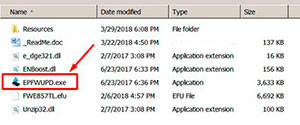
XP-430, XP-431   chipless firmware

When Firmware Update process is complete - printer will restart - usually it will take only a few minutes but can continue for 10-20 minutes in some rare cases. 
If process hangs or stops at 80-99% - replug power cable and start printer manually.

Now check current firmware version ( how to check ).
If firmware version is MO23HA - firmware has been uploaded successfully. You can go to next Step.

Step 4
If firmware version doesnt match - You have to upload firmware in special Firmware Mode - go to Step by Step Guide how to put printer in Firmware Mode - find Your printers model!!
After uploading firmware in Firmware Update Mode - run License.exe utility and use your Activation Key.

What do You have to do next after uploading chipless firmware?

1. Buy this Activation Key
2. Download License.exe application (Windows only) - download here
3. Run License.exe under Windows and press Activate Online button
4. Input Activation Key and press Ok!

Please keep in mind - there are 2 types of keys:
- Regular Activation Key (HAS expiration date of using);
- No Expiration date Activation Key (can be used whenever You want in 10 years).


Buy Activation Key after You have successfully uploaded Firmware to Your printer!

Prices and discounts:

Regular Activation Keys (HAS expiration date and couldn't be used after has expired):
1 Activation Key - $25
5 Activation Keys - $20 per Key
You can pay by Visa, MC etc. - Here
or by PayPal and other systems - Here

NO EXPIRATION Activation Keys (has NO expiration date - can be used whenever You want):
1 Activation Key - $27
5 Activation Keys - $22 per Key
You can pay by PayPal, Visa, MC etc. - Here

*The code is one-time use.

If You have any questions - You can read or place Your questions at Chipless thread at our Discussion Board - https://forum.2manuals.com/index.php?/topic/80414-chiplesssolutions-chipless-firmware-for-epson-printers-chip-virtual/

I want to:


Step 1
ADD TO CART
Step 2
CHECKOUT
Select payment method.
Step 3
Confirm the order.


We are in business since 2002 and do our best to give our customers perfect service!

Our customers reviews:

  Alberto Micker 2020-01-07 06:30:15  
  I bought the chipless key code and it worked as it should with the CIS...... Thank you
  roy titerlie 2004-10-30 06:07:36  
  i need service manual canon 6650 II, sorter and RDF please info.....
  latonna roberson 2019-04-03 18:41:10  
  My Epson 1400 got the end of life message and I had already reset it once before so I couldn't use the Epson site to reset it. I remembered this site from years ago and purchased the utility reset and it worked like a charm. Only wish I had not spent $400 on a new printer before remembering your site. Anyways I just did a live video showing that this really works on my youtube channel. More people need to know about this remedy!
  Ð›ÐµÐ½Ð¸ Виденова 2025-08-11 13:50:27  
  Just wanted to thank you! It's my second printer that need your help. I reset my Epson L3150 successfully only through WiFi. Excellent software and service!
  Timothy Tschanz 2025-11-18 18:20:32  
  This guide helped me get the program running on MacOS https://forum.2manuals.com/index.php?/topic/81227-mac-osx-developer-cannot-be-verified-solution/
  Joseph Bowman 2019-10-24 00:26:55  
  Epson XP-700 working fine till suddely get message saying 'ink pad at end of useful life - contact Epson Service' Epson service not interested as printer no longer under warranty and suggested best option would be to buy a new printer and scrap this one. So not a happy chappy and looked for options to try and resolve this issue. Found this site and downloaded reset program. WIN10 64bit PC connected to printer by WiFi. Ran reset utility - did not find any printers. Switched off printer and re started, disabled Epson Print Utility still no printer found. Rebooted PC and then after it had restarted tried the WIC Reset Utility again after connecting printer through USB. This time WIC found both connections WiFI and USB. Using USB took Reset option and purchased Key. Copied key into WIC utility and OK. Switched Off printer and then switched on and magic no error message and printer back to normal. Very pleased and somewhat relieved as have some printing to complete tonight before tomorrow morning. Very happy to pay £9.97 for this result.
  Eva Baumgartner 2025-06-02 15:36:12  
  Großartig! - mit trial versucht, heute gekauft, bezahlt, bekommen, angewendet - und mein Epson XP-950 läuft (mit neuem Tintenkissen) wie neu. Toller Service, ich bin sehr zufrieden.
  fernando rocha 2025-01-02 21:35:28  
  It works. Just purchased a one time counter reset license for my Epson L380. Immediately after payment with credit card (electronic version for web shopping) , I got the key number and used to reset the printer. Worked like a charm
  jose manuel gutierrez sagüillo 2012-12-04 07:30:14  
  todo perfecto a los 5 dias como dijeron me mandaron la clave un placer todo ok se puede confiar en la guente esta
Write review
Shopping Cart more
Shopping Cart is empty


How to pay?
We accept
Credit Cards, PayPal
and Western Union payments


We accept M-Pesa
Pay By M-Pesa
How to Pay by M-Pesa


Buy here or find Resellers in your country:

Argentina

Pay in Argentina Peso

Algeria

EasyPrint-dz.com

Australia

Mir-Aus.com.au

Bangladesh

Pay in Bangladesh by BDT

Brasil

Pay in Brasilian Reals
ReseteadoresWIC
Brasil

Burundi

PrintersAfrica.com

China

Pay in Chineese Yuan

Cote D Ivoire

MonpcImprime.com

Columbia

Pay in Columbian Peso
ReseteadoresWIC

Dominicana

Rellenadodecartuchos.com

DR Congo

Buy in DR Congo

Ecuador

ReseteadoresWIC

Ethiopia

PrintersAfrica.com

France

InkCissPrinter

Ghana

Pay in Ghana Cedis

Germany

InkCissPrinter.com

Japan

Pay in Japaneese Yen

Iran

MahaShop.ir
FixPrinters.ir

Iraq

AlmohandsWorkshop

Indonezia

Pay in Indonesian Rupiahs
FastPrint.co.id

Italia

Inkspeed.it
Stampacontinua.it

Kenya

PrintersAfrica.com
MagiColors.biz

New Zealand

Mir-Aus.com.au

Philippines

Pay in Philippine Peso

Poland

Tusze.info
Progbit.pl
ResetPampersa.pl
ResetWIC.pl

Portugal

Printsemfim.com
InkCissPrinter.com

Romania

CissMarket.ro
Cartuseria.ro
AmDigital.ro

Rwanda

PrintersAfrica.com
Ciss-Solutions.com

Saudi Arabia

Alelm-Alamal.com

Soomaaliya

PrintersAfrica.com

South Sudan

PrintersAfrica.com

Spain

InkCissPrintert.com

Tanzania

PrintersAfrica.com

Turkiye

Cescesor.com

Uganda

PrintersAfrica.com

Vietnam

WIC.vn
ResetKey.net
Want to sell Reset Keys in Your country?
Notifications more
NotificationsNotify me of updates to Activation Key for making Epson XP-430, XP-431, XP-434 Chipless Printers (for one device only)