Activation Key for making Epson XP-15000, XP-15010, EP-50V Chipless Printer (for one device only)

$65.00 $50.00
<b>Activation Key</b> for making Epson XP-15000, XP-15010, EP-50V Chipless Printer (for one device only)
   Click to enlarge
      

Be sure Your printer can be modified to Chipless Version.
That means You can pass Step 4 of this guide.

Don't buy Activation Key BEFORE You have checked if Your printers Firmware can be changed to Chipless! Follow next 5 Steps.

Step 1
Download and extract Zip archive (How to unzip (extract) files from Zip archive?) with Epson XP-15000, XP-15010, EP-50V Firmware  - NW07K7 version

Step 2
Connect printer to PC (under Windows OS) by proper USB cable.
Disable all Epson processes and services. You can do this manually using task manager and administration tools or You can do this via WIC Reset Utility (install and run it, then select MENU -> Support -> Disable processes).

Step 3
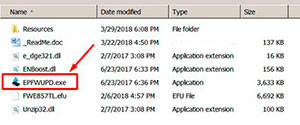
Upload Firmware to printer in the NORMAL MODE (do NOT use service mode yet just start the printer with the power button). Run EPFWUPD.EXE file and follow all steps until Firmware will upload in printer. 
xp-15000   chipless firmware

When Firmware Update process is complete - printer will restart - usually it will take only a few minutes but can continue for 10-20 minutes in some rare cases. 
If process hangs or stops at 80-99% - replug power cable and start printer manually.

Step 4
Now check current firmware version ( how to check ).
If firmware version is NW07K7 - firmware has been uploaded successfully. You can go to next Step.
If NO - restart the printer and try once more time.

What do You have to do next after uploading chipless firmware?

Step 5
1. Buy this Activation Key
2. Download License.exe application (Windows only). Password to extract - 12345.
3. Run License.exe under Windows and press Activate Online button
4. Input Activation Key and press Ok!

Please keep in mind - there are 2 types of keys:
- Regular Activation Key (HAS expiration date of using);
- No Expiration date Activation Key (can be used whenever You want in 10 years).


Buy Activation Key in case You have uploaded Firmware to Your printer successfully!

Prices and discounts:

Regular Activation Keys (HAS expiration date and couldn't be used after has expired):
1 Activation Key - $50
5 Activation Keys - $48 per Key
10 Activation Keys - $45 per Key
You can pay by PayPal, Visa, MC etc. :
Here or Here

NO EXPIRATION Activation Keys (has NO expiration date - can be used whenever You want):
1 Activation Key - $55
5 Activation Keys - $53 per Key
20 Activation Keys - $50 per Key
You can pay by PayPal, Visa, MC etc. :
Here

*The code is one-time use.

If You have any questions - You can read or place Your questions at Chipless thread at our Discussion Board - https://forum.2manuals.com/index.php?/topic/80414-chiplesssolutions-chipless-firmware-for-epson-printers-chip-virtual/


Step 1
ADD TO CART
Step 2
CHECKOUT
Select payment method.
Step 3
Confirm the order.


We are in business since 2002 and do our best to give our customers perfect service!

  Anonymous 2019-05-15 04:23:32  
  i couldn't print my work, but i found wic reset and keep my job, thanks from Mexico city.
  Art Fix 2011-06-06 09:34:43  
  My Epson 1280 started getting the dreaded flashing panel lights. The printer quit working all together. I found on the web, that the cause was the ink waste counter had topped out and the printer required service to reset the counter. Then I found this site and downloaded the manual and the service application. Ran the program and quickly reset the counter now all is well again! Worked like a dream. Thank you! Art @ artsgraphics.com
  Richard Chilton 2020-07-29 19:53:42  
  My Epson XP-800 max'd out on counters and died on me. Screen of death with printer disabled by manufacturers internal firmware. Researched the web and found these guys. The reset process and key purchase was easy to follow and after a few registration steps and a simple paypal transaction the reset key arrived, was entered and the printer was back working again. Saved me at least £80 on a new basic 3-in-1 printer plus ensured my existing ink supplies were not useless Thanks guys - thoroughly recommended
  santiago carlos 2004-06-26 18:59:49  
  prompt reply. thanks.
  Gary Heyes 2011-04-10 16:18:07  
  thanks guys,works a treat,no problems at all. all epson users would do well to use this util.
  Ivan Tilbury 2015-09-08 06:01:35  
  I purchased the epson adjustment program last night and got to work on it today.
I had a clog in C and it would not clear. I ve had my 4900 for over 2 years and have been able to handle them until now.
I learned about this site from another site that has cleaner for the 4900 and said I need to buy this software first. I bought it and tried it with the epson ink that was in my printer. I ran the adjustment and it cleared C but then there were other clogs. Because they werent clogged before I started, I cleared them the normal way through the printers options. Had they not cleared, I would have ran the adjustment again.
I had tried everything to get C to clear for a week and this program did it in one try!

I would highly recommend this for clearing a stubborn clog. And now it is in my arsenal if I get another one that I cant clear down the road. By the way, it does not work if your printer is networked. Mine was so I had to move a computer into the room with my printer, directly connect to it and install the drivers. Then it work fine.
If you got a clog that you cant fix, just buy it.
  an lyquoc 2007-08-17 22:13:51  
  Thank you! I paid less for my Epson R320 1 year ago than Epson want for servicing it. I had printed a head a nozzle check 2 days ago when I put in a new cartrige all printouts were perfect but today my Printer told me it needed service and refused to work. Your fix showed me two things the Ink wells did not need flushing as stated by the Epson Tech and that my printer had been set to only run half the usual plates so that was why the service notice cam up so soon after I purchased it.
Write review
Shopping Cart more
Shopping Cart is empty


How to pay?
We accept
Credit Cards, PayPal
and Western Union payments


We accept M-Pesa
Pay By M-Pesa
How to Pay by M-Pesa


Buy here or find Resellers in your country:

Argentina

Pay in Argentina Peso

Algeria

EasyPrint-dz.com

Australia

Mir-Aus.com.au

Bangladesh

Pay in Bangladesh by BDT

Brasil

Pay in Brasilian Reals
ReseteadoresWIC
Brasil

Burundi

PrintersAfrica.com

China

Pay in Chineese Yuan

Cote D Ivoire

MonpcImprime.com

Columbia

Pay in Columbian Peso
ReseteadoresWIC

Dominicana

Rellenadodecartuchos.com

DR Congo

Buy in DR Congo

Ecuador

ReseteadoresWIC

Ethiopia

PrintersAfrica.com

France

InkCissPrinter

Ghana

Pay in Ghana Cedis

Germany

InkCissPrinter.com

Japan

Pay in Japaneese Yen

Iran

MahaShop.ir
FixPrinters.ir

Iraq

AlmohandsWorkshop

Indonezia

Pay in Indonesian Rupiahs
FastPrint.co.id

Italia

Inkspeed.it
Stampacontinua.it

Kenya

PrintersAfrica.com
MagiColors.biz

New Zealand

Mir-Aus.com.au

Philippines

Pay in Philippine Peso

Poland

Tusze.info
Progbit.pl
ResetPampersa.pl
ResetWIC.pl

Portugal

Printsemfim.com
InkCissPrinter.com

Romania

CissMarket.ro
Cartuseria.ro
AmDigital.ro

Rwanda

PrintersAfrica.com
Ciss-Solutions.com

Saudi Arabia

Alelm-Alamal.com

Soomaaliya

PrintersAfrica.com

South Sudan

PrintersAfrica.com

Spain

InkCissPrintert.com

Tanzania

PrintersAfrica.com

Turkiye

Cescesor.com

Uganda

PrintersAfrica.com

Vietnam

WIC.vn
ResetKey.net
Want to sell Reset Keys in Your country?
Notifications more
NotificationsNotify me of updates to Activation Key for making Epson XP-15000, XP-15010, EP-50V Chipless Printer (for one device only)





