License for 1 PC for Epson XP-2100, XP-2101, XP-2105 series Adjustment Program (Latin)
How to buy unlimited version for One PC:
1. Log In to Your 2Manuals account
2. Download HardWare ID Utility HWID.exe, run it and copy yours PC Hardware ID
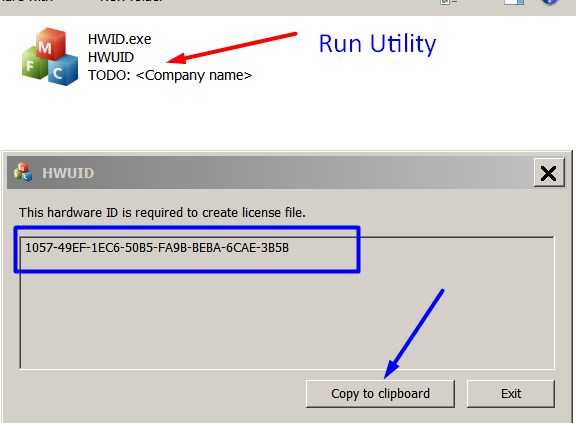
Note! You have to disable antivirus or put HWID.exe file to ignore list!
3. Put this item (License for One PC) in to your Shopping cart
4. Go to payment page and enter HardWare ID in to specified field:
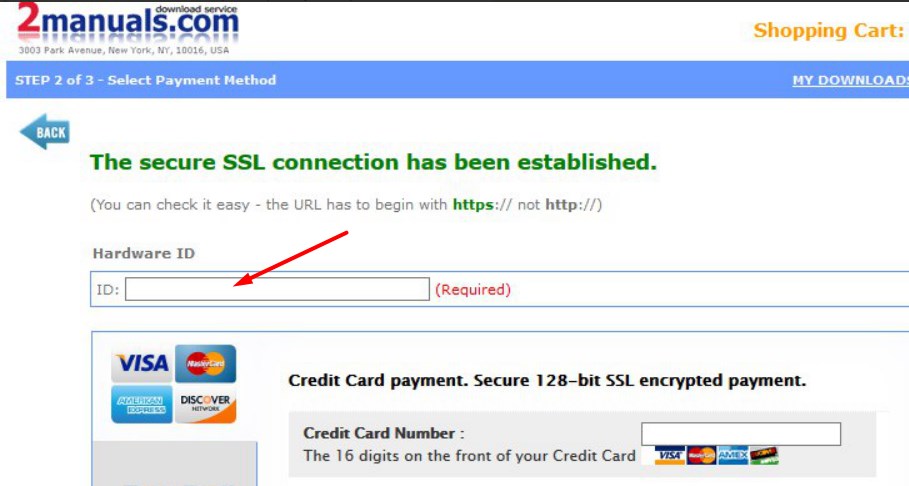
5. Make payment and You will get download link with Epson XP-2100, XP-2101, XP-2105 Adjustment Program with the License file included
6. Put Adjustment Program to Antivirus Ignore list or disable Antivirus. Then Run AdjProg.exe.
With this Epson Adjustment Program You can make adjustment procedures, Initial Ink Charge to clean and unclog printhead and Waste Ink Pad Counter Reset unlimited times.
What next?
- Download Epson XP-2100 Adjustment Program here -
- Purchase License for one printer
- You'll get License by email immediately after your payment transaction is complete.
before using the adjustment utility.
We dont have Free Epson XP-2101, XP-2105 resetter.
|

|
|
|
|
Step 1 ADD TO CART |
Step 2 CHECKOUT Select payment method. |
Step 3 Confirm the order. |
|
|
We are in business since 2002 and do our best to give our customers perfect service!
|
| Anonymous | 2020-08-14 14:18:58 | | I can't believe how easily my seemingly unfixable problem was solved by this site. Thank you so much, will definitely buy after the free trial! | |  | Patrick Blom Bachstein | 2016-02-25 19:28:33 | So had my Epson Pro 4900 disconnected from powersupply for about a month and a half, due to new facilities in my studio. Powered it up, printed a nozzle check, and banged my head against the wall! Only magenta and light cyan did appear, and two broken lines of photo black. Did the Windex trick 5-8 times, and at the 16. nozzlecheck, 9 colours appeared, BUT some actually has got worse, the more Windex the head had.
Preparing myself on making a stronger brew for the cleaning (a lot of Googling and reading!), I came across the Service Program. Reluctant to spill ~ 150 ml of ink, I first moved along (also, the website seemed shady, however, alot of mentions on various foras).
Today I decided \'What the heck, 30 bucks, if it doesn\'t work, I\'ll survive\', so I purchased a license, installed on a laptop (with USB connection instead of network), and chose the option to prime the left channels first - and WOW: EVERY nozzle on that side now fired, and made an (99%) perfect nozzle check. So did the other side, when finished filling the lines again.
So: 5 f*cking huge stars from me! :)
Thank you for this wonderful utility! | |  | cyril beckley | 2020-11-25 14:07:48 | |  | Wim De Bruycker | 2019-07-01 15:12:46 | | Epson xp-530 repaired thanks "trial"-key. Next time I'll puchase a fee-based key | |  | david miranda | 2016-04-07 16:43:28 | My Epson Stylus R280 is printing again! This was my favorite printer for photos and quick single-sided jobs. It printed and printed until the dreaded message and alternating flashing orange lights appeared.
I was skeptical that WicReset could do anything because of the flashing lights. I downloaded the Windows version (XP), virus scanned it and after it passed, installed it. I first tried the trial reset that sets the waste counters to 90%. That worked immediately. I bought a key. That worked immediately and now my printer is working like new and waste counters are near 0.
I use a continuous ink system (CIS) on my Epson printers... have for years. This software also has a nice utility to charge the cartridges and clean the heads. My R280 printer sat for a while after the counters reached limit and the ink lines filled with air. I used the WicReset utility to charge & clean, and now it prints like new.
This software is easy to use and guides you step by step. I encountered no difficulties and everything worked first time. It is very good that there are smart engineers out there who took the time to reverse-engineer Epson\'s awful ink pad limitations.
One note of caution, and this has nothing to do with WicReset... I print so much and fear my ink pads will truly overflow, so I\'ll be installing a waste ink tank on my printers. I had one on an ancient R200 printer and it worked great. This is an essential accessory for CIS printers.
Thank you WicReset. | |  | Dominique Aigroz | 2019-08-12 17:55:31 | | I'm happy, you saved my day. I was completely blocked.
Thank you! | |  | Sara Carmona | 2020-03-25 16:28:17 | | My printer Epson has encountered problem with ink pad waste and use wic tools and it works with the simplest step by step instructions.
thank you.Trusted and recommended | |
|




