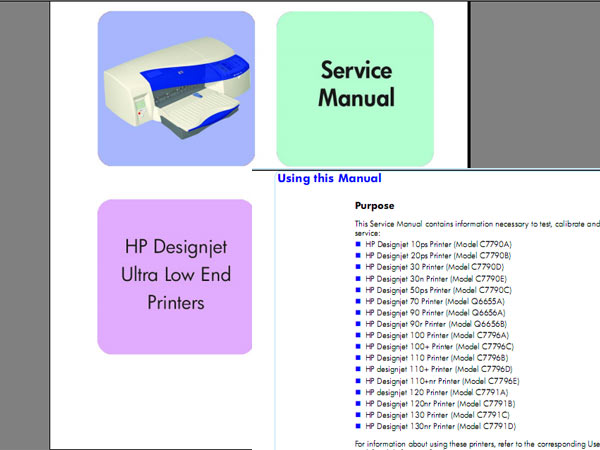
HP DesignJet 10, 20, 30, 50, 70, 90, 100, 110, 120, 130 Printer Service Manual, Parts Catalog and DDiagrams

$9.99
HP DesignJet 10, 20, 30, 50, 70, 90, 100, 110, 120, 130 Printer Service Manual, Parts Catalog and DDiagrams
   Click to enlarge
      

What’s in this Service Manual

This manual contains information necessary to test, calibrate and service:
HP Designjet 10ps Printer (Model C7790A)
HP Designjet 20ps Printer (Model C7790B)
HP Designjet 30 Printer (Model C7790D)
HP Designjet 30n Printer (Model C7790E)
HP Designjet 50ps Printer (Model C7790C)
HP Designjet 70 Printer (Model Q6655A)
HP Designjet 90 Printer (Model Q6656A)
HP Designjet 90r Printer (Model Q6656B)
HP Designjet 100 Printer (Model C7796A)
HP Designjet 100+ Printer (Model C7796C)
HP Designjet 110 Printer (Model C7796B)
HP Designjet 110+ Printer (Model C7796D)
HP Designjet 110+nr Printer (Model C7796E)
HP Designjet 120 Printer (Model C7791A)
HP Designjet 120nr Printer (Model C7791B)
HP Designjet 130 Printer (Model C7791C)
HP Designjet 130nr Printer (Model C7791D)

For information about using these printers, refer to the corresponding User Guide.
The procedures described in this manual are to be performed by HP-qualified
Service Personnel only.

FORMAT: High resolution PDF document
ZIP archive: 13 881 kB

I want to:

Any questions about this product?

SEND US REQUEST by filling the form below.


Step 1
ADD TO CART
Step 2
CHECKOUT
Select payment method.
Step 3
Confirm the order.


We are in business since 2002 and do our best to give our customers perfect service!

Our customers reviews:

  shilpa hankare 2006-09-20 00:35:09  
  Great job!! Thank you
  eloana coelho 2023-12-18 17:33:46  
  I always bought the key and it arrived correctly, but unfortunately in my last 3 purchases, the key did not arrive. I already sent an email to support with the order number with the problem, they told me that everything was resolved, but nothing was resolved, and I still don't have the key. very bad and slow customer support, it took almost 2 days for useless response.
  Biswajit Halder 2018-07-24 04:07:33  
  Dear ladies and gentlemen, I would like to thank you for your effort, it worked and the help was great. As a result, we have the throw-away society a trick beaten. Soooo I imagine help me Thank you
  Hadi Suryadi 2017-01-05 05:19:58  
  Very helpful, I can reset my epson L1800 printer counter in seconds so I can catch my deadline thanks for your efforts team!!
  rob cantrill 2006-07-30 09:41:39  
  Your Epson C42 Service Program worked a treat to clear the counter. So easy even I could do it
  grigri zine 2005-06-15 02:53:35  
  i just wnna thank u for ur gret websit becoz its so easy and shortly . by other wise i need u to info me about service manual if it has trouble codes and diagnostic and troubleshooting procedures ?......thanx
  Ð›ÐµÐ½Ð¸ Виденова 2025-08-11 13:50:27  
  Just wanted to thank you! It's my second printer that need your help. I reset my Epson L3150 successfully only through WiFi. Excellent software and service!
  Paul Jumbo 2019-04-19 18:47:57  
  I had Epson WF-2650 and it wasn't printing fully, skipping lines, even though colors were full.
I did a lot of cleaning, head cleaning, put new cartridge but no luck. I did some head cleaning using glass cleaner and syringes as shown on various youtube video.
After that, my printer didn't recognize two of the cartridges. I tried everything, cleaning contacts etc, nothing worked.

I was finally going to buy new cartridges however stores were closed today so I decided to look for chip-resetting tool but nothing good was available locally.

I came across this WIC reset utility and was really skeptical if it will work. I took the chance, bought the key, used the tool to reset firmware to chipless firmware, it was successful at the first go.
At this point, printer showed all ink levels 100%. I printed a test page and it came out perfect.
To make it even more interesting for me, I live in Europe and during one of the trip, I bought two sets of XL cartridges for this same model but printer didn't recognize in the past and I was going to throw them since these were no good for my EU model. I tried these again after chip reset firmware and voila, they works too.

I am amazed at the propaganda of these printer manufactures that even original printer cartridges from US didn't work on the model here in EUROPE, these used to fit perfectly but printer wouldn't recognize however, now they works too.
Today, I was almost ready to trash my 2.5 yr old and not much used printer but after a lot of trying and finally using WIC reset utility, the printers works like new and saved me a lot!

These were the best 20 CHF/USD I spent today!
Thank you very much and I don't need to worry about relying on a hardware chip-reset tool. I will now be able to use US model cartridges and re-fill i like without having to worry. I even printed some photos using this same printer on photo paper today and printer did an excellent job.
  roberto costa 2005-03-28 06:17:39  
  Want to thank u for ur gret websit becoz its so easy and shortly . by other wise i need u to info me about service manual if it has trouble codes and diagnostic and troubleshooting procedures ?......thanx
Write review
Shopping Cart more
Shopping Cart is empty


How to pay?
We accept
Credit Cards, PayPal
and Western Union payments


We accept M-Pesa
Pay By M-Pesa
How to Pay by M-Pesa


Buy here or find Resellers in your country:

Argentina

Pay in Argentina Peso

Algeria

EasyPrint-dz.com

Australia

Mir-Aus.com.au

Bangladesh

Pay in Bangladesh by BDT

Brasil

Pay in Brasilian Reals
ReseteadoresWIC
Brasil

Burundi

PrintersAfrica.com

China

Pay in Chineese Yuan

Cote D Ivoire

MonpcImprime.com

Columbia

Pay in Columbian Peso
ReseteadoresWIC

Dominicana

Rellenadodecartuchos.com

DR Congo

Buy in DR Congo

Ecuador

ReseteadoresWIC

Ethiopia

PrintersAfrica.com

France

InkCissPrinter

Ghana

Pay in Ghana Cedis

Germany

InkCissPrinter.com

Japan

Pay in Japaneese Yen

Iran

MahaShop.ir
FixPrinters.ir

Iraq

AlmohandsWorkshop

Indonezia

Pay in Indonesian Rupiahs
FastPrint.co.id

Italia

Inkspeed.it
Stampacontinua.it

Kenya

PrintersAfrica.com
MagiColors.biz

New Zealand

Mir-Aus.com.au

Philippines

Pay in Philippine Peso

Poland

Tusze.info
Progbit.pl
ResetPampersa.pl
ResetWIC.pl

Portugal

Printsemfim.com
InkCissPrinter.com

Romania

CissMarket.ro
Cartuseria.ro
AmDigital.ro

Rwanda

PrintersAfrica.com
Ciss-Solutions.com

Saudi Arabia

Alelm-Alamal.com

Soomaaliya

PrintersAfrica.com

South Sudan

PrintersAfrica.com

Spain

InkCissPrintert.com

Tanzania

PrintersAfrica.com

Turkiye

Cescesor.com

Uganda

PrintersAfrica.com

Vietnam

WIC.vn
ResetKey.net
Want to sell Reset Keys in Your country?
Notifications more
NotificationsNotify me of updates to HP DesignJet 10, 20, 30, 50, 70, 90, 100, 110, 120, 130 Printer Service Manual, Parts Catalog and DDiagrams