HP Digital Sender 9100C Service Manual, Parts and Diagrams

$9.99
HP Digital Sender 9100C Service Manual, Parts and Diagrams
   Click to enlarge
      

HP Digital Sender 9100C Service Manual, Parts and Diagrams

This manual is mainly thought for Technicians and Customer Engineers (CE's) that will repair the product On Site. It is a good reference document for the Repair Centers (RC's) too.

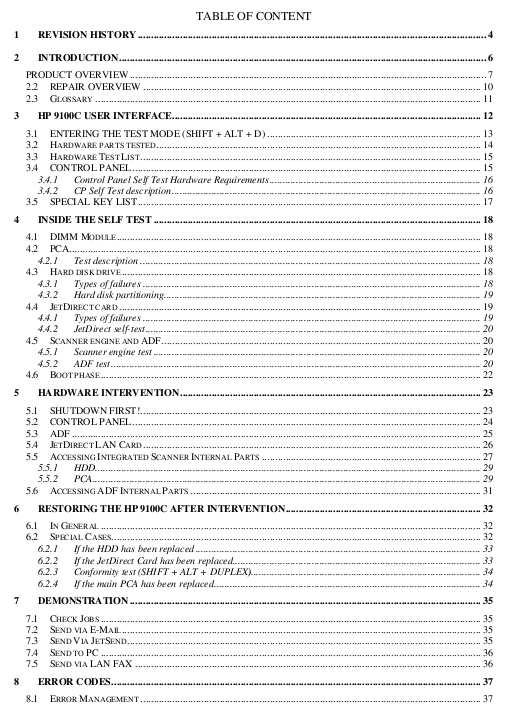
Table of Contents

1 REVISION HISTORY
2 INTRODUCTION
3 HP 9100C USER INTERFACE
4 INSIDE THE SELF TEST
5 HARDWARE INTERVENTION
6 RESTORING THE HP 9100C AFTER INTERVENTION.
7 DEMONSTRATION
8 ERROR CODES

Total 40 pages
FORMAT: High resolution PDF document!
ZIP archive: 620 kB

I want to:

Any questions about this product?

SEND US REQUEST by filling the form below.


Step 1
ADD TO CART
Step 2
CHECKOUT
Select payment method.
Step 3
Confirm the order.


We are in business since 2002 and do our best to give our customers perfect service!

  Brian Bloomer 2011-04-30 05:19:44  
  Success! I installed a OctInkjet waste inkpad overflow and tried their reset to no avail - they furnished your link. Your reset fixed my RX690 Epson printer within minutes . Ink started to flow into the overflow immediately (just as well it was installed). I did apattern check-all six colours perfect. Thank you Brian
  Josh Preston 2020-01-19 16:48:29  
  reset ink pads on Epson xp 720 in a few minutes, wonderful
  Kullervo Hirvonen 2017-12-20 12:54:32  
  Epson XP-750 alive again. Thank you! Installing and operating were simple. Christmas Greetings 2017 from Finland, 20.12.2017.
  Joseph Bowman 2019-10-24 00:26:55  
  Epson XP-700 working fine till suddely get message saying 'ink pad at end of useful life - contact Epson Service' Epson service not interested as printer no longer under warranty and suggested best option would be to buy a new printer and scrap this one. So not a happy chappy and looked for options to try and resolve this issue. Found this site and downloaded reset program. WIN10 64bit PC connected to printer by WiFi. Ran reset utility - did not find any printers. Switched off printer and re started, disabled Epson Print Utility still no printer found. Rebooted PC and then after it had restarted tried the WIC Reset Utility again after connecting printer through USB. This time WIC found both connections WiFI and USB. Using USB took Reset option and purchased Key. Copied key into WIC utility and OK. Switched Off printer and then switched on and magic no error message and printer back to normal. Very pleased and somewhat relieved as have some printing to complete tonight before tomorrow morning. Very happy to pay £9.97 for this result.
   2013-12-05 11:44:10  
  Holy crap this is a lifesaver / money saver / mental breakdown saver and just an amazing product. I was on the verge or completing my order for a new printer when I came across this site. Why spend $200. for a new printer when $10. can breathe new life into my old Epson Artisan 835 with CISS. I'm good to go now, just have to get a waste ink system installed and I'm back in business. Thanks.
  Prapan Chulapinyo 2016-11-10 15:46:54  
  It work great! But it like I\'ve force to buy because I\'ve no option. Price should be lower.
  victor zarate 2020-12-25 04:58:40  
  well pleased making my epson w-2860 chipless . the ink levels remain 100 % full i have a ciss system so i always have more ink than printer knows about.no longer the ritual of going through the motions of changing the cartridge when theres tons really being fed into the cartridges
Write review





