Epson WorkForce Pro WF-C5210, WF-C5290, WF-C5710, WF-C5790 Adjustment Program for printhead unclogging, printer adjustments and maintenance for ONE PC unlimited.
This Epson WorkForce Pro WF-C5210, WF-C5290, WF-C5710, WF-C5790 adjustment program can be used under Windows XP, 7, 8, 10
(or under higher versions [in Windows XP, 7 compatibility mode]) with USB connection only.
How to buy unlimited version for One PC:
1. Log In to Your 2Manuals account
2. Download HardWare ID Utility HWID.exe, run it and copy yours PC Hardware ID
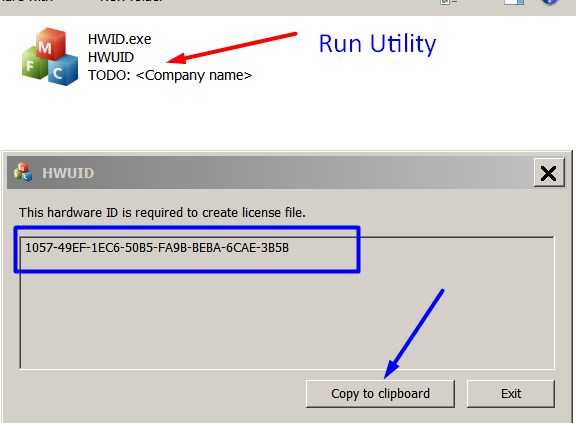
Note! You have to disable antivirus or put HWID.exe file to ignore list!
3. Put this item in to your shopping cart
4. Go to payment page and enter HardWare ID in to specified field:
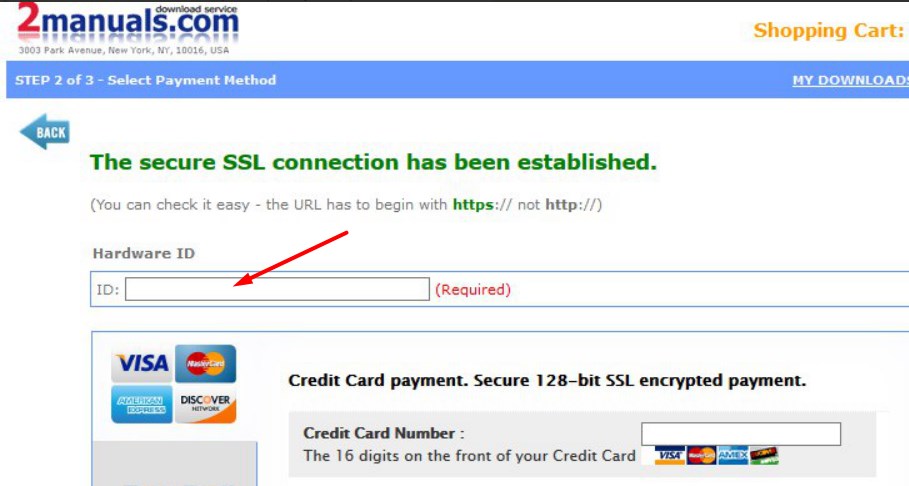
5. Make payment and You will get download link with Epson WF-C5210, WF-C5290, WF-C5710, WF-C5790 Adjustment Program with the License file included. Download ZIP Archive to your PC and extract files to the folder on Your PC.
6. Put WF-C5210, WF-C5290, WF-C5710, WF-C5790 Adjustment Program to Antivirus Ignore list or disable Antivirus. Then Run ServProg.exe.
If You want to pay by PayPal -
Go Here to pay by PayPal
With this EpsonWF-C5210, WF-C5290, WF-C5710, WF-C5790 Program You can make adjustment and maintenance procedures and Initial Ink Charge to clean and unclog printhead.
You can download Free DEMO version first. This DEMO Epson WF-C5210, WF-C5290, WF-C5710, WF-C5790 Adjustment Program is developed special for customers. Download it Free. You can see all available adjustment functions in Original WF-C5210, WF-C5290, WF-C5710, WF-C5790 Adjustment Program and be sure before purchasing the program.
Download Epson WF-C5210, WF-C5290, WF-C5710, WF-C5790 DEMO Adjustment Program Free - Download Free
Video Tutorial how to work with DEMO Epson WF-C5210, WF-C5290, WF-C5710, WF-C5790 Adjustment Program:
To get this adjustment program, for the Epson WF-C5210, WF-C5290, WF-C5710, WF-C5790 you need to do the following:
- Download Epson WF-C5210, WF-C5290, WF-C5710, WF-C5790 Adjustment Program.
- Buy this item - License for ONE PC for Epson WF-C5210, WF-C5290, WF-C5710, WF-C5790 Adjustment Program. You'll be able to download License file immediately after your payment transaction is complete.
before using the adjustment utility.
Please contact us if you have not received your order.
|
|
|
|
|
Step 1
ADD TO CART |
Step 2
CHECKOUT
Select payment method. |
Step 3
Confirm the order. |
|
|
We are in business since 2002 and do our best to give our customers perfect service!
|
| pierre commenge | 2011-06-08 14:51:41 | | it does not work, can not recognize ink cartridges always displayed, Epson SX400
========== REPLY ==============
The WIC reset utility can reset Waste Ink Counters only. Not Ink cartrigs levels in SX400. You can use auto reset chps to reset the ink levels. | |  | leandro condoleo | 2011-11-05 23:58:39 | | thats my first time to do that , so i hope working good , i hava a epson artisan 800, im gonna reset. | | | johnny grinyer | 2013-03-02 00:11:10 | | Well i\'d like to say thank you for your support now our printer Epson 1410 was reset already and we continue our printing now. good program to reset the counters of the printer it was very great... | | | Anonymous | 2020-02-01 22:20:42 | | I have used this ink pad reset utility MANY times on my Epson 1430. Works great! Highly recommend!! | | | Norbert Mezei | 2019-02-19 18:26:12 | | Hello there,
I am interested in buying a license key to make my WF-5620 chipless. Firmware upload is completed, I have fear I may have problems with your windows application and firewall. Do you offer support to make the License app work ?
Thank you, resetters !
===========
Yes sure | | | lee byoung kyu | 2008-04-16 01:54:28 | |
|





 Total customers: 436935
 Customers online: 87








