Epson WorkForce WF-3011, WF-3531 (ECC China) Ver.1.0.5 Service Adjustment Program New!

$9.99
Epson <b>WorkForce WF-3011, WF-3531</b> (ECC China) Ver.1.0.5 Service Adjustment Program  <font color=red>New!</font>
   Click to enlarge
      

Epson WorkForce WF-3011, WF-3531 ADJUSTMENT PROGRAM (ECC China) Ver.1.0.5

This adjustment program is developed for making printers adjustments, Ink charge, paper feed adjustments, printhead power cleaning etc.

This adjustment program DOESN'T HAVE Waste Ink Counters Reset function, EEPROM read/write function and Initialization.


The Epson Adjustment Program for New models Epson WorkForce WF-3011, WF-3531 can be used under Windows only (Millenium, 2000, XP, Vista [in compatibility mode]).

To get this adjustment program, for the Epson WorkForce WF-3011, WF-3531 you need to do the following:

  1. Purchase the utility from 2manuals.com.
  2. You'll get download link on-line and in the email message too
We recommend reading the Epson WorkForce WF-3011, WF-3531 Service Manual before using the adjustment utility.

Epson WorkForce WF-3010, WF-3520, WF-3530, WF-3540 ADJUSTMENT PROGRAM (EURO, CISMEA) Ver.1.0.0

This adjustment program is developed for making printers adjustments, Ink charge, paper feed adjustments, printhead power cleaning etc.

This adjustment program DOESN'T HAVE Waste Ink Counters Reset function.

The Epson Adjustment Program for New models Epson WorkForce WF-3010, WF-3520, WF-3530, WF-3540 can be used under Windows only (Millenium, 2000, XP, Vista [in compatibility mode]).

To get this adjustment program, for the Epson WorkForce WF-3010, WF-3520, WF-3530, WF-3540 you need to do the following:

  1. Purchase the utility from 2manuals.com.
  2. You'll get download link on-line and in the email message too
We recommend reading the Epson WorkForce WF-3010, WF-3520, WF-3530, WF-3540 Service Manual before using the adjustment utility.

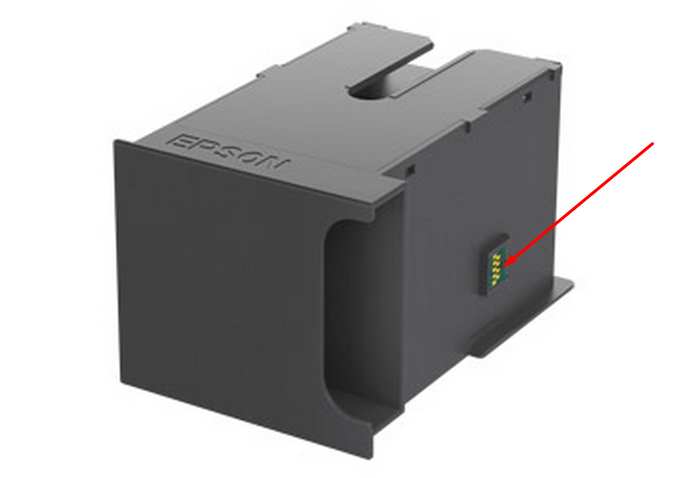
This printer models have separate Waste Ink Maintenance Box with its own IC chip. You can replace Waste Ink Maintenance Box or reset the chip on the Waste Ink Maintenance Box. Read more about how to reset the Waste Ink Maintenance Box.
Please contact us if you have not received your order.

I want to:

Any questions about this product?

SEND US REQUEST by filling the form below.


Step 1
ADD TO CART
Step 2
CHECKOUT
Select payment method.
Step 3
Confirm the order.


We are in business since 2002 and do our best to give our customers perfect service!

  Ian Jones 2012-08-11 17:15:25  
  This is my second purchase today, for the same utility. Purchased under \"ian@cinnamoncafe.com\", had no end of problems. Once I paid the system did not let me in. Tried to change the password and it sent me 3 updates to the correct address, then informed me that the e-mail and password where both incorrect. Still have no joy. Decided to register again at ian@jonesi.demon.co.uk, and everything worked smoothly!
  gökhan semizer 2010-12-03 23:40:12  
  Thank you! My Artisan 810 now working.
  fer mon 2011-08-06 16:16:20  
  NECESITARÍA LA LLAVE PARA LIMPIAR UNA EPSON STYLUS PHOTO RX-585
  Wim De Bruycker 2019-07-01 15:12:46  
  Epson xp-530 repaired thanks "trial"-key. Next time I'll puchase a fee-based key
  carmelo carmelo 2020-06-27 19:33:16  
  Thanks a lot all works. You saved my money. Didnt believe that it will be so easy to solve the problem. one more time thanks a lot
  Neil Skidmore 2015-11-23 00:28:01  
  Ace. I downloaded the programme which told me that one waste ink was at 65 % and the other was at 100% This told me that the programme was communicating with the printer (Another utility I tried would not even talk to the printer.) This gave me confidence to buy the key to activate the reset. It worked in seconds and my now perfectly functioning A3+ printer is no longer a pile of scrap. If only Epson UK were this good!!!
  dave hardik yogeshbhai 2006-12-03 22:49:16  
  Good heavens -- that\'s not just good service, it\'s frighteningly good! I hope you do get to sleep once in a while . . . . Many thanks, and take good care! Dave
  Mervyn Scott 2013-09-03 06:14:42  
  Your product worked like a dream. I have been having a horrible problem using ideas from other sources and your solution worked immediately and fast! Excellent program, you save my wallet and time...!!! Epson Artisan 810
Write review
Shopping Cart more
Shopping Cart is empty


How to pay?
We accept
Credit Cards, PayPal
and Western Union payments


We accept M-Pesa
Pay By M-Pesa
How to Pay by M-Pesa


Buy here or find Resellers in your country:

Argentina

Pay in Argentina Peso

Algeria

EasyPrint-dz.com

Australia

Mir-Aus.com.au

Bangladesh

Pay in Bangladesh by BDT

Brasil

Pay in Brasilian Reals
ReseteadoresWIC
Brasil

Burundi

PrintersAfrica.com

China

Pay in Chineese Yuan

Cote D Ivoire

MonpcImprime.com

Columbia

Pay in Columbian Peso
ReseteadoresWIC

Dominicana

Rellenadodecartuchos.com

DR Congo

Buy in DR Congo

Ecuador

ReseteadoresWIC

Ethiopia

PrintersAfrica.com

France

InkCissPrinter

Ghana

Pay in Ghana Cedis

Germany

InkCissPrinter.com

Japan

Pay in Japaneese Yen

Iran

MahaShop.ir
FixPrinters.ir

Iraq

AlmohandsWorkshop

Indonezia

Pay in Indonesian Rupiahs
FastPrint.co.id

Italia

Inkspeed.it
Stampacontinua.it

Kenya

PrintersAfrica.com
MagiColors.biz

New Zealand

Mir-Aus.com.au

Philippines

Pay in Philippine Peso

Poland

Tusze.info
Progbit.pl
ResetPampersa.pl
ResetWIC.pl

Portugal

Printsemfim.com
InkCissPrinter.com

Romania

CissMarket.ro
Cartuseria.ro
AmDigital.ro

Rwanda

PrintersAfrica.com
Ciss-Solutions.com

Saudi Arabia

Alelm-Alamal.com

Soomaaliya

PrintersAfrica.com

South Sudan

PrintersAfrica.com

Spain

InkCissPrintert.com

Tanzania

PrintersAfrica.com

Turkiye

Cescesor.com

Uganda

PrintersAfrica.com

Vietnam

WIC.vn
ResetKey.net
Want to sell Reset Keys in Your country?
Notifications more
NotificationsNotify me of updates to Epson WorkForce WF-3011, WF-3531 (ECC China) Ver.1.0.5 Service Adjustment Program New!





