Epson PP-50, PP-50BD, PP-100, PP-100N, PP-100AP, PP-100II Adjustment Program
This adjustment program is developed for making PP-50, PP-50BD, PP-100, PP-100N, PP-100AP, PP-100II Disc Producer adjustments and maintenance
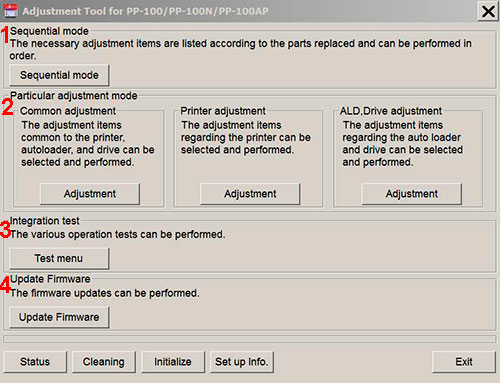
Adjustment program for Epson PP-50, PP-50BD, PP-100, PP-100N, PP-100AP, PP-100II Disc Producers has 4 main sections:
1. Sequential mode includes necessary adjustment items according to the parts replaced and can be performed in order
2. Particular adjustment mode includes 3 parts:
- Common adjustments - adjustments common to the printer, autoloader and drive.
- Printer adjustments - adjustments items regarding the printer.
- ALD, Drive adjustments - adjustments items regarding auto loader and drive.
3. Integration test - various operation tests can be performed in this section.
4. Update Firmware - the firmware updates can be performed in this section.
NOTE: Reset Drives function is NOT AVAILABLE for PP-100II model!
This adjustment program DOESN'T HAVE such functions as Waste Ink Counters Reset
If You need Waste Ink Counters reset - please use the WIC Reset Utility - Download here
Epson PP-50, PP-50BD, PP-100, PP-100N, PP-100AP, PP-100II
Adjustment Program can be used under Windows only (Millenium, 2000, XP, 7, 8, 10 Vista [in compatibility mode]).
To get this adjustment program, for the
Epson PP-50, PP-50BD, PP-100, PP-100N, PP-100AP, PP-100II
you need to do the following:
- Purchase the utility from 2manuals.com.
- You'll get download link on-line and in the email message too
Before You will use Adjustment Program we recomend You reading Service Manuals:
Epson PP-100 Service Manual
Epson PP-100AP Service Manual
Epson PP-100N Service Manual
You can download Free DEMO version first. This DEMO PP-50, PP-50BD, PP-100, PP-100N, PP-100AP, PP-100II Adjustment Program is developed special for our customers. You can download it and use - Free. You can see all available adjustment functions in Original PP-50, PP-50BD, PP-100, PP-100N, PP-100AP, PP-100II Adjustment program and be sure before purchasing this Adjustment program.
Download Epson PP-100, PP-100N, PP-100AP, PP-100II DEMO Adjustment Program Free - Download Free
Video Tutorial how to work with DEMO Epson PP-50, PP-50BD, PP-100, PP-100N, PP-100AP, PP-100II Adjustemnt Program:
Please contact us if you have not received your order.
We don't supply Free Epson PP-50, PP-50BD, PP-100, PP-100N, PP-100AP, PP-100II Resetter
|
|
|
|
|
Step 1
ADD TO CART |
Step 2
CHECKOUT
Select payment method. |
Step 3
Confirm the order. |
|
|
We are in business since 2002 and do our best to give our customers perfect service!
|
| Ahmad BALOSH | 2024-07-14 22:29:40 | | للآمانة المنتج فعال
قام بالمطلوب واعاد ضبط منشفة الحبر
sans aucune doute, il marche bien, j'avoue | |  | Alexander Molinar | 2019-09-27 22:53:46 | Printer reset with key then failed waste counter back to 100% after test print. Key no longer works!
2Manuals reply:
There is bug in Epson Photo 1390, 14000, 1410 firmware that put waste counter overflow back again after reset. This problem can be solved by updating printers firmware. Here is step by step manual how to fix it - www.2manuals.com/1400fw_update.php | | | Stewart Hulls | 2009-10-24 13:33:34 | | I have just downloaded the adjustment program for epson tx800fw it took 2 minutes to reset the printer and it is back up and running. You guys are the best Thank you. | | | Alessandro Regoli | 2011-09-03 14:19:11 | | ok and the printer is' unlocked immediately
you are great thanks | | | JEFF GILLINGHAM | 2010-11-11 18:45:59 | | very good program,easy to use,saved me throwing away a very good printer.well worth the money.Jeff (uk) | | | Robert Tainio | 2013-11-08 03:16:47 | | I was ready to trash my Epson 1400 but decided to give 2manuals.com a try. I purchased the usb sender tool and firmware upgrade as well. Had my printer fixed in minutes! Great work and products! Anyone out there that is thinking of trying the products offered here but are hesitant, don't be. There stuff works.
Regards, Forrest T. | |
|





 Total customers: 437351
 Customers online: 114








