Epson WorkForce Pro WF-C5210, WF-C5290, WF-C5710, WF-C5790 Adjustment Program for printhead unclogging, printer adjustments and maintenance for ONE PC unlimited.
This Epson WorkForce Pro WF-C5210, WF-C5290, WF-C5710, WF-C5790 adjustment program can be used under Windows XP, 7, 8, 10
(or under higher versions [in Windows XP, 7 compatibility mode]) with USB connection only.
How to buy unlimited version for One PC:
1. Log In to Your 2Manuals account
2. Download HardWare ID Utility HWID.exe, run it and copy yours PC Hardware ID
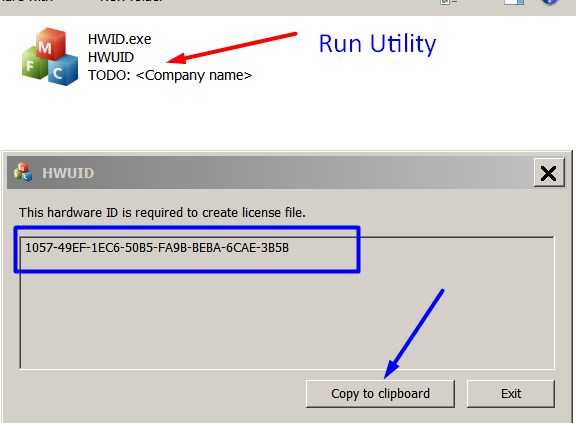
Note! You have to disable antivirus or put HWID.exe file to ignore list!
3. Put this item in to your shopping cart
4. Go to payment page and enter HardWare ID in to specified field:
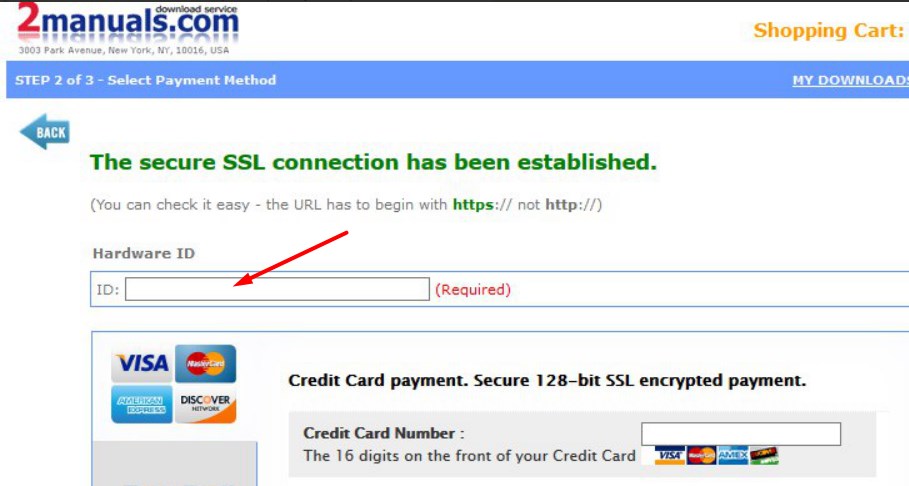
5. Make payment and You will get download link with Epson WF-C5210, WF-C5290, WF-C5710, WF-C5790 Adjustment Program with the License file included. Download ZIP Archive to your PC and extract files to the folder on Your PC.
6. Put WF-C5210, WF-C5290, WF-C5710, WF-C5790 Adjustment Program to Antivirus Ignore list or disable Antivirus. Then Run ServProg.exe.
If You want to pay by PayPal -
Go Here to pay by PayPal
With this EpsonWF-C5210, WF-C5290, WF-C5710, WF-C5790 Program You can make adjustment and maintenance procedures and Initial Ink Charge to clean and unclog printhead.
You can download Free DEMO version first. This DEMO Epson WF-C5210, WF-C5290, WF-C5710, WF-C5790 Adjustment Program is developed special for customers. Download it Free. You can see all available adjustment functions in Original WF-C5210, WF-C5290, WF-C5710, WF-C5790 Adjustment Program and be sure before purchasing the program.
Download Epson WF-C5210, WF-C5290, WF-C5710, WF-C5790 DEMO Adjustment Program Free - Download Free
Video Tutorial how to work with DEMO Epson WF-C5210, WF-C5290, WF-C5710, WF-C5790 Adjustment Program:
To get this adjustment program, for the Epson WF-C5210, WF-C5290, WF-C5710, WF-C5790 you need to do the following:
- Download Epson WF-C5210, WF-C5290, WF-C5710, WF-C5790 Adjustment Program.
- Buy this item - License for ONE PC for Epson WF-C5210, WF-C5290, WF-C5710, WF-C5790 Adjustment Program. You'll be able to download License file immediately after your payment transaction is complete.
before using the adjustment utility.
Please contact us if you have not received your order.
|
|
|
|
|
Step 1
ADD TO CART |
Step 2
CHECKOUT
Select payment method. |
Step 3
Confirm the order. |
|
|
We are in business since 2002 and do our best to give our customers perfect service!
|
| mohammed kateeb | 2006-01-02 01:40:38 | | i just wnna thank u for ur gret websit becoz its so easy and shortly . by other wise i need u to info me about service manual if it has trouble codes and diagnostic and troubleshooting procedures ?......thanx | |  | edu col | 2006-12-16 12:50:56 | | Dear Mr.
eval program
thanks
Eduin Col | | | NACHO GOMEZ | 2010-10-25 23:44:48 | I got the flashing lights and Service required message on my Epson R2400, as many others have before!
I spent hours online and eventually managed to download Epsons own
Adjustment Program. It showed me the waste ink settings but would not let me reset the counter, although I had disconnected the feed tubes and re-routed them to an external bottle.
Today I found 2Manuals.com and downloaded their WIC reset program. I thought It probably won\'t work but one key is only $9.99 so what the heck!
Well that was the best $9.99 I have ever spent - as soon as I entered the key and hit RESET the printer whirred into action, ink pumped into my waste bottle and I am back in action!
This has saved me a lot of money and the hassle of sending the printer to an Epson service centre. Truly a 5***** product! Chris Porteous, Prestatyn, U.K. | | | sunday omebe | 2013-08-28 10:58:28 | | Quick and easy. i have an XP600 and Artisan 725 that were showing the \'waste inkpad error\'. I bough 2 keys and solved a 2 week headache in 10 minutes.
Thanks for doing what you do and doing a Great Job in helping people Your the Best
Thanks | | | Gerard van Bennekom | 2019-06-18 14:00:12 | | Much easier then I had expected.
Downloaded the program, purchased the key, switch off and on the printer and that was it!
The printer works again. | | | Philip George | 2011-05-05 02:15:19 | | Worked like a champ on my Epson Artisan 700. . Thanks! | | | keven gilson | 2020-04-09 17:10:11 | | thank you for the free trial!! I think the printer companies should give low income customers the reset key free!! It took me a few tries to get this to work, but was successful. You saved my day!! | |
|





 Total customers: 437323
 Customers online: 105








