Licence for 1 PC for Epson L1110, L3100, L3101, L3110, L3111, L3116, L3150, L3151, L3156, L5190 Adjustment Program V 1.0.2 (EURO)
This Epson L1110, L3100, L3101, L3110, L3111, L3116, L3150, L3151, L3156, L5190 adjustment program can be used under Windows XP, 7, 8, 10 with USB connection only. Download here. Password - 12345
How to buy unlimited version for One PC:
1. Log In to Your 2Manuals account
2. Download HardWare ID Utility HWID.exe, run it and copy yours PC Hardware ID
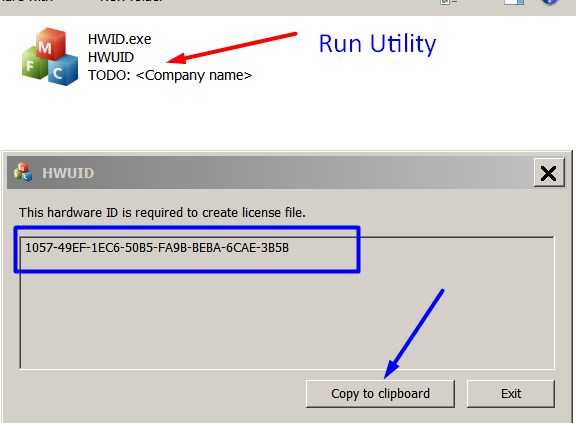
Note! You have to disable antivirus or put HWID.exe file to ignore list!
3. Put this item (License for One PC) in to your Shopping cart
4. Go to payment page and enter HardWare ID in to specified field:
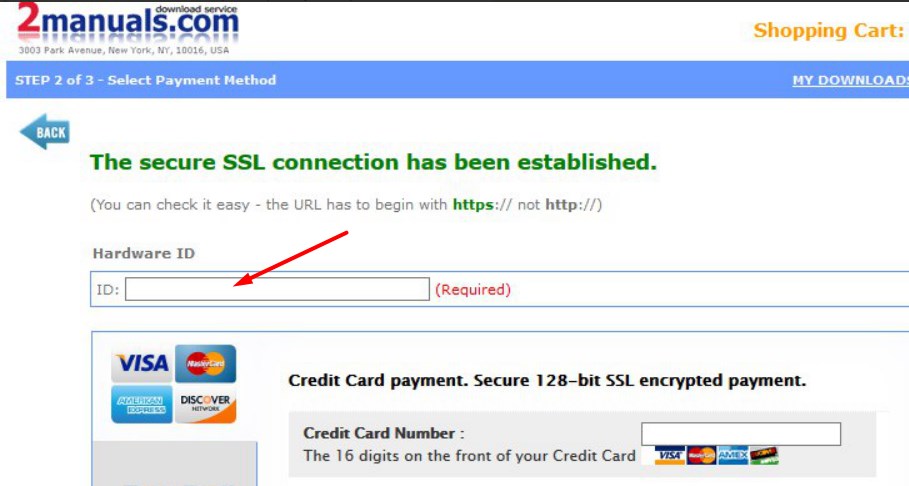
5. Make payment and You will get download link with Epson L1110, L3100, L3101, L3110, L3111, L3116, L3150, L3151, L3156, L5190 Adjustment Program with the License file included
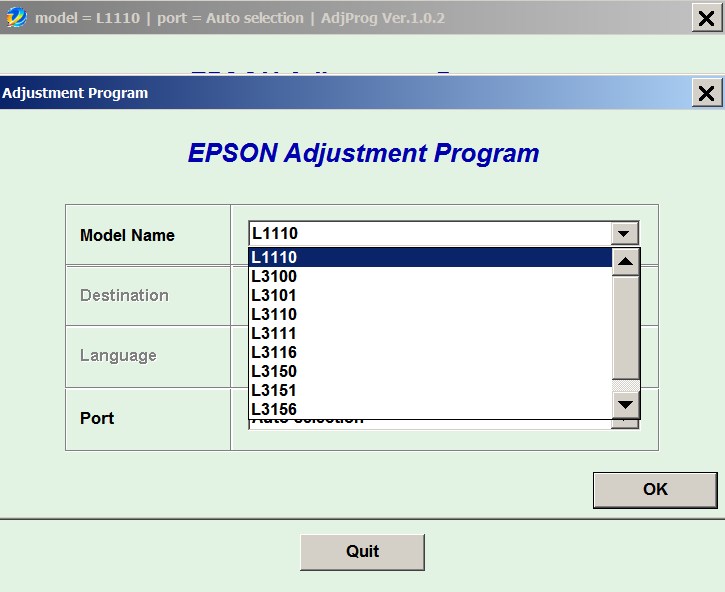
6. Put Adjustment Program to Antivirus Ignore list or disable Antivirus. Then Run AdjProg.exe.
With this Epson Adjustment Program You can make adjustment procedures, Initial Ink Charge to clean and unclog printhead and Waste Ink Pad Counter Reset unlimited times.
To get this adjustment program you need to do the following:
- Purchase the utility from 2manuals.com.
- You'll be able to download program immediately after your payment transaction is complete.
before using the adjustment utility.
Please contact us if you have not received your order.
I purchased the adjustment program last night and got to work on it today.
I had a clog in C and it would not clear. I ve had my printer for over 2 years and have been able to handle them until now.
I learned about this site from another site that has cleaner for the L1110 and said I need to buy this software first. I bought it and tried it with the epson ink that was in my printer. I ran the adjustment and it cleared C but then there were other clogs. Because they werent clogged before I started, I cleared them the normal way through the printers options. Had they not cleared, I would have ran the adjustment again.
I had tried everything to get C to clear for a week and this program did it in one try!
I would highly recommend this for clearing a stubborn clog. And now it is in my arsenal if I get another one that I cant clear down the road. By athe way, it does not work if your printer is networked. Mine was so I had to move a computer into the room with my printer, directly connect to it and install the drivers. Then it work fine.
If you got a clog that you cant fix, just buy it.
Ivan Tilbury
|
|
|
|
|
Step 1
ADD TO CART |
Step 2
CHECKOUT
Select payment method. |
Step 3
Confirm the order. |
|
|
We are in business since 2002 and do our best to give our customers perfect service!
|
Our customers reviews:
| ramesh eete | 2023-02-10 07:45:41 | | Epson L5190 model is the best printer colour print and black print is good quality - good program! | | | Daniel Plaquin | 2025-12-28 16:36:56 | | Ce logiciel a le mérite de fonctionner en WiFi. On n'a donc pas besoin du câble USB.
Pour 8.54 € (9.99 $) j'ai facilement réinitialiser les compteurs de mon Epson XP-610 qui était bloquée.
This software has the advantage of working over Wi-Fi, so you don't need a USB cable.
For €8.54 ($9.99), I easily reset the counters on my Epson XP-610, which had frozen. | |  | Robin BARNFATHER | 2023-09-28 19:51:59 | | Was a bit sceptical/dubious but worked without any problem. Printer up and going again. Impressed. Thanks. 5* Transaction. | | | Gbenga Ojo | 2023-09-12 02:00:22 | my canon pixma ts9540 has not pick picking paper properly again since i reset the ink counter. pls help. this is the second printer of the same model it happened to exactly like that. it is this second printer that made me realise it is immediately after the ink counter reset that my printer stop picking paper itself. it just continue jamming. unless i feed it manually deep in the process of picking the papers. kindly help pls. sobddinn@gmail.com is my mail. thanks
Reply:
Printers Waste ink counters doesn't have any relation to paper feed process. Please clean all paper feed rollers | | | NORWIN SENORON | 2019-08-26 20:04:05 | | reset ok on epson dx7400. super :-), pay ok with paypal | | | kumar tulva | 2013-03-03 15:40:02 | | its vary fast and it is lenthi process, I required to rectify my printer | | | Graham Payne | 2012-02-14 20:50:30 | | Many thanks for the reset key, Best $9.99 I've spent in a long time my dear old EPSON stylus PHOTO RX425 is all singing once again. Graham | | | yisi vera | 2023-09-29 02:43:40 | | Aun que puede parecer mentira es 1000000000 VERDADERO, aprovecha y compra mas de 1 clave por que si funcona y claro no olviden cambiar las almohadillas porque su impresora funcionara pero empezara a chorrear tinta.MUCHAS GRACIAS. | | | Brent Buttorff | 2024-03-02 20:36:42 | | I was skeptical, but I paid for a key and the WIC Reset Utility program worked PERFECTLY on my Epson ET-2400. Thank you! | |
|







 Total customers: 437323
 Customers online: 102








