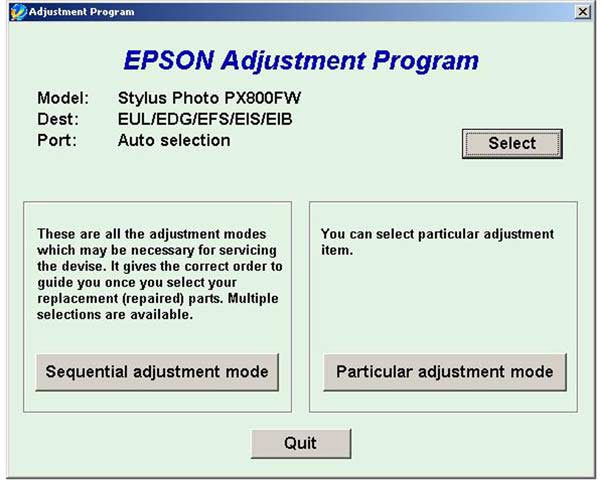
Epson PX800FW Service Adjustment Program

$9.99
Epson <b>PX800FW</b> Service Adjustment Program
   Click to enlarge
      

The Epson Adjustment Program for Epson PX800FW can be used under Windows only (Millenium, 2000, XP, Vista [in compatibility mode]).

To get this adjustment program, for the Epson PX800FW you need to do the following:

  1. Purchase the utility from 2manuals.com.
  2. You'll get download link on-line and in the email message too
We recommend reading the Epson PX800FW Service Manual before using the adjustment utility.

Please contact us if you have not received your order.

You can run this program under Windows XP, Windows Vista, Windows 7 in compatibility mode. It is easy!

Lets get to know how to set it up.

To configure the compatibility mode for an application, just locate the installation directory and right click on the .exe file (program you want to run), selecting Properties from the menu.

Select the Compatibility tab:


Windows 7 compatibility mode


You can choose to run the program in Windows XP compatibility mode.

FOR THIS PROGRAM please use the WINDOWS XP compatibility mode!!!


Download the program and run in compatibility mode!

I want to:

Any questions about this product?

SEND US REQUEST by filling the form below.


Step 1
ADD TO CART
Step 2
CHECKOUT
Select payment method.
Step 3
Confirm the order.


We are in business since 2002 and do our best to give our customers perfect service!

Our customers reviews:

  Kevin McCammon 2009-12-29 21:58:39  
  Thanks man, works excellent service will recommened for anyone !!!
  Ahmed Moudnib 2018-07-24 09:06:25  
  "A printer's ink pad is at the end of its service life" - Great! It worked! Thank you very much
  fouzi fouzi 2010-04-24 03:13:02  
  Thank you. for the program. It worked on TX106 printer. Reset waste ink counter in few minutes. Not go to epson customer service. Good.
  Zoran Zdravkovic 2012-10-17 18:45:42  
  Ja sam prezadovoljan, kupoprodaja je uspesno zavrsena a stampac Epson Stylus Photo P50 je odmah po resetovanju proradio.Ovo prvi put radim ali svakom preporucujem saradnju sa ovom firmom, zaista su korektni.
  mihail andronic 2017-10-25 08:24:10  
  Looks ok, working fine, save a lot of time in my case, finding a bad sensor in 15 minutes, but can not read counter information`s. Only can reset.
  santosh kadam kadam 2014-05-31 20:14:43  
  A printer\'s ink pad is at the end of its service life. Please contact Epson Support.-- it worked! thank you
  alaa saedy 2013-03-04 19:10:42  
  Hi thank you so much for help more people for there job and help me about rest my printer and other helps
Write review