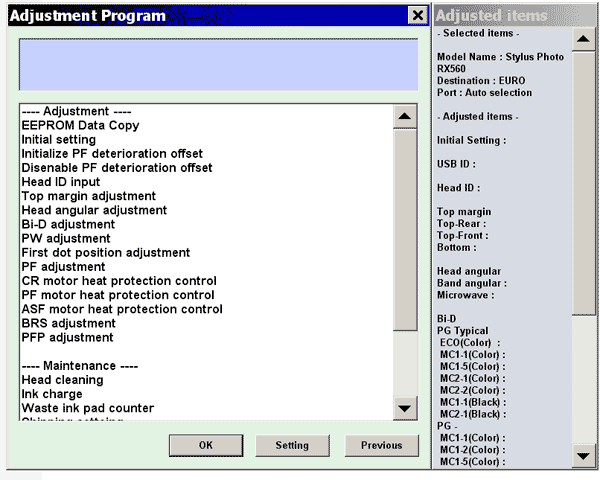
Epson RX560 Service Adjustment Program

$9.96
Epson <b>RX560</b> Service Adjustment Program
   Click to enlarge
      

The Epson Adjustment Program for Epson RX560 can be used under Windows only (Millenium, 2000, XP, Vista [in compatibility mode]).

To find out how to use this utility to reset the waste ink counter we recommend reading the:
5 Clicks Reset Procedure

To get this adjustment program, for the Epson RX560 you need to do the following:

  1. Purchase the utility from 2manuals.com.
  2. You'll get download link on-line and in the email message.

We recommend reading the Epson RX560, RX580, RX590 Service Manual before using the adjustment utility.

Please contact us if you have not received your order.

You can run this program under Windows XP, Windows Vista, Windows 7 in compatibility mode. It is easy!

Lets get to know how to set it up.

To configure the compatibility mode for an application, just locate the installation directory and right click on the .exe file (program you want to run), selecting Properties from the menu.

Select the Compatibility tab:


Windows 7 compatibility mode


You can choose to run the program in Windows XP compatibility mode.

FOR THIS PROGRAM please use the WINDOWS XP compatibility mode!!!


Download the program and run in compatibility mode!

I want to:

Any questions about this product?

SEND US REQUEST by filling the form below.


Step 1
ADD TO CART
Step 2
CHECKOUT
Select payment method.
Step 3
Confirm the order.


We are in business since 2002 and do our best to give our customers perfect service!

Our customers reviews:

  philip haynes 2010-01-04 01:28:00  
  Excellent! Thanks. All working nicely now! One happy customer - philip
  Gerry McNeilly 2009-12-31 07:30:21  
  Thanks John, I received your reply and downloaded the correct version. I appreciate the prompt customer service, and I plan on returning as a customer. Regards, Gerry McNeilly
  DIOGENES CABANA 2012-05-18 05:56:50  
  perfecto, un servicio muy bueno desde colombia "Gracias"
  Oliver Hofmann 2017-12-08 01:22:10  
  thx !! my Epson PX830FWD is alive again greetings from austria
  Peter Eichberg 2011-10-24 01:36:03  
  I just bought the Epson Artisan 800 ink pad resetting software and it did the trick and totally reset the ink pad counter just like advertised. However, I must give anyone who uses the software a piece of advice. The product will not work wirelessly. You MUST connect your printer via the printer's USB connection. The printed material that comes with the download does not mention this. I had to play around with the printer before I realized there had to be a USB connection. Once I figured this out it was a snap to get the printer to reset and the error I was getting has now stopped appearing! I could not be happier with my purchase and I must admit I was a skeptic when I first bought the download. You guys are terrific and I will never fail to but again from 2Manuals.com. Peter
  richard haynes 2020-05-11 23:57:36  
  Thank you so much for the reset. I was able to clean my ink pads, and then using your reset utility, reset my printer and now it works perfectly! So much better than buying a new printer!
  JEFF GILLINGHAM 2010-11-11 18:45:59  
  very good program,easy to use,saved me throwing away a very good printer.well worth the money.Jeff (uk)
  lamine lamine 2010-12-03 18:29:51  
  thank you for Ihtmacm
  Mark Wainwright 2022-11-15 18:03:40  
  Very impressed! After a fruitless search for official Epson support for the Waste Ink error I found a YouTube video showing how to remove and clean the ink pads but still needed to reset the counter. After some initial "Is this unofficial 3rd Party Solution a scam?" trepidation I took a chance on the WIC reset tool and now, about half an hour (mainly spent drinking tea and waiting for the key to be emailed) and 6 quid later I have a fully functioning XP-342. In the meantime, Epson UK responded to a message I sent them on Twitter, telling me that I could send the printer away to their service centre for an unspecified period of time and pay them £48 to have the ink pads changed and the counter reset. All with a caveat that having "tampered" with the ink pads myself, the service centre might refuse to fix the printer. Thanks for a great piece of kit which has saved me a lot of time, effort and money.
  Joseph Bowman 2019-10-24 00:26:55  
  Epson XP-700 working fine till suddely get message saying 'ink pad at end of useful life - contact Epson Service' Epson service not interested as printer no longer under warranty and suggested best option would be to buy a new printer and scrap this one. So not a happy chappy and looked for options to try and resolve this issue. Found this site and downloaded reset program. WIN10 64bit PC connected to printer by WiFi. Ran reset utility - did not find any printers. Switched off printer and re started, disabled Epson Print Utility still no printer found. Rebooted PC and then after it had restarted tried the WIC Reset Utility again after connecting printer through USB. This time WIC found both connections WiFI and USB. Using USB took Reset option and purchased Key. Copied key into WIC utility and OK. Switched Off printer and then switched on and magic no error message and printer back to normal. Very pleased and somewhat relieved as have some printing to complete tonight before tomorrow morning. Very happy to pay £9.97 for this result.
Write review