CANON Service Tool V2000 for iP series, MP series, MX series printers work under Windows OS only.
Supported printer models for work with Service Tool V2000:
iP2700, iP3600, iP4600, iP4700, iP4840, iP4810, iP4850, iP4870
Pro9000 MarkII, Pro9500 MarkII
IX7000
G5240
MP250, MP260, MP270, MP280, MP287, MP480, MP490, MP497, MP540, MP550, MP560, MP620, MP630, MP640, MP980, MP990
MX320, MX330, MX860
MG5140, MG5150, MG5170, MG5270, MG6170, MG8170
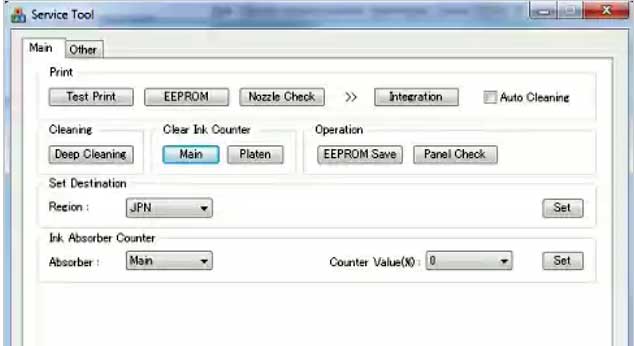
This Service Tool can make service adjustments and Reset procedures with the Ink Absorber Counter. To reset waste ink absorber counters you have to use Service Tool V2000 under Windows XP or under other Windows OS in the compatibility mode:
1. Order and DOWNLOAD Service Tool V2000 for Canon iP, iX, MP, MX series
2. Unzip downloaded file by WinZip.
3. Set the printer in Service Mode:
- power OFF the printer bu Power button. Dont disconnect power cable
- connect the printer by USB cable to the PC.
- press and hold Resume button (red triangle in the red circle) and press Power button
- hold both buttons until power on indicator will light then release resume button (dont release Power button) and press Resume button 2 times (for iP2700, iP4840, iP4850, MP280 models - press Resume button 5 times)
- release all buttons - the printer will blink few times with green light and will then light green constantly. You have put the printer in Service Mode now and you can now run the Service Tool. (If the printer is still blinking by green - you have some other errors in printer and you have to fix them first, because the Service Tool will not work if the printer is not put in service mode - green light is constant)
4. Run the Service Utility.exe program.
5. Select the connected USB port number from USB PORT
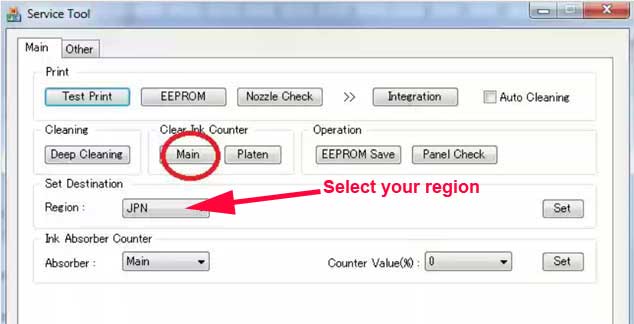
6. In the Ink Absorber Counter section of the Service Tool, select MAIN from the Absorber pull-down menu.
7. From the Counter Value(%) pull-down menu, select the value (in 10% increments) which is the closest to the actual counter value confirmed before replacement of the logic board, and click SET.
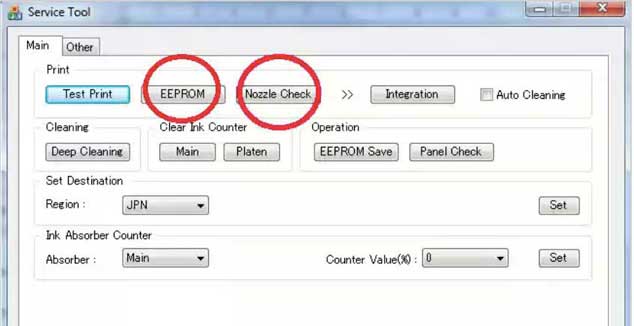
Print EEPROM information to confirm that the value is properly set to the EEPROM.
printers Service Tool
ZIP archive: 392 kB
|
|
|
|
|
Step 1
ADD TO CART |
Step 2
CHECKOUT
Select payment method. |
Step 3
Confirm the order. |
|
|
We are in business since 2002 and do our best to give our customers perfect service!
|
Our customers reviews:
| Sven Struzyna | 2012-09-02 13:17:11 | | Es funtioniert einwandfrei und auch genauso einfach, wie es beschrieben ist. Einfach spitze! Thanks from Germany!! | |
| HELIO MUTOVO | 2011-04-28 14:53:48 | | AGRADECO MUITO PELA AJUDA
PECO QUE VOU SEGUIR AS RECOMENDACOE DADAS | | | haekal cakep | 2005-07-13 01:49:24 | | i never try, but i wwanna ask about canon bjc-1000 eeprom adjustment program. if i buy that produk may i get this software | |  | dimitrije pavicevic | 2015-07-26 07:26:13 | | John thank you, on my wife\'s birthday and she was like
\"what? you are on your dead printer again, when am here and its my Birthday? \"
Then the machine was resurrected WOW!!
Thank you John, my wife will have more than me tonight!
Spencer | | | CARLOS DAVILA | 2011-02-21 20:41:11 | | ANTES DE COMPRAR QUISIERA SABER SI ESTA EN ESPAŅOL | | | nyi oo | 2012-09-06 17:07:55 | | Hi! I\'m from Myanmar. I need reset key for Epson ME 900WD printer. I have no credit card because credit card is not use in Myanmar now. So please give me a reset key. Please .
-============================-
You can pay by Western Union | | | Krittawit Sitthichaiwatthana | 2012-02-29 21:55:38 | | It work very well for my TX720WD!
This is easy step to save your time and money.
Successful reset in 2 minute after payment by paypal. | | | linda rotgans | 2012-07-18 18:49:33 | | All I can say is thank you so much for saving my printer.
I changed the ink pads ( very simple task ) and used the Epson Reset. My printer still did not work and I was devastated. I spent MANY hours online researching the problem ( Epson was absoutely no help at all ) and finally came across your product. I used your program to reset the ink pad counter and it reset the counter as advertised. After I restarted the printer It would not do anything. I uninstalled all of the Epson software and reinstalled with the original disk that came with the printer. AWESOME a new printer!!!
I can not tell you how much i appreciate your product!
I thought I was buying one of the best printers on the market at that time and I am really TICKED off at Epson for building in an unnessisary self destruct.
I had purchased every upgrade for my printer Epson offered and was determined to get it working again and you did that for me. THANK YOU !!!! | |
|







 Total customers: 445142
 Customers online: 142








